Introduction
AI tools are appearing everywhere in QA workflows, from code review assistants that promise to catch bugs early, to test automation platforms that claim to write and maintain tests automatically.
We’ve observed that most industry discussions about AI in quality assurance fundamentally miss a critical point. While the tech world keeps debating sensational claims like “AI will replace QA engineers,” smart organizations are asking a different question: “How can AI make our QA teams significantly more effective?”
Successful implementations have a common theme, AI works best when it enhances existing QA expertise rather than trying to replace it. Teams implementing thoughtful AI augmentation see significant improvements in efficiency and accuracy.
Let’s examine how they are actually doing it.
Proven AI Augmentation in QA
The most effective AI implementations in QA follow predictable patterns. Instead of trying to transform everything at once, successful teams focus on specific workflows that address immediate pain points.
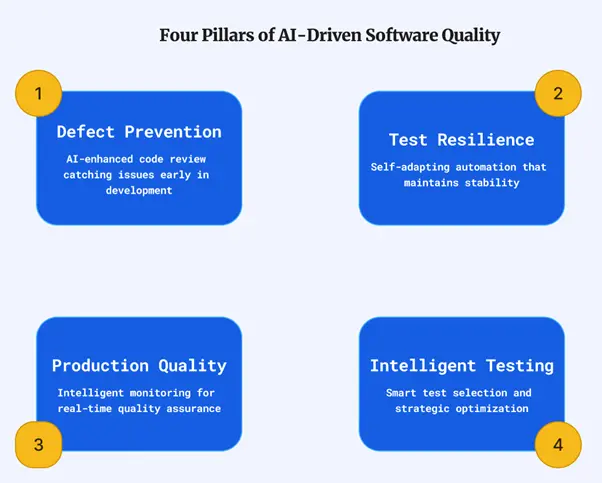
1. Defect Prevention Through AI-Enhanced Code Review
The best bugs are the ones that never reach QA environments. AI-powered code review catches issues during the development phase, when fixing them costs minutes instead of hours and doesn’t disrupt testing schedules.
How It Works in Practice
AI-powered code review goes beyond simple pattern matching to understand code context and catch subtle bugs:
- Semantic Code Understanding: Analyzes comments and variable names to understand developer intent and validates that the code’s implementation matches.
- Cross-File Dependency Analysis: Identifies all dependent components when an API changes, preventing integration failures before they reach QA.
- Intent-Based Review: Flags when a function’s name (e.g., validateEmail) mismatches its actual behavior (e.g., performing authentication), indicating logic errors or security flaws.
- Historical Pattern Recognition: Learns from your codebase’s history to flag patterns that previously caused production issues in your specific application.
- Contextual Vulnerability Detection: Traces execution paths across multiple files to find complex vulnerabilities that traditional scanners miss.
This shifts issue discovery earlier, allowing QA to focus on high-value strategic testing instead of initial code screening. The system continuously learns from engineer feedback to adapt to your specific coding standards.
Implementation Strategy
Begin with AI-enhanced code analysis tools that integrate directly into your pull request workflow. For self-hosted environments, leverage open-source models like CodeLlama or StarCoder. Establish baseline automation with ESLint for JavaScript or PMD for Java, combined with security-focused tools like Semgrep. Configure these tools to flag issues that typically cause QA delays,null pointer exceptions, unhandled edge cases, and security vulnerabilities, providing immediate value while building team comfort with AI assistance.
2.Test Resilience Through Self-Adapting Automation
Every QA team deals with this frustration: application changes break test automation, and teams spend more time maintaining scripts than creating new ones. AI-enhanced test frameworks address this by making tests adapt automatically to application changes.
How It Works in Practice
AI makes tests more stable by using multiple intelligence layers to handle UI changes, overcoming brittle selectors:
- Visual Recognition: Identifies UI elements by their visual appearance and on-screen context, not just their HTML attributes, making it immune to ID changes.
- Semantic Understanding: Understands an element’s purpose from its text (e.g., knows “Complete Purchase” and “Submit Payment” are functionally the same) even if the label changes.
- Adaptive Locator Intelligence: Uses multiple backup locators for each element, automatically switching strategies (e.g., from CSS to XPath) if one fails.
- Predictive Failure Prevention: Analyzes upcoming deployments to predict test failures and proactively updates locators before the tests even run.
Ultimately, AI-powered tests learn from application changes, creating a feedback loop where they become more stable and reliable over time, not more fragile.
Implementation Strategy
To improve test stability and reduce maintenance, teams can begin by building custom resilience into traditional tools like Selenium using smart locators, retry logic, and dynamic waiting mechanism.
A more advanced strategy is to adopt modern AI frameworks that leverage intelligent waits and visual recognition to adapt to UI changes automatically, starting by migrating the most maintenance-heavy tests first.
For teams implementing test resilience and intelligent test automation, BrowserStack’s Nightwatch.js provides a robust, enterprise-supported framework that combines the stability benefits we discussed with the reliability and support that large organizations require.
Success metrics include dramatic reductions in test maintenance time and improved test stability scores as your test suite learns to adapt to application evolution.
3.Production Quality Assurance Through Intelligent Monitoring
Traditional production monitoring focuses on system health, but QA teams need visibility into how issues affect user experience and product quality. AI-enhanced monitoring provides this perspective while enabling faster response to quality-impacting problems.
How It Works in Practice
AI transforms production monitoring from reactive alerts to proactive quality intelligence, providing deep analysis instead of generic notifications:
- User Experience Correlation: Correlates technical errors with user behavior to identify issues that actually impact critical tasks, like checkout, rather than alerting on every minor error.
- Automated Root Cause Analysis: Automatically traces errors across logs, metrics, and deployments to pinpoint the specific root cause, not just the surface-level symptom.
- Quality Trend Prediction: Analyzes historical data to predict when certain types of issues are likely to occur, such as during promotional campaigns or after specific maintenance events.
- Intelligent Context Generation: Automatically generates detailed issue reports—including user impact, reproduction steps, and probable root cause—saving hours of investigation.
AI transforms the typical production issue response from “something’s broken” to “here’s exactly what users experienced, why it happened, and how to reproduce it.” It enables QA teams to prioritize fixes based on business outcomes, not just technical severity, while the system learns from each incident to improve future analysis.
Implementation Strategy
Begin with comprehensive error tracking and user behavior analytics using tools like Sentry and PostHog, then layer on AI-powered analysis capabilities that correlate technical issues with user experience impact. Configure intelligent alerting that provides QA-specific context and recommended actions, focusing on user experience issues rather than system metrics. Success metrics include faster issue validation times and better prioritization of user-impacting problems.
4.Intelligent Test Strategy Through Smart Test Selection
Running comprehensive test suites for every code change wastes time and resources. AI-powered test selection identifies which tests are actually relevant to specific changes, dramatically reducing execution time while maintaining thorough coverage.
How It Works in Practice
AI transforms test strategy from running static suites to dynamically selecting tests based on change analysis and historical data:
- Change Impact Analysis: Analyzes code changes to identify affected features and workflows, then selects only the tests that validate those specific areas.
- Historical Correlation Intelligence: Learns which tests have historically been most effective at finding bugs for similar types of code changes, improving selection over time.
- Test Effectiveness Optimization: Prioritizes tests that consistently find real bugs while deprioritizing those that rarely fail, optimizing for maximum value and efficiency.
- Dynamic Test Generation: Generates new test cases automatically based on code changes and identified coverage gaps, ensuring new functionality is tested.
Instead of running thousands of tests for every change, AI analysis identifies the 50-100 tests that actually validate modified functionality. This approach can reduce test cycle times by 80-90% while maintaining confidence in quality. The key is understanding code dependencies and test coverage relationships through intelligent analysis rather than manual categorization.
Implementation Strategy
Start with custom impact analysis for your existing test suites, focusing on identifying high-value tests that provide maximum coverage with minimal execution time. Implement AI-powered correlation analysis that learns from your team’s testing patterns and production outcomes. Success metrics include significant reductions in test execution times while maintaining or improving defect detection rates and better resource utilization in CI/CD pipelines.
For teams seeking a pre-built solution, BrowserStack’s Test Case Management Tool offers AI-powered capabilities without extensive setup.
For more details click here.
Collaborative QA Workflows Through Integrated AI Tools
The most effective AI implementations combine multiple tools into cohesive workflows that enhance team collaboration rather than replacing human expertise.
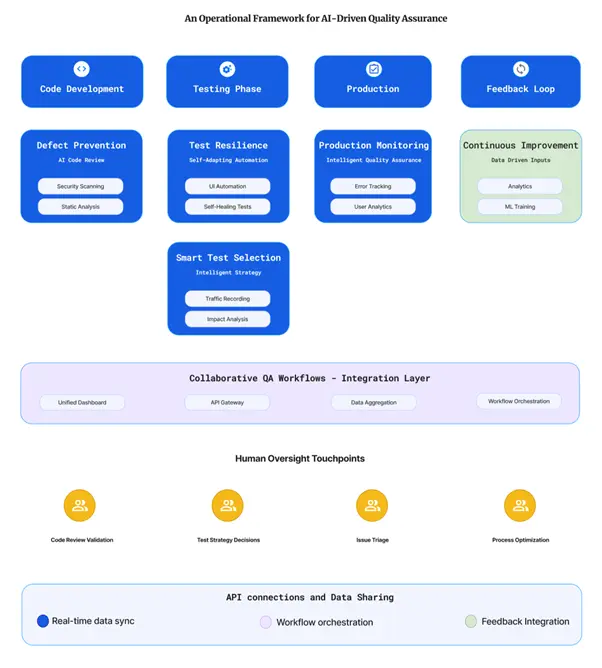
Building Integrated QA Workflows
Successful implementations combine specialized tools into unified workflows:
- Test automation frameworks with custom resilience logic and intelligent element identification
- AI code review integrated with additional static analysis tools
- Error tracking tools combined with comprehensive user experience monitoring
- Natural language test creation tools for broader team participation
- Automated accessibility testing integrated into CI/CD pipelines
The integration requires connecting these tools through APIs, creating unified dashboards, and establishing workflows that provide seamless handoffs between different types of analysis.
Human-In-The-Loop with AI
Effective AI implementations maintain human oversight while leveraging AI efficiency. QA engineers validate AI-flagged issues, provide context for complex scenarios, and continuously train systems to understand team-specific requirements.
Reinforcement Learning from Human Feedback (RLHF) plays a critical role in making AI systems more helpful and aligned with human expectations. In QA workflows specifically, RLHF enables:
- Contextual Bug Detection: AI learns from QA engineer feedback about what constitutes genuine bugs versus expected application behavior in specific business contexts
- Improved Test Case Relevance: When QA engineers mark AI-generated test cases as valuable or irrelevant, the system learns to generate more appropriate scenarios for similar applications
- Enhanced Error Explanation: AI improves the clarity and usefulness of error explanations based on feedback about which descriptions help developers resolve issues faster
- Reduced False Positives: Continuous feedback helps AI tools reduce noise by learning team-specific patterns and acceptable coding practices
This creates a virtuous cycle where the AI becomes more valuable as it’s continuously fine-tuned with QA feedback.
Compounding Benefits Across QA Verticals
When these integrated workflows span across different QA activities, they create a multiplier effect. AI-powered code review prevents bugs before testing begins, which allows test automation to focus on more complex scenarios. Self-adapting tests provide more reliable results, making test selection more effective. Production monitoring insights feed back into both code review and test creation, continuously improving defect prevention. This creates a virtuous cycle where improvements in one area enhance effectiveness in others.
Strategic Implementation
Most successful teams start with one or two open-source tools to establish basic AI capabilities, then gradually expand based on demonstrated value. This organic growth builds expertise while maintaining cost control. The choice between integrated open-source tools and commercial platforms often depends on team technical capabilities and organizational preferences for control versus convenience.
Managing AI implementation: The Self-Hosted Consideration
When implementing AI in QA, you face a key strategic decision: should AI capabilities run on a managed cloud service, or on your own infrastructure? This choice has significant impacts on your security, cost, compliance, and speed of implementation.
Why Some Teams Consider Self-Hosting
Organizations in highly regulated industries like finance or healthcare may choose to self-host to comply with strict data governance rules that require keeping code and test data in-house. Others do so to protect valuable intellectual property or proprietary algorithms from being sent to third-party services.
The Practical Challenges of Self-Hosting
While valid for specific cases, setting up a private AI infrastructure is a significant undertaking with challenges that should not be underestimated:
- High Costs: Self-hosting requires substantial investment in computational resources, including multiple GPUs and significant memory, in addition to infrastructure management overhead.
- Specialized Skills: Your team will need expertise beyond typical QA, including MLOps specialists who can deploy, fine-tune, and maintain AI models to keep everything running smoothly.
- Complex Implementation: Integrating and configuring open-source tools requires internal development time, security reviews, and custom modifications that can extend timelines.
Ultimately, while self-hosting offers maximum control for those with the resources and specific compliance needs to justify it, the decision often comes down to organizational readiness. For many teams, an enterprise-grade cloud platform provides a more practical path, offering robust security, scalability, and support without the significant upfront investment and operational complexity.
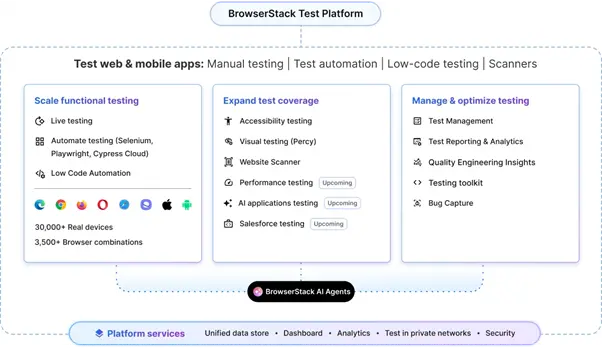
The BrowserStack Test platform delivers these AI-augmented workflows on a secure, enterprise-grade solution, letting you bypass the complexity of self-hosting and focus on quality.
Making AI in QA Work
Approaching AI as a fundamental workflow enhancement will help you achieve improvements that make AI worthwhile.
Start Small, Think Strategically
Successful implementations start with one specific, measurable problem. Choose something your team experiences daily: UI test maintenance consuming too much time, production issues taking too long to diagnose, or code reviews missing obvious security vulnerabilities.
Once you have dialed into a problem to solve, focus on immediate pain relief rather than comprehensive transformation. For instance, if your team spends hours each week updating test selectors after UI changes, start with test automation resilience.
Understanding True Implementation Costs
Budgeting for AI QA must go beyond tool licensing. Factor in the high cost of computational resources for self-hosting, the need for specialized MLOps skills, several months of team training that will reduce initial productivity, and the custom development often required for enterprise integration.
Evaluating Your Team’s Readiness
- Technical readiness varies dramatically based on your chosen approach. Open-source implementations require solid CI/CD pipeline knowledge, API integration skills, and troubleshooting capabilities. Self-hosted AI adds machine learning operations expertise and infrastructure management requirements.
- Process: You need mature workflows, i.e, solid testing and review standards, as AI amplifies existing processes, it doesn’t fix them.
- Culture: Your team’s culture must support AI by trusting its analysis, providing feedback, and adapting to new ways of working.
Building Pilot Programs That Actually Work
For a successful pilot program, limit the scope to a single team working on one application, which is large enough to show real value but small enough to manage complexity. Plan for a timeline of about six months to allow for both the initial technical setup and the time your team needs to adapt their new workflows. Finally, measure success using both quantitative data (like hours saved) and qualitative feedback (like team satisfaction), as team feedback is often the best indicator of long-term adoption.
Strategic Implementation Patterns That Work
For implementation, start with enthusiastic early adopters who can serve as internal champions, rather than mandating adoption across the entire team. Expand usage organically based on demonstrated value, which builds confidence and reduces resistance.
Integrate with existing quality processes rather than attempting replacement. AI QA should enhance your overall quality strategy, compliance requirements, and process documentation. Teams that try to rebuild their entire QA approach around AI typically create more problems than they solve.
Making the Business Case
Focus executive communication on business outcomes like faster time-to-market, not on technical features. Demonstrate value by calculating the ROI, comparing the AI investment against the ongoing costs of current manual processes.
Risk mitigation often provides the most compelling justification. Recent production incidents, customer impact from quality issues, and development time consumed by reactive debugging typically cost more than AI tool investments. Position AI as insurance against these recurring problems.
Your Next Steps
Begin by assessing your current QA pain points and team readiness. Launch 2-3 focused pilot programs with enthusiastic team members to prove value, and plan for gradual expansion based on documented learnings and successful collaboration patterns.
While the open-source approaches we’ve discussed provide excellent starting points for AI-augmented QA, many organizations eventually need enterprise-grade solutions that offer comprehensive support, proven scalability, and seamless integration with existing development workflows.
If you would still like to know more, BrowserStack provides AI enabled products and agents across the testing lifecycle. Reach out to us here.
Author

Shashank Jain
Director – Product Management
Browserstack were exhibitors at AutomationSTAR Conference EXPO 2025. Join us in Antwerp 4-5th November 2026.