• Skip to main content
Super Early Bird - Save 30% | Teams save up to 25%

AutomationSTAR

Test Automation Conference Europe

  • Programme
    • AutomationSTAR Team
    • 2025 programme
  • Attend
    • Why Attend
    • Volunteer
    • Location
    • Get approval
    • Bring your Team
    • 2025 Gallery
    • Testimonials
    • Community Hub
  • Exhibit
    • Partner Opportunities
    • Download EXPO Brochure
  • About Us
    • FAQ
    • Blog
    • Test Automation Patterns Wiki
    • Code of Conduct
    • Contact Us
  • Tickets

EXPO

Sep 22 2025

What Is Application Performance Monitoring (APM)?

Applications have become the heartbeat of modern business. From online shopping to digital banking to enterprise SaaS platforms, every click and every request matters. However, here’s the challenge: users today expect apps to be lightning-fast and always available. Even a few seconds of delay or an unexpected crash can drive customers away and cost businesses revenue.

That’s where Application Performance Monitoring (APM) steps in. APM provides teams with visibility into how applications behave in real-time, helps uncover issues before they escalate, and ensures that users receive a smooth and reliable experience. In this guide, we’ll break down what APM is, how it works, and why it matters in today’s digital landscape.

What Is Application Performance Monitoring?

Application Performance Monitoring (APM) is the process of tracking and analyzing how applications perform across different environments, users, and devices. It answers three critical questions:

  • Is the app available and working as expected?
  • How quickly is it responding to user actions?
  • Where exactly are performance bottlenecks or failures occurring?

Instead of guessing what might be slowing down your app, APM tools give you real-time insights into both the frontend (what the user sees) and the backend (what your systems process behind the scenes).

The ultimate goal of APM is straightforward: to optimize the user experience while providing businesses with confidence that their applications can handle growth, scale, and complexity.

APM vs. Monitoring vs. Observability

It’s easy to confuse APM with other buzzwords like monitoring and observability, so let’s clear that up.

  • Monitoring involves tracking known metrics and triggering alerts when a threshold is crossed. For example, CPU usage above 90% might trigger an alert.
  • Observability is broader. It’s about making systems transparent enough so engineers can ask new questions about performance and behavior, even if they didn’t know what to look for in advance.
  • APM focuses specifically on application health and performance. It utilizes monitoring and observability techniques to track user journeys, analyze slowdowns, and pinpoint root causes.

Think of it this way: monitoring tells you “something broke,” observability helps you figure out “why it broke,” and APM is the application-focused toolkit that brings it all together.

How APM Works

APM solutions typically rely on multiple sources of data to build a complete view of how applications behave. While the exact mix varies between providers, the following are the main pillars that matter:

  1. Metrics: Core performance indicators such as response times, error rates, throughput, and resource utilization. These give a high-level snapshot of application health.
  2. Traces: The ability to follow a request as it flows through different services, APIs, or databases, helping teams quickly isolate where latency or failures occur.
  3. Logs: Detailed records that provide context around specific events or errors. When paired with traces, logs help engineers pinpoint root causes.
  4. Synthetic Monitoring: Instead of waiting for real users to encounter issues, synthetic tests simulate critical journeys, such as logins, checkouts, or payments, under various network and device conditions. This is an area where HeadSpin specializes, offering synthetic monitoring on real devices across global locations.
  5. User Experience Insights: Beyond raw system data, it’s essential to understand how performance impacts users. HeadSpin connects backend metrics with real-world device and network conditions, allowing teams to evaluate the digital experience as their customers would.

By combining these signals, APM tools build a holistic view of how your application is performing.

Why APM Matters for Businesses

So why invest in APM at all? The answer lies in the direct impact of performance on both users and revenue.

  • User experience: A slow app frustrates users and increases churn. Studies show that even a one-second delay can drastically reduce conversions.
  • Revenue protection: For e-commerce and fintech platforms, downtime or slowness translates directly into lost sales.
  • Operational efficiency: APM helps DevOps and engineering teams identify root causes quickly, reducing the time spent firefighting issues.
  • Business growth: As companies scale and adopt microservices, containers, and cloud-native architectures, complexity grows. APM keeps teams ahead of that complexity.

In short, APM isn’t just a “nice-to-have.” It’s a business enabler.

Best Practices for Implementing APM

Rolling out APM effectively takes more than just installing a tool. Here are some best practices:

  1. Prioritize critical paths: Focus first on key user journeys, such as login, checkout, or payment.
  2. Set clear SLIs and SLOs: Define what success looks like (e.g., 99.9% of transactions under 300 ms).
  3. Correlate performance with releases: Track whether new deployments cause latency or errors.
  4. Avoid alert fatigue: Instead of relying only on thresholds, set alerts based on user impact.
  5. Continuously refine: Use each incident as a learning opportunity to improve monitoring coverage.

Common Pitfalls to Avoid

Not all APM efforts succeed. Here are mistakes to watch out for:

  • Relying only on metrics without tracing the full request path.
  • Ignoring frontend performance and focusing only on backend services.
  • Locking into proprietary agents that limit flexibility.
  • Over-alerting leads to engineers ignoring alerts altogether.

Avoiding these pitfalls ensures that your APM strategy remains practical and actionable.

HeadSpin’s Approach to APM

Unlike traditional APM tools that rely heavily on agents and backend data, HeadSpin focuses on performance from the user’s perspective. Our platform provides:

  • Synthetic Monitoring on Real Devices: Validate performance across thousands of devices and locations worldwide.
  • Network Condition Testing: Measure how apps behave under various network conditions, including 3G, 4G, 5G, and poor Wi-Fi.
  • End-to-End Transaction Monitoring: Track critical user journeys like checkout, login, video playback, and mobile banking flows.
  • Root Cause Analysis: Get detailed session recordings with performance insights tied to specific user actions.
  • Benchmarking Across Releases: Compare performance across app versis to ensure new updates don’t introduce regressions.

This enables teams to directly link application performance with the digital experience of their end-users.

Final Thoughts

APM is more than a technical checklist; it’s a business necessity. The question isn’t whether you should monitor your app’s performance, but how effectively you can do it.

HeadSpin helps organizations move beyond traditional monitoring to synthetic performance testing on real devices and networks, offering visibility into the experiences that truly matter. With this approach, businesses can ensure reliable, high-performing apps that delight users, regardless of their location.

Connect now.

Original blog published here.

Author

Debangan Samanta

Debangan is a Product Manager at HeadSpin and focuses on driving our growth and expansion into new sectors. His unique blend of skills and customer insights from his presales experience ensures that HeadSpin’s offerings remain at the forefront of digital experience testing and optimization.

HeadSpin are exhibitors in this years’ AutomationSTAR Conference EXPO. Join us in Amsterdam 10-11 November 2025.

· Categorized: AutomationSTAR · Tagged: EXPO

Sep 10 2025

Supercharge Test Automation with the power of GenAI in Sahi Pro

In Quality Assurance, testers are domain experts who understand their application, domain and environment better than any software. Imperatively, testers must also maintain complete control over their automation. Adhering to this, Sahi Pro has always been a tester-friendly automation tool. Sahi Pro’s No-Code automation solution(Business Driven Flowcharts) exemplifies the same philosophy.

In 2025, ‘Generative AI will replace the tester’ may be a notion doing the rounds. At Sahi Pro, we do not subscribe to this notion. Rather, we believe that ‘Generative AI will assist the tester and make testing faster’. Built on this resolve, we will be launching Sahi Pro Genaina – GenAI Integrated No-code Automation solution that employs Large Language Model platforms to power your automation with Sahi Pro.

Sahi Pro’s Genaina (pronounced jah-nah-ee-nah) embraces a holistic approach to automation testing. It accelerates your deliverables by assisting you in following:

  • Automatic Test Case Authoring – Generate visual flowcharts effortlessly.
  • Reliable Implementation – Implement keywords without the need to record actions.
  • Effortless Data-Driving – Simplify test parameterization for dynamic execution.
  • Quick Assertion Handling – Easily add assertions for expected behaviors.

See How Genaina Works

Why QA Teams Will Love Genaina

1. Usability – Built for Every Tester

Genaina enables everyone—from Manual Testers to Automation Engineers—to create robust tests without writing a single line of code.

  • Intuitive, chat-like interface for natural interactions
  • Visual artifacts that are easy to edit, share, and maintain
  • Designed for fast adoption by cross-functional QA teams

2. Dependability – Automation You Can Trust

Say goodbye to flaky tests. Genaina is built on Sahi Pro’s core strengths in stability and precision:

  • Automatic Waits & Retries: Handle timing issues out of the box
  • Deterministic Layers: Ensure consistent outputs from LLMs
  • Smart Element Detection: Selects stable identifiers directly from your application
  • Human-in-Control Automation: Unlike AI agents that take over, Genaina gives testers complete control while providing smart suggestions

3. Maintainability – No-Code That Lasts

Most GenAI tools can generate test scripts—but maintaining them requires coding knowledge.

Genaina is different:

  • Produces fully no-code artifacts using Step Composer and Visual Flows
  • Allows granular control over test logic and data
  • Designed for long-term usability by testers who aren’t programmers
  • Whether you’re updating a scenario or troubleshooting failures, Genaina keeps maintenance simple.

4. Extensibility – LLM-Agnostic by Design

Built to be flexible, Genaina supports all major LLM platforms:

  • OpenAI (GPT), Google Gemini, Meta LLaMA, Anthropic Claude, Amazon Bedrock, and more
  • Works across models while ensuring reliability through internal validation layers
  • Future-ready architecture, powered by Sahi Pro’s proven automation engine

The Bottom Line

Sahi Pro Genaina delivers the best of GenAI – speed, intelligence, and ease – without compromising on stability, control, or quality. Whether you’re leading QA for a product or scaling automation across teams, Genaina empowers your testers to do more, faster.

Connect with us for a free demo on Sahi Pro Genaina.

Author

Rohan Surve

Rohan heads the product team at Sahi Pro. He has more than a decade of experience in the design, development and maintenance of tools for Software Automation. Rohan provides a blend of technical acumen and strategic insight to the Sahi Pro team, ensuring that products align with market needs and organisational objectives.

Sahi Pro are exhibitors in this years’ AutomationSTAR Conference EXPO. Join us in Amsterdam 10-11 November 2025.

· Categorized: AutomationSTAR · Tagged: 2025, EXPO

Sep 08 2025

Stop Tool Training, Start to Learn Test Automation!

Test automation is an integral part of modern software development, primarily focused on enhancing the efficiency and effectiveness of testing processes. But for some reason, after decades of effort, success is still anything but obvious. I think anyone can mention numerous examples where the expected or hoped-for success did not materialise.

You would expect that after all this time, we should be quite skilled at it. Yet, I believe there are a number of reasons that prevent us from fully harnessing the true power of test automation.

Firstly, there is a vast number of tools available, and the pace at which these tools develop and surpass each other is impressively high. Just keeping up with these changes could be a full-time job. But aside from that, we also need to ensure that we don’t end up using a new tool every few months, which we then have to learn, implement, and manage.

It’s not by chance that I’m focusing on the tools here. This is exactly one of the reasons our success is often jeopardised: an excessive focus on the tools! Test automation encompasses so much more than just having a tool to avoid manual testing, yet training programmes almost always focus heavily on tool training.

Let’s Look Beyond the Tools

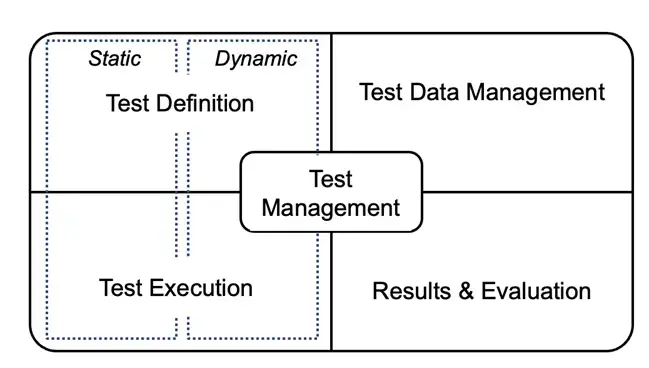
I am convinced that the likelihood of success significantly increases when we pay more attention to truly understanding what test automation entails. In test automation, you deal with a broad and diverse landscape, extending beyond just test definition and execution. When we look at the whole picture and include test management, test data management, and results and evaluation, all play an essential role. However, we are often not aware of this.

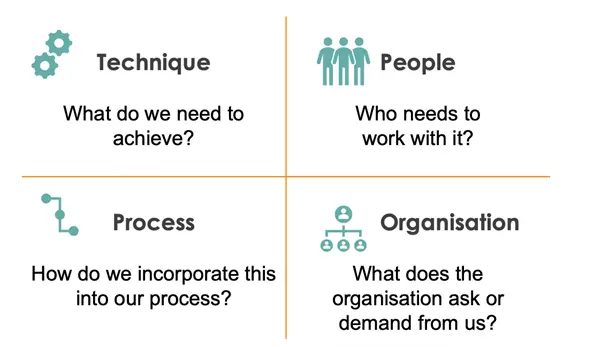
When we look beyond the tools themselves, an entirely new world opens up: that of the relevant aspects impacting the implementation of test automation. Questions that then arise include:

  • Which techniques are we working with and need to be supported?
  • How do we optimally integrate the test (automation) process into existing processes?
  • What does the organisation itself demand and require from us?
  • How does the human factor influence the choices we make?

If we are aware of which questions to ask and how to integrate the answers into our architecture, we increase the likelihood of a successful test automation implementation. Now, the challenge remains… we won’t gain the necessary knowledge if we continue to focus on learning yet another tool.

Let’s Make a Change: Learn About Test Automation!

Fortunately, there are now training programmes available specifically aimed at teaching that knowledge. Certified Test Automation Professional (CTAP) is a good example of this, and I am very enthusiastic about it. The CTAP programme is designed to educate its participants on all critical aspects of test automation.

This training programme focuses on things like:

  • Different areas of application for test automation
  • Aspects that impact test automation
  • Test architecture and tool selection
  • The impact of AI on test automation
  • Principles and methodologies
  • And much more…

It balances important theoretical knowledge with useful practical skills. Armed with that expertise, you will undoubtedly be able to ask the right questions and uncover the necessary answers.

Dutch organisations like the Tax Office (Belastingdienst) and the Social Security Agency (UWV) are already embracing this training and the associated certification, and they are seeing many positive effects. They cite increased quality and a higher level of collaboration around test automation as major advantages. Additionally, it helps to have a common frame of reference and a clear understanding of what the world of test automation entails.

Ready to join the change and significantly increase the chances of success for test automation? Then dive further into the Certified Test Automation Professional programme or sign up for one of our training sessions! More information can be found here – Certified Test Automation Professional CTAP 2.0

Author

Frank van der Kuur

Frank embarked on his IT journey early in life, with a significant portion of his career devoted to the field of testing. Throughout this time, he has supported various organisations in improving the quality of their products. By bridging the gap between process and technology, he strives to enhance the efficiency of testing efforts.

Alongside his role as a practical consultant, Frank is also an enthusiastic trainer. He takes pleasure in helping his peers improve through training on testing tools, the testing process, or on-the-job coaching.

BQA are exhibitors in this years’ AutomationSTAR Conference EXPO. Join us in Amsterdam 10-11 November 2025.

· Categorized: AutomationSTAR · Tagged: 2025, EXPO

Sep 03 2025

Test Gap Analysis: Reveal Untested Changes

In long-lived software, the majority of errors originate in areas of the code that were recently modified. Even with systematic testing processes, a significant portion of such changes often gets shipped to production entirely untested, leading to a much higher probability of field errors. Test Gap Analysis (TGA) is designed to identify code changes that have not been tested, enabling you to systematically reduce this risk.

Scientific background

The efficacy of TGA is supported by scientific studies. One such study on a business information system comprising approximately 340,000 lines of C# code, conducted over 14 months, revealed that about half of all code changes went into production untested, even with a systematically planned and executed test process. Critically, the error probability in this changed, untested code was five times higher than in unchanged code (and also higher than in changed and tested code).

This research, along with comparable analyses conducted in various systems, programming languages, and companies, underscores the challenge of reliably testing changed code in large systems. The core problem is not a lack of tester discipline or effort, but rather the inherent difficulty in identifying all relevant changes without appropriate analytical tools.

How does TGA work?

TGA integrates both static and dynamic analyses to reveal untested code changes. The process involves several key steps:

  • Static Analysis: TGA begins by comparing the current source code of the system under test with the source code at a baseline, e.g., the last release. This identifies newly developed or modified code. The analysis filters out refactorings (e.g., changes in documentation, renaming of methods or code reorganization), which do not alter system behavior, thereby focusing attention on changes that could introduce errors.
  • Dynamic Analysis: Concurrently, TGA collects test coverage data from all executed tests, including both automated and manual test cases. This provides information on which code has been executed during testing.
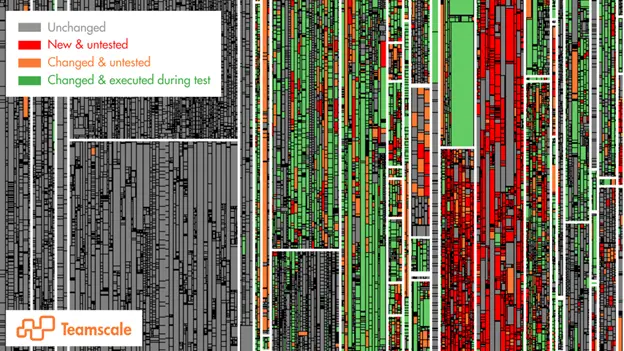
  • Combination and Visualization: The results from both analyses are then combined to highlight the “Test Gaps” – those code areas that were changed or newly implemented but were not executed during testing. These results are typically visualized using treemaps, where rectangles represent methods or functions (sized proportionally to the amount of code inside them).

On these treemaps:

  • Gray represents methods that have not been changed since the last release.
  • Green indicates methods that were changed (or newly written) and were executed during testing.
  • Orange (and red) signifies methods that were changed (or newly written) but were not executed in any test, highlighting the critical “gaps” where most field errors are likely to occur.

Impact

TGA is highly effective when applied continuously, e.g., to provide feedback to developers on pull/merge requests, to product owners on tickets, or the test managers on dedicated dashboards – enabling informed decisions about additional testing needs. It significantly reduces the amount of untested changes that get shipped, and has shown to reduce field errors by 50%.

Learn more about TGA and other test optimizations in our free online deep dives!

Author

Dr. Sven Amann

Sven is developer and software-quality consultant at CQSE GmbH. He studied computer science at TU Darmstadt and PUC de Rio de Janeiro and did his PhD in software engineering at TU Darmstadt. Sven is a requested (keynote) speaker on software quality topics at conferences, meetups, companies and universities around the world, drawing inspiration from his vast project experience working with CQSE’s many customers across all industries.

CQSE are exhibitors in this years’ AutomationSTAR Conference EXPO. Join us in Amsterdam 10-11 November 2025.

· Categorized: AutomationSTAR · Tagged: EXPO

Sep 01 2025

Leave Complexity Behind: No-Code Test Automation with Low-Code integration via Robot Framework and TestBench

Fast releases demand efficient testing – but traditional test automation is often too complicated. TestBench and Robot Framework combine no-code test design with low-code implementation. The result: test automation that is clear, fast, and flexible – without technical barriers.

Challenges in Test Automation

Agile software development demands high quality and fast delivery cycles. Test automation is essential for this – but comes with two typical hurdles:

1. Separated know-how: QA testers know the requirements, technical automation engineers know how to implement them. However, the other knowledge is often missing.

2. Delays due to disruptions in the processes: Changes to automated tests often require successive work steps between the QA specialist and technical teams – which takes time.

Goal: Specification = Automation

The solution: An approach in which tests are automated directly during specification – without prior technical knowledge on the QA specialist side or detailed domain knowledge on the technical side.

This article shows how a combined no-code/low-code approach with TestBench and the Robot Framework closes precisely this gap.

Expertise and Technology – Thought of Separately, Strong Together

The idea: Professional test design and technical automation are created in specialised tools – TestBench for the specification, Robot Framework for the execution.

Both tools are based on the principle of Keyword Driven Testing and exchange test data and structures via defined interfaces. This enables a clean separation – and efficient interaction at the same time.

Keyword Driven Testing with TestBench

With the test design editor in TestBench, test cases can be put together using drag-and-drop from reusable steps, the so-called keywords – without any programming knowledge. Test data is defined as parameters or in data tables and clearly managed.

The advantages:

• Clarity: Each keyword stands for an action and generates its own test result.

• Reusability: Keywords can be used multiple times and maintained centrally.

• Efficiency: Changes only affect individual keywords – not the entire test case.

Example:

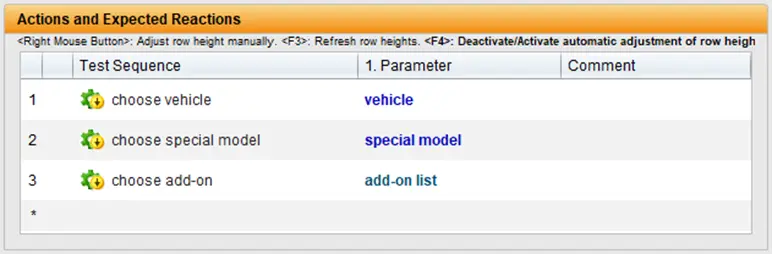
A vehicle consisting of a basic model, special model and several accessories is to be configured. The test sequence required for this is mapped using three keywords:

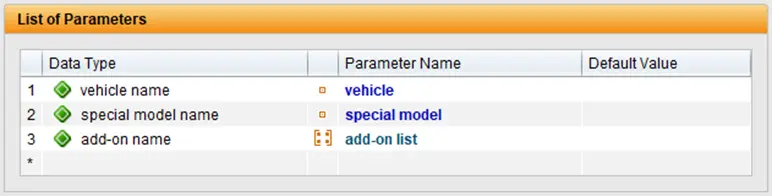
The parameter list of the test sequence maps the data interface of the test sequence:

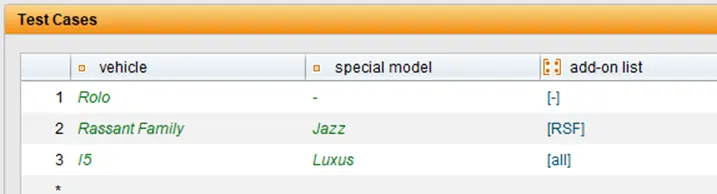
The values of the test sequence parameters are stored in data types and can be assigned values in the associated data table:

Each line of this table represents a run of the test sequence with the values from the line, i.e. it represents a specific test case. The specifications of the test cases are created in TestBench, which serve as a template for the implementation of the test automation in the Robot Framework. TestBench therefore represents the no-code part of the solution.

Keyword Driven Testing with Robot Framework

The Robot Framework also relies on the Keyword Driven approach, in which test steps are described by reusable commands, the keywords. The advantage: The tests are structured in tabular form, are easy to read and can also be understood by non-technicians. However, basic programming knowledge is helpful for implementing technical keywords. Robot Framework comes with many standard libraries (e.g. BuiltIn, OperatingSystem, Collections) and can be extended by hundreds of specialised libraries – for example for web tests with Selenium or Browser Library, SAP with Robosapiens, databases, APIs and much more. Customised libraries only need to be developed for very specific requirements. The tests themselves are usually created in VS Code or IntelliJ IDEA – supplemented by plugins such as RobotCode, which enable syntax highlighting, code completion and test execution directly in the IDE.

Example: Vehicle configuration by keywords

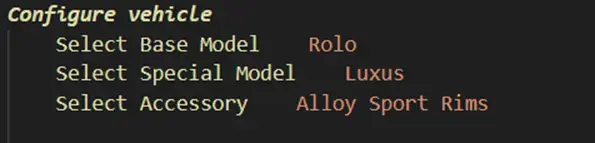
A simple test case, e.g. for configuring a vehicle, could look like this:

In this illustration, each step of the test procedure is described using a single keyword – such as Select Base Model, Select Special Model or Select Accessory. Each keyword takes on a clearly defined task – and can be reused several times.

The technical realisation takes place on several levels: A keyword such as Select Base Model calls up other keywords internally – for example to find UI elements, wait for visibility and make a selection.

Transparency at every level: the Robot Framework protocol

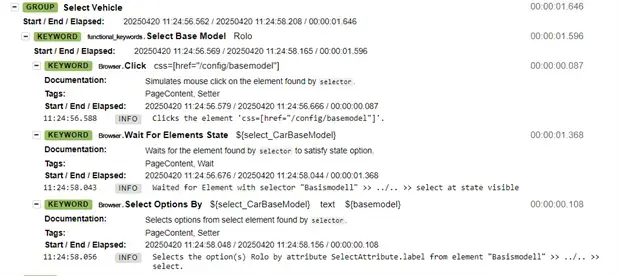
A major advantage of the Robot Framework is the detailed logging of each test step – including all keywords called, times, success or error messages:

As can be seen in the example, the Robot Framework not only documents the process of the keyword select base model but also shows all internal steps – from the mouse click to the selection of the correct option. Errors can therefore be analysed down to the lowest level.

Technology that adapts – and integrates

Thanks to the large selection of libraries, almost all technologies can be tested with Robot Framework – web, mobile, desktop, databases, APIs, SAP, etc. Different libraries can even be combined within a test case, enabling flexible end-to-end scenarios: from web browser to SAP to mobile app – and back again.

In combination with TestBench’s no-code design, this results in a consistent, efficient automation approach: QA testers specify – technology implements. Fast, legible and robust.

Test Design Meets Automation – Seamlessly Synchronised

The test cases specified in TestBench are transferred directly to the Robot Framework – where they are implemented with technical keywords. Conversely, already realised keywords from Robot Framework can be transferred back into TestBench and used for new tests.

The speciality:

Top-down and bottom-up work simultaneously.

QA testers create scenarios, technical teams develop the appropriate keywords. Everything remains synchronised via a dedicated TestBench extension for Robot Framework – without media discontinuity or loss of time.

TestBench acts as a leading system: it generates test cases, expects ready-made keywords – and controls the execution. The test data is also transferred directly, which does not require any separate data logic on the technical side.

Result: Specification = Automation.

Advantages of the No-Code/Low-Code Combination

The integrated solution consisting of TestBench and Robot Framework offers numerous advantages:

Simple test design: Users with domain knowhow create tests without detailed technical knowledge.

Centralised keyword management: Domain specific and technical keywords are clearly separated – but centrally available.

Efficient collaboration: Clearly defined responsibilities, seamless exchange.

High maintainability: Keywords can be maintained with pinpoint accuracy, changes are implemented quickly.

Parallel working: Specification and implementation take place simultaneously – without dependencies.

Future-proof: The architecture remains flexible and expandable – especially in the rapidly developing technology sector.

Conclusion: Test automation that adapts – not the other way round

The combination of no-code test design with low-code automation elegantly solves the typical challenges in test automation:

• Domain specialists and technical teams work together efficiently.

• Automated tests are created at an early stage – and adapt with flexibility.

• The solution scales – from small scenarios to large test suites.

Compared to pure no-code solutions, the approach is significantly more flexible, sustainable and technically robust – making it a future-proof choice for professional test automation.

Would you like to find out more about this topic? Then download our whitepaper now!

Author

Dierk Engelhardt

Dierk Engelhardt is TestBench product manager at imbus AG. With his many years of experience, he advises and supports customers in the introduction and customized integration of tools into the software development process. He also advises on setting up agile teams and integrating testing into the agile context.“

Imbus are exhibitors in this years’ AutomationSTAR Conference EXPO. Join us in Amsterdam 10-11 November 2025.

· Categorized: AutomationSTAR · Tagged: 2025, EXPO

  • Page 1
  • Page 2
  • Page 3
  • Page 4
  • Go to Next Page »

Copyright © 2026 · Impressum · Privacy · T&C

part of the