• Skip to main content
Don't miss out - Join us 4-5 Nov | Book Now!

AutomationSTAR

Test Automation Conference Europe

  • Programme
    • AutomationSTAR Team
    • 2026 programme
  • Attend
    • Why Attend
    • Volunteer
    • Location
    • Get approval
    • Bring your Team
    • 2025 Gallery
    • Testimonials
    • Community Hub
  • Exhibit
    • Partner Opportunities
    • Download EXPO Brochure
  • About Us
    • FAQ
    • Blog
    • Test Automation Patterns Wiki
    • Code of Conduct
    • Contact Us
  • Tickets

Lauren Payne

Sep 21 2026

Who Tests the Tests? The Hidden Risk in AI-Generated Test Cases

A test suite goes green across the board. Every check passes, and the release ships to production. Then the support tickets start coming in: a regression got through, something the tests were supposed to catch. Nobody investigates too deeply, since it happened only once and could easily have been an isolated case.

Then it happens again. The same pattern repeats: a green suite, a real bug, and a gap nobody can explain. That is when teams finally start asking the question they should have asked from the beginning: did these tests ever actually work, or did they simply never fail?

That question matters more now than it did two years ago because AI can write test cases in seconds, allowing teams to generate large numbers of tests in a fraction of the time. The problem is that teams can quickly end up with a suite full of tests that look thorough but fail to catch the bugs that matter. A green checkmark tells you that a test passed, but it says nothing about whether that test was ever capable of catching a real bug.

The AI doesn’t know your product, it’s guessing

An AI model writing a test case doesn’t know your product. It knows patterns. It has seen thousands of checkout flows, login forms, and API calls, and when you ask it to test yours, it draws on what those examples have in common. That’s often a reasonable starting point, since the basic structure of a checkout test is fairly predictable across products. But looking like a good test and actually checking the right thing are not the same, and the model has no way to tell the difference on its own.

Left unchecked, the model guesses. It might assert that a page loaded, that a field is not empty, that a button exists, none of which tell you the feature actually works the way your business needs it to. The test runs, returns green, and sits in your suite as false confidence.

Does this test actually earn its green checkmark?
Take a concrete case: an AI tool generates a test for a checkout discount code. The test enters a code, clicks apply, and checks that the page didn’t show an error. It passes. Should you trust it?

Here’s what actually you should do:

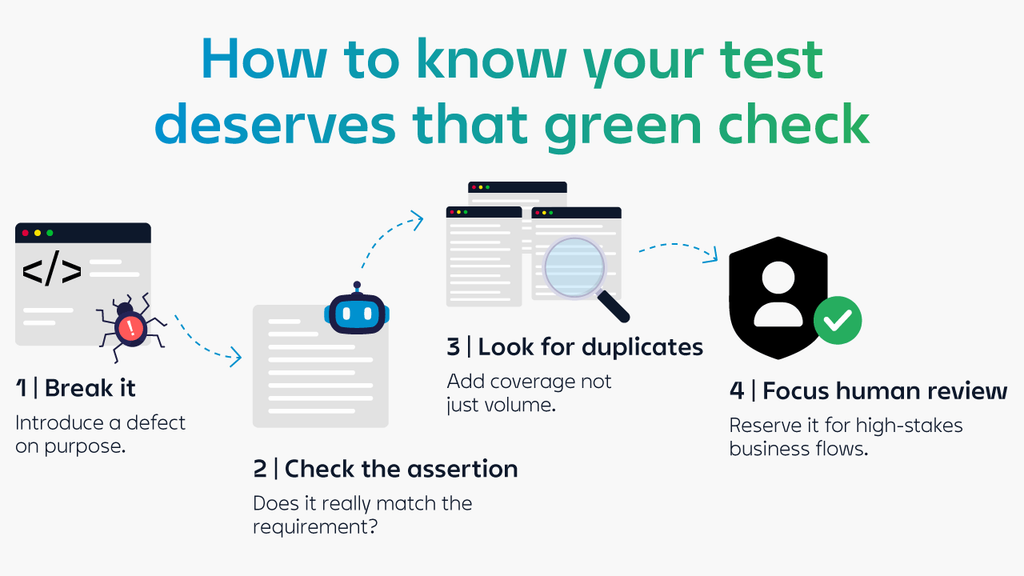
Break the code on purpose: this is one of the most reliable checks you can run, so it deserves close attention. Go into the discount logic and deliberately break it: make the discount apply twice, ignore the expiry date, or apply to an already-discounted item. If the test still passes after you’ve broken the logic it is meant to protect, it was never checking the right thing. This is called mutation testing. Instead of asking, “Does the test pass?”, it asks, “Can this test fail when it should?” Gartner recommends this approach for teams using AI to expand test coverage, since AI-generated tests can lack the depth needed to catch real defects on their own. In practice, you create several broken versions of the discount logic and check that the test catches each one. Any failure to detect a mutation tells you exactly what needs to be fixed before you can trust the green result.

Have a second AI model check the assertion: Once a test survives mutation testing, ask a different question: does its assertion actually match the requirement, or does it just confirm that something happened? For the discount code, the requirement isn’t simply that no error appears. It’s that the discount matches what the code entitles the customer to and that the order total reflects it correctly. A second model can compare the assertion against the written requirement and flag any mismatch. The goal is to close the gap between a test that confirms something happened and one that confirms the right thing happened.

Check for near-duplicates: AI tools generate tests quickly, but that can also mean generating the same test several times with small variations. If you already have four tests confirming that a discount code works correctly, a fifth that only changes the code string is not adding coverage. It is just adding another test to maintain. The ASTQB calls this “false confidence from volume”: a large test suite can look thorough while still leaving the same risks uncovered. Merge tests that overlap heavily and keep near-duplicates only when they cover a genuinely different path, such as combining a discount code with a gift card.

Save human review for what matters most: Not every test needs the same level of scrutiny. Sonar’s 2026 State of Code Developer Survey found that 96% of developers don’t fully trust AI-generated code to be functionally correct, while only 48% always check it before committing. The same caution should apply to AI-generated tests, particularly in areas where a failure can have a direct impact on customers and the business. Pricing, payments, and authentication deserve closer attention: a discount applied twice, a payment processed more than once, or a login that gives access to the wrong session can all have serious consequences. Reserve manual review for these high-stakes flows, while using mutation testing and AI-assisted review to validate the rest of the suite.

The next question testingON is built to answer
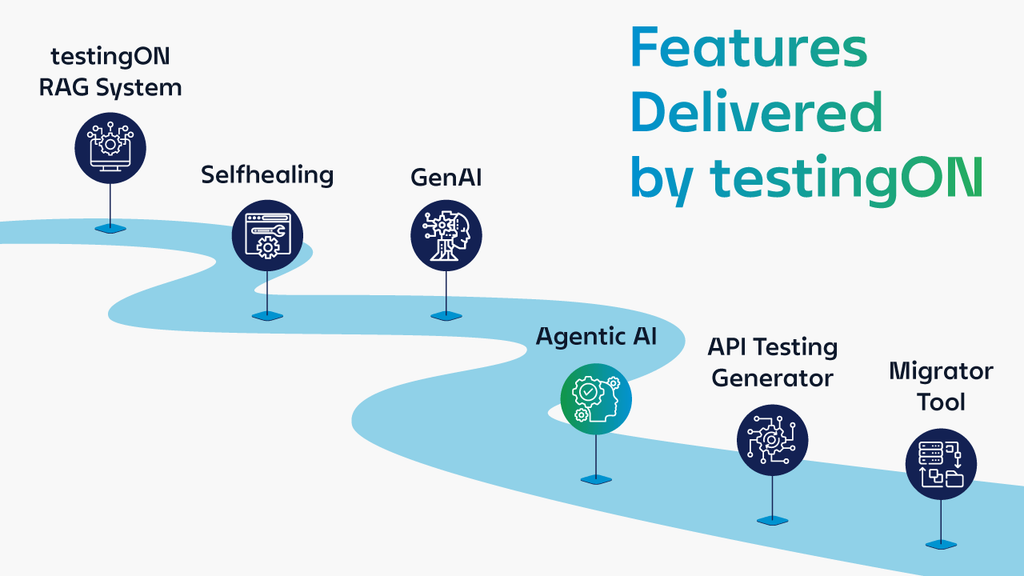
Most AI test-generation tools, including the ones enterprise QA teams are piloting right now, stop at generation. They write the test, hand it back green, and move on. They don’t run the checks described above, they don’t break the code on purpose, they don’t flag near-duplicates, they don’t know which paths are high-stakes enough to need a human. That’s true of most AI test-generation vendors too: speed is the pitch, and validation is left entirely to whoever’s using the tool.

We built testingON’s roadmap around closing that specific gap. Under an initiative we’re calling Agentic AI, we’re building an agent whose job is exactly what this post describes: taking a generated test and verifying it can actually catch a real defect, not just checking that it runs green. It sits alongside a companion agent that generates tests overnight against new user stories, and another that runs tests in the background and reports on execution results and performance, so generation, validation, and execution work as one connected process instead of three separate

tools bolted together. This is a roadmap direction we’re actively building toward, not a shipped feature today, but it’s a direct answer to the exact problem this post lays out.

If you’re piloting AI test generation and want to talk about how to validate what it’s producing before it reaches production, see what testingON is building.

Author

Tiago Honorato, Quality Management DevOps & Automation Associate Director at Noesis

I am a technology leader with more than 18 years of experience in Software Engineering, Quality Assurance, Product Innovation, and Digital Transformation.

I started my career as a Software Developer at Nokia Siemens Networks after completing my Master’s degree in Computer Science in Lisbon, Portugal. Shortly after, I embraced a new challenge at Noesis, where I founded and scaled the company’s Test Automation practice, helping clients accelerate their software delivery lifecycle and significantly improve quality standards.

Although I transitioned from development to Quality Assurance, I have always maintained a strong connection to software engineering — combining deep technical expertise with strategic quality vision. Over time, I led multiple initiatives across test automation, application development, and quality transformation programs for major enterprise clients.

Leveraging this cross-functional experience, I conceived and led the creation of testingON — a test management and automation platform designed to reduce testing time while increasing coverage and enabling non-technical users to actively contribute to quality processes. The platform integrates with leading test management, CI/CD, and project management tools and is currently used by major Telco, Retail, Banking, and Insurance organizations in Portugal and Brazil.

I later accepted a new challenge at NTT DATA, where I served as Senior Manager responsible for the Quality Assurance & Testing offering, leading strategic accounts, strengthening delivery capabilities, and expanding quality services.

Subsequently, I returned to Noesis as Associate Director to lead the strategic evolution of testingON. In this role, I am responsible for product vision, innovation roadmap, and growth strategy — including the integration of Generative AI capabilities and the modernization of the platform’s architecture to ensure scalability, cloud readiness, and long-term competitiveness.

testingON are Platinum Partners at AutomationSTAR Conference EXPO 2026. Join us in Antwerp 4-5th November 2026.

· Categorized: AutomationSTAR · Tagged: 2026, EXPO

Sep 14 2026

Meet BQA and Teammaite at AutomationSTAR: from testing expertise to AI-powered quality

Visit BQA and Teammaite at AutomationSTAR and discover how testing expertise, AI and automation come together – with AI as the accelerator and the professional in the driver-seat.

AI-powered development is delivering code faster, sometimes producing an entire feature in a single iteration. Testers therefore need to analyse specifications, risks, test strategy, coverage and automation just as quickly – without sacrificing quality.

That raises a practical question:

How do you stay relevant, valuable and effective as quality becomes more AI-driven?

At AutomationSTAR, BQA and Teammaite will explore that question with testers, automation engineers, QA leads and business owners. Our message is simple: AI should not replace testing expertise; it should make that expertise more powerful.

Quality Starts Before Testing Starts

Requirements often look clear until testing reveals the gaps: exception flows are undefined, acceptance criteria are not measurable, risks are unclear or the business expectation does not match what was built.

BQA therefore believes quality must move upstream. Requirements, user stories and acceptance criteria should be analysed before development starts, with risks and test ideas linked to business intent from the beginning.

With AI support, Teammaite can analyse requirements for ambiguity, missing information, inconsistencies and testability, helping teams build a stronger foundation for test design and automation.

The challenge is not simply generating tests faster, but deciding what should be tested:

  • What does the specification really mean?
  • Are the requirements complete, unambiguous and testable?
  • Where are the biggest product and business risks?
  • Which test techniques and level of coverage are appropriate?
  • How do we translate those choices into existing processes and tools in a traceable way?

From Dpecification to the Right Test Coverage

At our stand, we will demonstrate one recognisable end-to-end quality flow:

Specifications -> requirements -> quality improvement -> risk analysis -> test strategy -> test design -> execution and management

Teammaite can process documents, models, tables or existing tickets, while a BQA consultant determines the appropriate context and extraction approach.

Teammaite then identifies ambiguity, inconsistencies, missing information and testability issues. AI can propose product risks, impact and priorities, but consultants and stakeholders validate the business context and risk weighting.

Based on clearer requirements and validated risks, teams can define relevant test levels, test types, techniques and desired coverage.

The goal is not automatically more tests, but targeted and explainable coverage of the risks that matter.

From Tester to AI Test Orchestrator

AI accelerates the process, but it does not remove the need for testing expertise. Experienced testers understand context, recognise risk, judge whether test cases are meaningful and decide what should be automated or explored by people.

BQA calls this role the AI test orchestrator: a quality professional who uses AI deliberately, critically and effectively across the software development lifecycle. For test managers and QA leads, governance, prioritisation, traceability and release confidence remain essential.

The key question is no longer only:

“Can AI create tests?”

It is:

“Can we explain why these tests cover the right risks?”

That is the central question behind our stand at AutomationSTAR.

AI in Control: People Make the Decisions

Responsible AI must be visible in the way quality decisions are made: AI makes proposals; people make decisions.

Important steps can include review and approval. Sources, assumptions, modifications and decisions remain traceable, uncertainty is explicit, and the degree of autonomy can be adjusted to the organisation and the risk involved.

Teammaite delivers the intelligent, integrated workflow. BQA provides the human link – from selecting the approach and facilitating stakeholder discussions to risk analysis, test strategy, governance and implementation.

Connect AI to the Tools you Already Use

AI-supported quality should not become an isolated experiment. Approved results need to fit the organisation’s existing way of working.

The approach can connect with tools such as Robot Framework, Testersuite, Jira and Azure DevOps while maintaining traceability from specification through requirements and tests to findings.

Together, BQA and Teammaite support the full quality flow: requirements analysis, test strategy, test cases, automation and release insight.

Teammaite brings the AI capability; BQA brings experienced consultants who understand testing, test management, automation, governance and software delivery in complex organisations.

AI tooling alone does not change an organisation. People, process and implementation determine whether AI becomes a useful colleague or just another experiment.

Bring Us Your Specification

At AutomationSTAR, we want to go beyond a generic AI product presentation.

Bring a specification or sample requirement and take the spec-to-strategy challenge.

In a few minutes, Teammaite can highlight potential improvements, risks and suggested test coverage. A BQA consultant will discuss which proposals make sense, which assumptions need challenging, where human judgement is required and what integration into your quality process could look like.

You leave with a compact AI-in-control quick scan and a clearer view of what AI-supported quality could mean for your organisation.

Come and Challenge Us

We believe in practical quality improvement, not AI hype for its own sake.

Come to the BQA and Teammaite stand with a testing challenge, requirements problem, automation bottleneck, management concern or simply one existing specification.

Ask us what AI can do, where human expertise remains essential and how your team can move from specification to improved requirements, validated risks, an appropriate test strategy and integrated test facts.

And come prepared for one question from us:

Can you explain why your current tests cover the right risks?

Authors:

Sander Ulrich – Teammaite

Gerben Braakman – BQA       

Frank van der Kuur – BQA

BQA are exhibitors at AutomationSTAR Conference EXPO 2026. Join us in Antwerp 4-5th November 2026.

· Categorized: AutomationSTAR · Tagged: 2026, EXPO

Sep 07 2026

The Keyword Is the Contract

How the right layers of abstraction improve collaboration, maintainability and technical flexibility

Open a test specification and you read: the customer places an order. Open the automation for the
same test and you find forty lines of selectors, waits and assertions. Both claim to describe one test.
Three sprints later a checkout step has moved, someone patched the code but not the specification,
and nobody can say which one is still true.

Anyone who has maintained a test suite for a year knows the situation. It isn’t a communication
problem. It’s a missing interface.

The people best placed to decide what to test are usually not the people who can automate it.
Business testers understand processes, requirements and the scenarios that matter. Automation
engineers understand frameworks, interfaces and the technical details of the system under test.
Traditional automation puts the two groups in a relay race: first specify, then automate. Every
change to the specification means a change to the code, and unless someone keeps paying the
manual cost of alignment, the two artifacts drift.

That drift was survivable when releases came quarterly. At weekly, it isn’t. Cycles get shorter,
expectations keep rising, and a specification nobody trusts stops being documentation and becomes
a liability.

More discipline won’t fix it. Abstraction will, applied in more places than most teams think.

Why Abstraction

Clean code has a rule for it: single level of abstraction. A function works on one level of detail instead
of mixing business logic with string handling. What you get is readability, understandability,
maintainability and reuse. Testing can borrow the principle, and two standards tell you where to put
it.

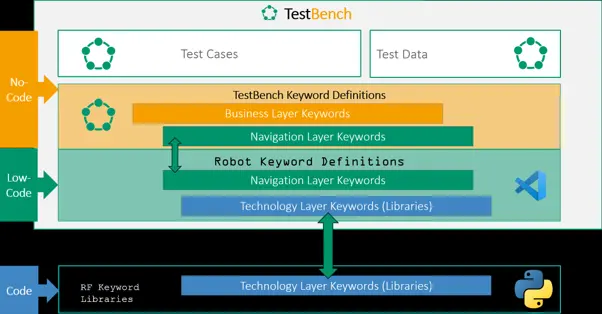
Abstraction 1: The Test Automation Architecture

ISTQB’s Generic Test Automation Architecture, laid out in the CTAL-TAE syllabus, applies the same
idea to the automation solution and separates four layers:

  • Test generation — designing test cases, deciding what to test
  • Test definition — test suites, test cases, test data, the reusable keyword library
  • Test execution — the engine that runs the tests, logs and reports
  • Test adaptation — the code that talks to the interfaces of the system under test

What makes the model useful is the separation it enforces. A change in one layer rarely forces a
change in another. A re-labelled button hits the adaptation layer, not two hundred test cases. Swap a UI-driven check for an API call on the same business step and the test definition layer never notices. The layers tell you where the boundaries belong, not how an intent stated at the top arrives as
executable code at the bottom.

Abstraction 2: The Test Specification

Keyword-driven testing is the answer. ISO/IEC/IEEE 29119-5 describes keyword-driven testing, and
the second edition from 2024 is explicit about hierarchy. At the bottom sit generic technical
keywords such as “Click” , “ Fill Text ” or “Get Element States ” . Those get composed
into business-level keywords: “ Log in as a registered customer ” , “ Place an
order ”
. A test case is then a sequence of business keywords plus test data, readable by anyone
who knows the domain, with no code in sight.

The hierarchy itself isn’t the most interesting part. What it produces is a contract. The keyword name
and its parameters are the interface between the two worlds. A business tester can reorder steps,
add a data variant or build a new test case from existing keywords without touching automation
code. An automation engineer can rewrite whatever happens behind “ Place an order ” , new
UI, new API, new library, without invalidating a single test case. Each side changes what it owns. The
artifacts stay aligned because the thing that matters exists only once: the keyword.

Abstraction 3: The Tooling

Here is the step most teams skip. If the layers really are separate, no single tool must cover all of
them. That matters, because the two groups don’t want the same tool. Ask a business tester to
specify tests in VS Code and you lose them; an IDE isn’t their workplace and Git isn’t their
vocabulary. Ask an automation engineer to implement technical steps by clicking through a GUI and
you take away autocompletion, refactoring, version control and code review, which is most of what
makes engineering possible.


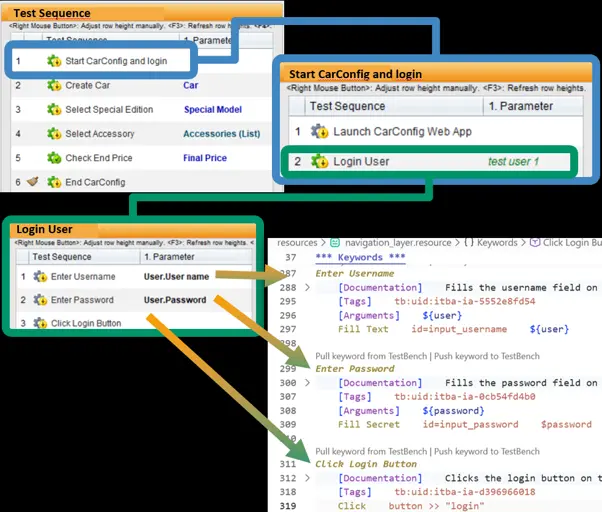
So choose per layer, then connect the layers. In our case, TestBench covers test definition, entirely
no-code: business testers maintain keywords and test data in a GUI and assemble test cases from
them. Robot Framework and VS Code cover the implementation, low-code where the existing Robot
Framework libraries suffice and real Python in user keywords where they don’t.
testbench2robotframework generates Robot Framework suites from a TestBench report and writes
the results back, and the TestBench extension for VS Code keeps keywords, descriptions and test
data in sync.

29119-5 expects this. The standard defines requirements for a common data exchange format so
that tools from different vendors can hand test cases, keywords and test data to each other.
Exchanging artifacts between tools isn’t a workaround for the all-in-one product nobody sells; the
standard treats it as the normal case.

Where It Breaks

Abstraction isn’t free. Keyword libraries grow, and an unmaintained catalogue of hundreds of nearidentical keywords is worse than none: nobody finds the right one, so everybody adds another.
Keywords cut too finely (Click button, Enter text) push technical detail straight back into the test
specification and cancel out the benefit. Layers hold only if someone owns the keyword library, if
naming conventions are agreed and enforced, and if keywords get reviewed as seriously as code.
Standards hand you a structure. Nobody hands you the discipline to keep it clean.

What You Actually Gain

Two things. A shared artifact that a business tester can read and an engineer can execute. And, less
obviously, a shared vocabulary. Domain-driven design calls this a ubiquitous language: one rigorous
set of terms used by domain experts and developers alike, in conversation and in the code. Keyword driven testing produces exactly that as a by-product. When “Place an order” means the same thing in a review meeting, in a test case and in a Robot Framework keyword, the two groups have stopped translating between worlds. They are editing the same sentence.

Further Reading

Leave Complexity Behind: No-Code Test Automation with Low-Code integration via Robot Framework and TestBench

Author

Falk Altrock, Product Owner TestBench
imbus AG

TestBench are exhibitors at AutomationSTAR Conference EXPO 2026. Join us in Antwerp 4-5th November 2026.

· Categorized: AutomationSTAR · Tagged: 2026, EXPO

Aug 24 2026

Why AI Coding Agents Need a Way to Verify Their Own Work

AI coding agents can now build entire features from a single prompt. Tools like Claude Code, Codex CLI, and Cursor write code quickly and confidently. But there is a gap in this workflow that testers will recognize immediately: writing code and verifying that it works are two different disciplines.

The Verification Gap

Large language models are non-deterministic. The same prompt can produce different output on different runs, and agents occasionally hallucinate behavior that does not exist. One common workaround is asking the agent to review its own work, but self-verification in a loop is expensive and circular. An agent grading its own homework is not evidence.

What is missing is what testers have always insisted on: an independent, repeatable check against the real system. For web applications, that means opening an actual browser, executing the user journey step by step, and returning a clear pass or fail.

Closing the Gap from the Terminal

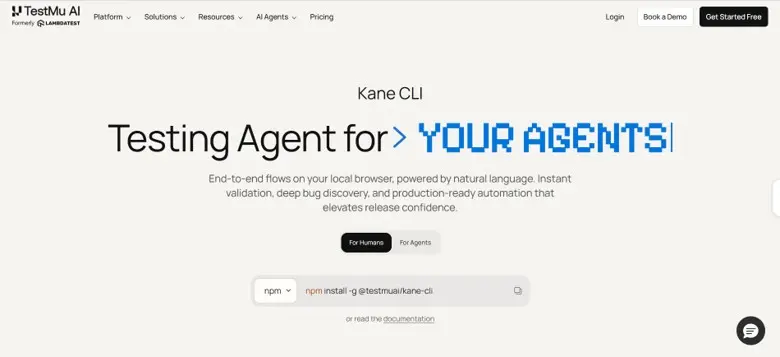
This is the problem Kane CLI, from TestMu AI, sets out to solve. It brings the KaneAI testing agent into the terminal, where both developers and coding agents already work. You describe a flow in natural language, such as a login, a form validation, or a checkout journey. Kane CLI runs it in a local Chrome browser and returns a deterministic result with a shareable evidence link containing video and a step trace.

The design choices reflect sound testing principles:

  • Deterministic results. Every run ends in a binary pass or fail, backed by a real browser execution rather than the agent’s own opinion.
  • Human-realistic actions. It only performs actions a real user could take inside the viewport. It never injects custom JavaScript to bypass validations and force a pass.
  • Resilient, repeatable tests. Vision-based waiting detects loaders and animations, and self-healing absorbs cosmetic UI changes, so tests survive across runs and environments.
  • Human-in-the-loop. When a flow hits an OTP or CAPTCHA, it pauses, asks a human to complete that step, and continues.

Where This Fits

For agents, verification happens through a structured agent mode: the coding agent calls Kane CLI, reads the machine-readable result, and decides whether to fix, continue, or escalate to a human. For teams, flows can export to native Playwright code and run headlessly in CI/CD pipelines.

The broader lesson holds regardless of tooling: as agents take on more of the building, independent validation becomes more important, not less. Verification, like testing itself, works best when it is decoupled from the thing being verified.

Author

Mudit Singh Co-Founder at TestMu AI

Mudit Singh, Co-Founder and Head of Growth at TestMu AI (Formerly LambdaTest), is a dynamic force in the world of software innovation. With over a decade of expertise in building and scaling remarkable software products, Mudit has played a pivotal role in TestMu AI’s mission to transform the software testing landscape.

His strategic vision is centered around shifting testing ecosystems to the cloud, optimizing efficiency, and driving tangible business outcomes. Known for his hands-on approach to product development, Mudit thrives on creating solutions that deliver immense value to customers. When he’s not pushing the boundaries of product and growth, Mudit enjoys exploring the intersection of technology and business trends, always staying ahead of the curve.

TestMu AI are an AutomationSTAR 2026 exhibitor. Join us in Antwerp 4-5 Nov 2026.

· Categorized: AutomationSTAR · Tagged: 2026, EXPO

Aug 17 2026

How to Easily Build Automation Scripts with Xray’s AI Test Script Generation

Test automation is widely recognized as essential to modern delivery; it enables faster feedback, supports CI/CD practices, and increases release confidence. Yet in many organizations, automation growth lags behind development velocity. The reason is rarely a lack of intent.

It’s the effort required to convert validated manual tests into automation scripts.

Most teams already have structured manual test cases inside Jira. These tests represent validated functionality, documented business logic, and risk mitigation. However, the step that consistently slows progress is converting those structured manual tests into automation scripts compatible with frameworks like Playwright or Selenium. This often happens because automation engineers are in short supply within many teams. As a result, manual test cases need to be handed over, reviewed, and rewritten before they can be automated, creating a bottleneck in the overall testing process.

Xray’s AI Test Script Generation addresses this exact point of friction. Instead of treating manual validation and automation as separate tracks, it connects them directly within Jira, transforming validated test cases into framework-ready automation scripts while preserving traceability and workflow continuity.

Let’s explore how the feature works in practice, why it changes automation scalability, and how it fits into a broader AI-enabled quality strategy.

AI Test Script Generation operates on Test work items within Jira. For manual tests, the item must include at least one defined Test Step. For tests written in Gherkin format, the definition field must contain a valid scenario before automation can be generated. This ensures the AI has structured input to interpret the intended test behavior.

Why converting manual tests into automation slows teams down

Manual tests are rarely the problem; in fact, they are often well-structured and thoughtfully written. The challenge arises after validation, when those tests are handed off for rewriting in an automation framework. 

This rewrite phase introduces duplication, which means the logic has already been defined, but it must be translated step by step into executable code. That translation requires framework knowledge, coding expertise, and careful attention to application-specific details. When automation engineers are responsible for this conversion, their time is spent recreating what already exists in documented form.

Over time, this creates predictable consequences. Automation backlogs grow. Coverage expansion becomes dependent on a small group of specialists. The gap between manual validation and automated execution widens.

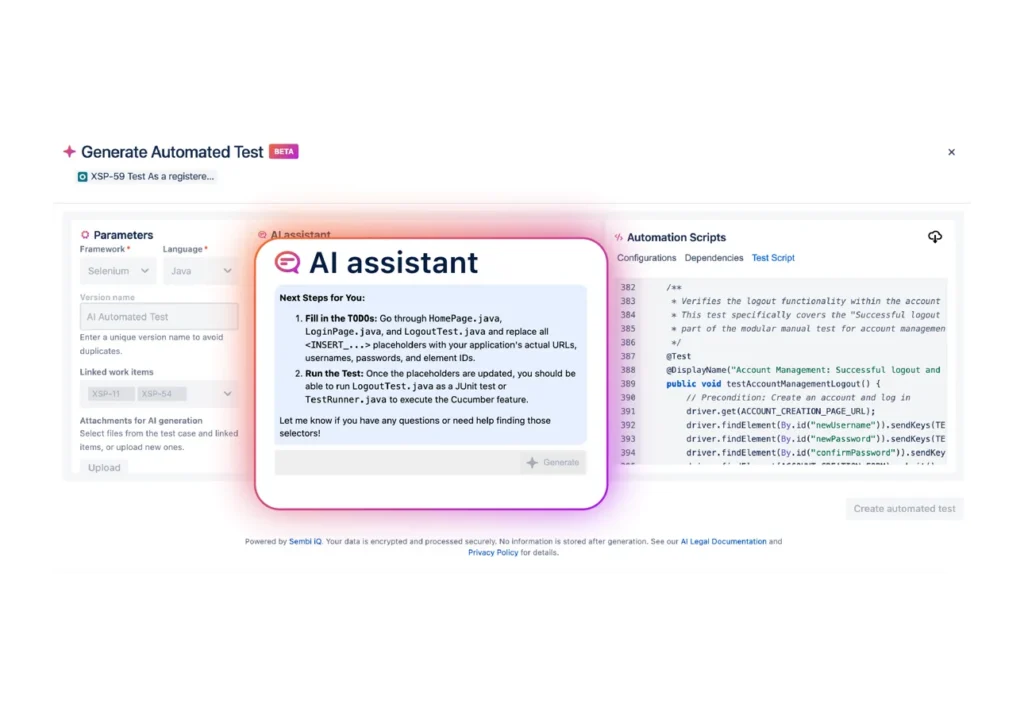
When scripts are generated, they may include placeholders such as  <BASE_URL> or <USERNAME>. These markers indicate values that should be replaced with environment-specific details, including application URLs, credentials, or element selectors, before the script is executed.

Xray’s AI Test Script Generation reduces that duplication of effort. It does not eliminate the need for expertise, but it shifts the starting point. Instead of beginning with a blank file, teams begin with a generated script that already reflects the structured intent of the manual test case. This fundamentally changes how quickly automation can scale.

How Xray’s AI Test Script Generation works step by step

The entire process is embedded inside Xray and Jira, which means teams do not need to introduce new platforms or adjust their existing test management structure.

The workflow begins with an existing structured manual test case. Because the feature relies on clearly defined steps and expected results, it builds directly on artifacts that already represent validated logic.

From there:

  1. Open a manual test case in Xray
    The test case should include structured steps and expected outcomes.
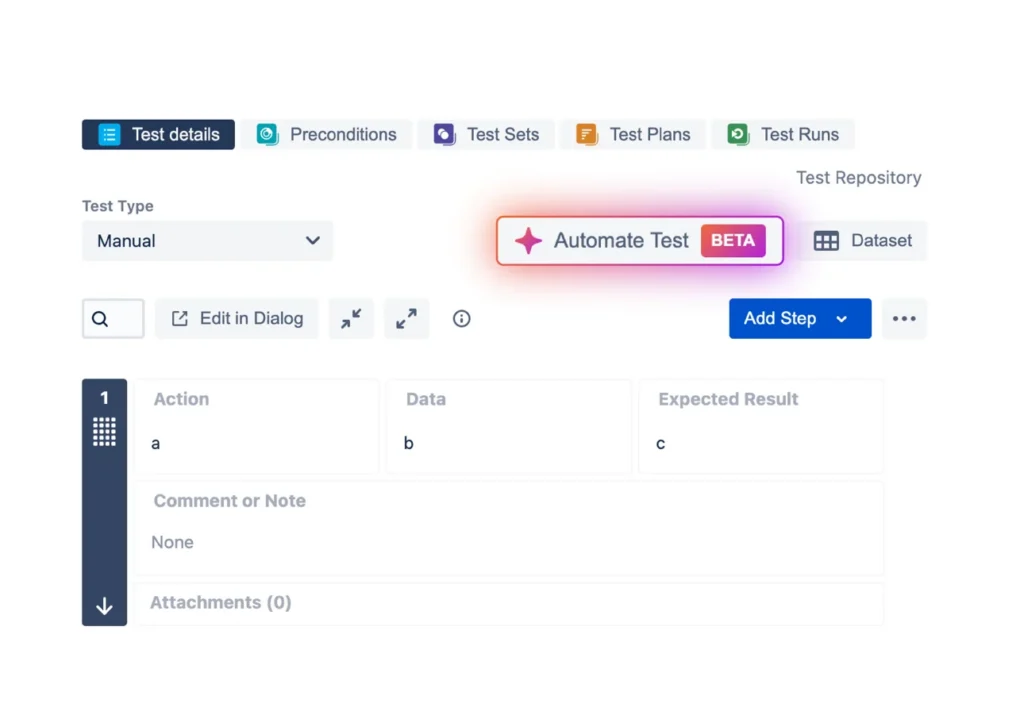
  2. Select “Automate Test”
    This option is available directly within the test case interface.
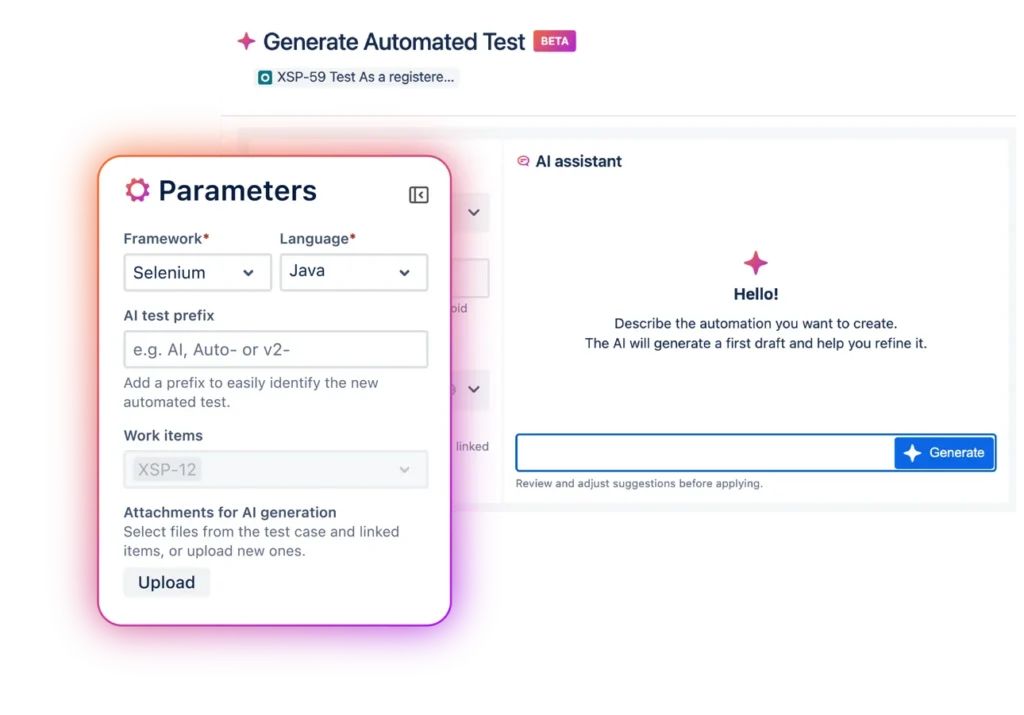
  3. Choose your framework and language
    Select Playwright or Selenium and define the programming language used by your team. A version name is assigned to distinguish this automation instance.
  4. Provide a short contextual prompt
    A brief description clarifies what the automated script should accomplish, giving the AI additional context.
  5. Review generated outputs
    Sembi IQ generates:
    A framework-compatible automation script
    Configuration and dependency guidance
    A checklist of refinement tasks
  6. Refine and iterate
    Before execution, teams adjust parameters such as URLs, environment variables, and element identifiers. The AI remains interactive, allowing additional modifications, such as testing invalid inputs or expanding validation logic.
    During this refinement phase, you can provide additional instructions to improve or modify the generated script. Each generation allows up to five iterative refinements. Once this limit is reached, a new script generation must be initiated.
  7. Integrate and save
    The script can be downloaded or copied into an IDE. Finalizing the process creates a new automated test version inside Xray, maintaining traceability back to the original manual test and associated requirements.

The refinement stage is particularly important. Generated scripts are intentionally designed as structured starting points. Teams remain responsible for validation, optimization, and alignment with application-specific nuances before execution.

How this capability, powered by Sembi IQ, differs from generic AI code generators

Generic AI tools can produce automation snippets, but they lack structured context. They operate outside Jira. They do not understand requirement linkage. They do not preserve test version history or maintain traceability within a QA workflow.

Framework-native generators often assume coding proficiency and require scripts to be created independently from requirement artifacts. They typically start from scratch, detached from manual validation.

Xray’s AI Test Script Generation operates differently because it is embedded inside structured test management. It reads validated manual test steps directly from Jira, generates scripts within that context, and creates version-linked automated artifacts. This ensures continuity between requirements, manual tests, and automation.

The difference is not just in script generation. It is in maintaining governance and traceability throughout the transition from validation to automation.

Expanding automation participation without compromising control

Automation growth is frequently constrained by available engineering bandwidth. When every automated test requires deep framework expertise from the outset, coverage expansion becomes limited.

By generating the initial script structure, Xray’s AI Test Script Generation enables testers who understand functional intent to participate more directly in the automation process. Automation engineers can then focus on refining logic, improving resilience, and integrating scripts into CI pipelines rather than rewriting foundational steps.

This reduces repetitive scripting effort and shortens the path from validation to automation. It also lowers dependency on handoffs between roles, improving collaboration within QA and engineering teams.

Importantly, the feature maintains a human-in-the-loop approach. Generated scripts are editable, version-controlled, and traceable. Final execution remains under team oversight. The objective is acceleration with structure, not automation without control.

The impact at the organizational level includes faster automation velocity, improved coverage scalability, and stronger alignment between manual validation and automated execution.

Operational considerations

When using AI Test Script Generation, teams should also be aware of several practical constraints.

If files are uploaded during the generation process, their combined size cannot exceed 1 MB. The limit applies to the total size of all selected files. If the threshold is exceeded, the file selection must be adjusted before proceeding.

Supported file formats include TXT, MD, XML, YAML, PY, C, CPP, CC, C++, JAVA, JS, TS, JSX, TSX, SH, BASH, GO, RUST, SQL, HTML, RTF, CSV, JSON, DOC, DOCX, and PDF.

Recommended practices

As with any AI-assisted output, generated automation scripts should be treated as an initial foundation rather than a final deliverable.

To get the best results:

  • Provide clear instructions that describe the intended test behavior.
  • Keep prompts concise so the AI focuses on the relevant scenario.
  • Always review and refine the generated script to ensure it aligns with your project’s automation standards and environment configuration.

How it fits into Xray’s broader AI ecosystem

Xray’s AI Test Script Generation builds on the AI foundation powered by Sembi IQ.

AI Test Case Generation helps teams accelerate the creation of structured test drafts from requirements across editions. AI Test Model Generation, available in Xray Enterprise, supports structured modeling of system behavior to strengthen coverage design.

Together, these capabilities create a connected workflow that moves from requirement interpretation to validation, behavioral modeling, and now directly into automation script generation.

Rather than existing as isolated AI features, they reinforce each stage of the testing lifecycle within Jira.

FAQ: Xray’s AI Test Script Generation

What is Xray’s AI Test Script Generation?

It is an AI-powered capability that transforms structured manual test cases into framework-ready automation scripts compatible with Playwright and Selenium, directly inside Jira.

Which Xray tiers include this feature?

Xray’s AI Test Script Generation is available for Xray Advanced and Xray Enterprise.

Does this replace automation engineers?

No. The feature accelerates initial script creation, but teams review, refine, and finalize scripts before execution. Expertise remains central to quality.

Is automation generated independently from requirements?

No. Scripts are generated from validated manual test cases that are already linked to requirements inside Jira, preserving context and traceability.

How does this relate to Xray’s other AI features?

It complements AI Test Case Generation and AI Test Model Generation by extending the AI-enabled workflow from requirement drafting and coverage modeling into executable automation.


Note on availability

We’ve transitioned our AI capabilities to “Enabled by Default” to ensure all users have immediate access to the productivity gains Sembi IQ provides. The platform’s full power is available out of the box, rather than hidden behind menus. However, your workflow comes first, and you have absolute control to toggle it off in the settings if it doesn’t fit your needs.

If you are still on Xray Cloud 6.16.0, your Jira admin must manually update Xray to the latest version in order to take advantage of all recent and future releases. (Including AI Test Script Generation)

Author

Mariana Santos, Content Marketing Manager

Mariana Santos is the Content Marketing Manager for Xray. She is responsible for implementing and promoting content that reflects the most important topics for the testing community. She focuses on highlighting crucial subjects from the software testing and quality ecosystem and communicating them continuously.

· Categorized: AutomationSTAR · Tagged: 2026, EXPO

  • Page 1
  • Page 2
  • Page 3
  • Interim pages omitted …
  • Page 5
  • Go to Next Page »

Copyright © 2026 · Impressum · Privacy · T&C

part of the