• Skip to main content
Don't miss out - Join us 4-5 Nov | Book Now!

AutomationSTAR

Test Automation Conference Europe

  • Programme
    • AutomationSTAR Team
    • 2026 programme
  • Attend
    • Why Attend
    • Volunteer
    • Location
    • Get approval
    • Bring your Team
    • 2025 Gallery
    • Testimonials
    • Community Hub
  • Exhibit
    • Partner Opportunities
    • Download EXPO Brochure
  • About Us
    • FAQ
    • Blog
    • Test Automation Patterns Wiki
    • Code of Conduct
    • Contact Us
  • Tickets

Lauren Payne

Oct 19 2023

End-to-end testing: An end-to-end guide to overcoming 7 common challenges.

End-to-end testing — which tries to recreate the user experience by testing an application’s entire workflow from beginning to end, including all integrations and dependencies with other systems — is more difficult now than ever.

The challenges with end-to-end testing have increased tremendously over the past several years as enterprise IT has exploded; this has led to an unprecedented number of applications, all of which are highly distributed and interconnected.

But it’s exactly this situation that makes conducting end-to-end testing an imperative for your organization.

Unpacking the current state of end-to-end testing: Inside the explosion of enterprise IT

The average organization uses more than 900 applications today, according to MuleSoft’s 2022 Connectivity Benchmark Report, and a single business workflow might touch dozens of these applications via microservices and APIs. To ensure business processes keep running, testers must replicate the work users perform across multiple applications and ensure none of those workflows are impacted when one of those applications is updated.

Ongoing cloud migration further complicates things. Bessemer Venture Partners’ State of the Cloud Report notes that more than 140 public and private cloud companies have now reached a valuation of $1 billion or more. At current growth rates, cloud could penetrate nearly all enterprise software in a few years, according to the report’s authors. That means that tests must function across heterogenous architectures as enterprise cloud migration journeys progress.

To truly protect the user experience as all of these enterprise IT systems evolve at ever-increasing speeds, it’s critical to test the complete end-to-end business process, which may span multiple applications, architectures, and interfaces. That’s because any given part of an application might function differently when working in conjunction with another system than it does when working in isolation — the latter of which is not a real-world scenario. Given this situation, it’s no surprise that leading industry analysts call out end-to-end testing as a critical capability for test automation software.

Despite this growing need, end-to-end testing isn’t easy. Not only do today’s applications evolve at a rapid-fire pace, but they’re often highly connected with other systems in an enterprise IT landscape. These connections create numerous dependencies and, as a result, many points of potential failure to test. It’s all but impossible to carry out extensive end-to-end testing manually, unless you have a lot of time on your hands, but end-to-end test automation has its own challenges.

In fact, Google went so far as to “say no” to conducting more end-to-end testing, citing the relative instability of the test scripts, which require updating every time a connected application gets updated, creating a significant maintenance burden. Despite this challenge, comprehensive end-to-end testing still offers the best solution to protecting the user experience, which should be the ultimate goal of everyone from business analysts to developers and testers. Here’s a look at the top end-to-end testing challenges, as well as how the right processes and testing tools can help you overcome them.

Addressing end-to-end testing head on: The top seven challenges + best practices to address them.

There’s no doubt about it: Successful end-to-end testing is challenging. But it’s also well within reach for modern testing organizations. Success is simply about understanding the challenges, identifying the best ways to overcome them, and introducing the right processes and technology to help put those plans into action.

With that in mind, here’s a look at the top seven end-to-end testing challenges, plus best practices for how to address them.

1) Testing across a diverse set of complex apps & programs

Proper end-to-end testing will likely include a combination of both enterprise applications (e.g. SAP, Salesforce, Oracle, ServiceNow, etc.) and custom developed, customer-facing applications. Gregor Hohpe of “The Architect Elevator” sums up why testing across disparate, interconnected systems is so difficult:


“Complex, highly interdependent systems tend to have poorly understood failure states and large failure domains: It’s difficult to know what can go wrong; if something does go wrong, it’s difficult to know what actually happened; and if one-part breaks, the problems cascade in a domino effect.”

Of course, that complexity is exactly what makes end-to-end testing so important, particularly in a DevOps-driven world where speed is a priority and applications change so quickly. To address this challenge and maintain speed, organizations must introduce advanced test automation tools. The testing technology makes a big difference in this regard, as organizations must aim for high levels of automation to maintain the necessary speed and coverage when it comes to testing all of the necessary workflows within an application, including all of the connection points with other applications.

2) Accounting for overall maintenance challenges

End-to-end tests are flat-out difficult to maintain. That’s because every time a component of the application’s user interface changes, the test needs to get updated along with it. In today’s world of frequent updates, that can mean quite a lot of changes. And if your tests don’t get updated to match UI changes, they may miss critical bugs that degrade the user experience.

One of the best ways to combat these challenges is to prioritize certain workflows over others based on risk, so QA teams aren’t overwhelmed with writing and rewriting end-to-end tests for every possible workflow. While end-to-end testing is absolutely a must for the reasons described above, not every single area of the application requires this level of scrutiny if testers also use lower-level tests, such as unit tests and integration tests, throughout.

3) Combating flakiness in tests

Beyond overall maintenance challenges, end-to-end tests tend to be “flaky” because they are meant to mimic real-world scenarios. As a result, factors like network conditions, API failures, and system load can impact the outcomes of these tests.

Additionally, the testing solution used matters, particularly given the level of test automation required for ongoing end-to-end testing at the necessary speed. For example, Selenium is a useful tool, but it can create brittle tests (due to factors like data, context, and ties to external services), which makes Selenium useful, but only if your organization has the resources to maintain and update the test scripts.

Using model-based test automation — for example, with a tool like Tricentis Tosca — can help combat the flaky nature of end-to-end tests. Tosca’s modular test design eliminates the maintenance burden that’s typically so challenging for end-to-end test automation. Its no-code approach means that there’s no scripting knowledge required, so testers can start and quickly scale end-to-end test automation, regardless of their skillset. And because it’s built for both enterprise packaged applications and custom-developed software, it’s ideal for testing end-to-end workflows that span both. To see how it works, watch the webinar: How to master enterprise end-to-end testing: A scalable, codeless approach.

4) Handling an ever-increasing volume of connected apps

On average, organizations require access to 33 different systems for developing and testing. This means a lot of dependencies on web services and third parties exist throughout the testing process, many of which are likely external systems over which an organization’s QA team has no control. And these connections continue to increase, which only adds to the number of applications to account for during end-to-end testing.

Including those connected systems in end-to-end testing can be challenging when they are changing rapidly themselves. It can also become quite costly depending on the number of systems involved that charge for simulations. The solution to this challenge lies in a service virtualization solution that can mock those external systems for end-to-end testing so that testers don’t have to pay for costly simulations or rely on a live version of the system (which may experience issues that can contribute to test flakiness). Ultimately, this type of solution eliminates many of the factors that are out of testers’ control when it comes to interacting with connected apps.

5) Working with comparatively slower tests

End-to-end tests are often much slower than other types of testing, which can be a challenge for DevOps-driven teams that want immediate feedback so they can react quickly. Ultimately, the comparatively slower speed of end-to-end tests makes iterative feedback difficult. And this challenge only compounds as the number of end-to-end tests in use increases.

This challenge goes back to two critical solutions: (1) Increasing automation to help maintain speed throughout testing, since automated tests will always run faster than manual tests, and (2) prioritizing which workflows require end-to-end testing and which don’t. The latter of these solutions is especially important, as it’s not realistic for organizations to conduct end-to-end testing for every possible workflow within their applications. Rather, it’s important to identify top workflows within the application (either due to level of usage or business-critical functionality) and prioritize those for end-to-end testing, while supplementing with lower-level tests throughout.

6) Using proper test data

Testers spend the most time simply finding and preparing the right data for tests. And end-to-end tests require a variety of data, regardless of whether they’re manual or automated. For example, testers might need to track down historical data or speak to a subject matter expert to get the right data. In some cases, organizations pull in production data and anonymize it for security purposes, but that approach adds another layer of complexity and can create risks in the case of any kind of audit.

Fortunately, there is another way to speed up this process without adding the complexity created by using production data: introducing a test data management tool to automate the creation of synthetic test data. Testers can run about 80-90% of the necessary tests using this synthetic test data, which mimics production data but doesn’t carry the same risk since it is not actually real user data. And because a test data management tool can automate the creation of this synthetic data, it makes the entire process faster.

7) Ensuring alignment across teams

All the complexities involved with end-to-end testing become even more challenging if testing is distributed rather than centralized, Tricentis Founder Wolfgang Platz wrote for “InfoWorld.” With end-to-end testing, the entire team — from business analysts to developers and testers —needs to work together, and this isn’t easy when each set of users has different tools, and the information doesn’t carry over from one to the next. When that happens, teams end up having to duplicate work or build custom integrations between the tools. Ultimately, it can lead to misunderstandings and breakdowns in communications.

To deliver a smoother end-to-end testing process, teams should align on a solution that can synchronize information across the variety of technologies each group uses. Doing so should create a single source of truth to eliminate communication issues and make the hand-off from one team to the next more efficient. Additionally, because end-to-end testing connects tests across front-end systems of engagement and back-end systems of record to assess the complete user experience, this type of alignment across teams not only improves the testing process for internal users, but delivers better results across packaged and customer-facing apps.

End-to-end testing is challenging, but organizations must prioritize it

There’s no getting around it: End-to-end testing is challenging, and the explosion of enterprise IT alongside increasingly rapid speeds of change only complicates it further. However, it’s these exact reasons that make end-to-end testing so important for organizations to conduct regularly.

Specifically, all the dependencies between applications create various points of failure and require more complete testing that mimics real-world scenarios for users. And while organizations won’t realistically be able to apply end-to-end testing to every single workflow within an application, they do need to apply this higher level of testing to highly used and “mission critical” workflows.
The key to delivering on this need successfully (which includes maintaining the necessary speed and overcoming challenges around test maintenance, flakiness, and more) lies in introducing the right technology and processes. Doing this improves maintenance needs, creates less flaky tests, speeds up test setup and feedback times, and helps keep all users aligned, among many other benefits.

Author

Tricentis Team

Tricentis is the global leader in continuous testing and automation, widely credited for reinventing software testing for DevOps and agile environments. The Tricentis AI-based, automation platform enables enterprises to accelerate their digital transformation by dramatically increasing software release speed, reducing costs, and improving software quality.

Tricentis has been widely recognized as the leader by all major industry analysts, including being named a leader in Gartner’s Magic Quadrant five years in a row. Tricentis has more than 2,000 customers, including the largest brands in the world, such as Accenture, Coca-Cola, Nationwide Insurance, Allianz, Telstra, Dolby, RBS, and Zappos.

Tricentis are a Platinum Sponsor at AutomationSTAR 20-21 Nov. 2023. Join us in Berlin.

· Categorized: AutomationSTAR

Oct 16 2023

Prompt-Driven Test Automation

Bridging the Gap Between QA and Automation with AI

In the modern software development landscape, test automation is often a topic of intense debate. Some view it strictly as a segment of Quality Assurance, while others, like myself, believe it intersects both the realms of QA and programming. The Venn diagram I previously shared visualizes this overlap.

Historically, there’s a clear distinction between the competencies required for QA work and those needed for programming:

Skills Required for QA Work:

  • Critical Thinking: The ability to design effective test cases and identify intricate flaws in complex systems
  • Attention to Details: The ability to ensure that minor issues are caught before they escalate into major defects.
  • Domain knowledge: A thorough understanding of technical requirements and business objectives to align QA work effectively.

Skills Required for Programming:

  • Logical Imagination: The capability to deconstruct complex test scenarios into segmented, methodical tasks ripe for efficient automation.
  • Coding: The proficiency to translate intuitive test steps into automated scripts that a machine can execute.
  • Debugging: The systematic approach to isolate issues in test scripts and rectify them to ensure the highest level of reliability.

We’re currently at an AI-driven crossroads, presenting two potential scenarios for the future of QA. One, where AI gradually assumes the roles traditionally filled by QA professionals, and another, where QAs harness the power of AI to elevate and redefine their positions.

This evolution not only concerns the realm of Quality Assurance but also hints at broader implications for the job market as a whole. Will AI technologies become the tools of a select few, centralizing the labor market? Or will they serve as instruments of empowerment, broadening the horizons of high-skill jobs by filling existing skill gaps?

I’m inclined toward the latter perspective. For QA teams to thrive in this evolving ecosystem, they must identify and utilize tools that bolster their strengths, especially in areas where developers have traditionally dominated.

So, what characterizes such a tool? At Loadmill, our exploration of this question has yielded some insights. To navigate this AI-augmented future, QAs require:

  • AI-Driven Test Creation: A mechanism that translates observed user scenarios into robust test cases.
  • AI-Assisted Test Maintenance: An automated system that continually refines tests, using AI to detect discrepancies and implement adjustments.
  • AI-Enabled Test Analysis: A process that deploys AI for sifting through vast amounts of test results, identifying patterns, and highlighting concerns.

When it comes to actualizing AI-driven test creation, there are two predominant methodologies. The code-centric method, exemplified by tools like GitHub Code Pilot, leans heavily on the existing codebase to derive tests. While this method excels in generating unit tests, its scope is inherently limited to the behavior dictated by the current code, making it somewhat narrow-sighted.

Contrarily, Loadmill champions the behavior-centric approach. An AI system that allows QA engineers to capture user interactions or describe them in plain English to create automated test scripts. The AI then undertakes the task of converting this human-friendly narrative into corresponding test code. This integration of AI doesn’t halt here – it extends its efficiencies to areas of test maintenance and result analysis, notably speeding up tasks that historically were time-intensive.

In sum, as the realms of QA and programming converge, opportunities for innovation and progress emerge. AI’s rapid advancements prompt crucial questions about the direction of QA and the broader job market. At Loadmill, we’re committed to ensuring that, in this changing landscape, QAs are not just participants but pioneers. I extend an invitation to all attendees of the upcoming conference: visit our booth in the expo hall. Let’s delve deeper into this conversation and explore how AI can be a game-changer for your QA processes.

For further insights and discussions, please engage with us at the Loadmill booth. 

Author

Ido Cohen, founder and CEO of Loadmill.

Ido Cohen is the Co-founder and CEO of Loadmill. With over a decade of experience as both a hands-on developer and manager, he’s dedicated to driving productivity and building effective automation tools. Guided by his past experience in coding, he continuously strives to create practical, user-centric solutions. In his free time, Ido enjoys chess, history, and vintage video games.

Loadmill are a Gold Sponsor at AutomationSTAR 20-21 Nov. 2023 in Berlin

· Categorized: AutomationSTAR, test automation · Tagged: 2023, EXPO, Gold Sponsor

Aug 24 2023

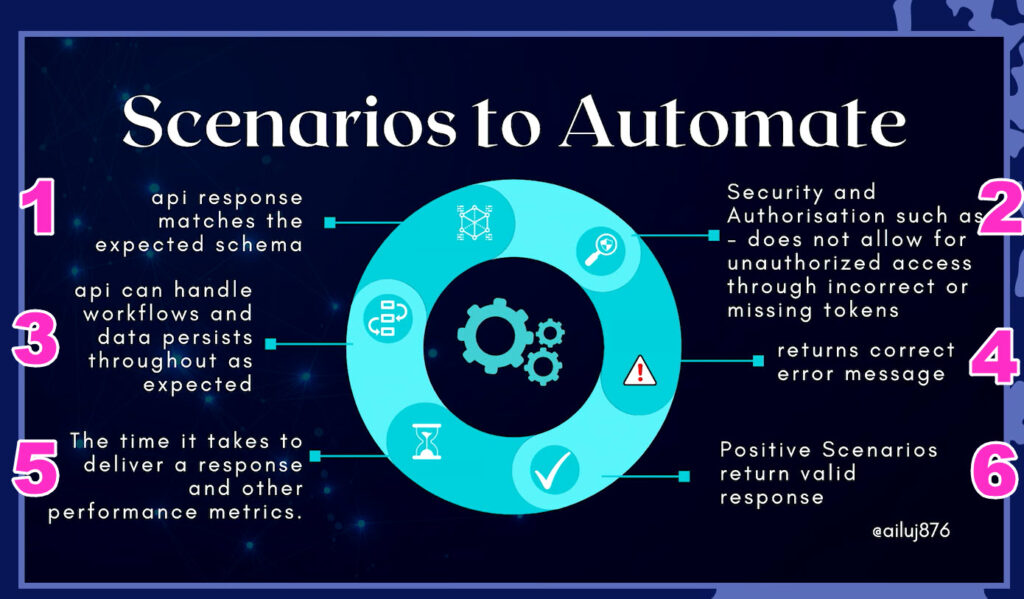
6 Essential Test Scenarios Using Postman Flows

This blog has been compiled by Beth Marshall, who will be at AutomationSTAR 20-21 Nov. 2023 in Berlin, showing you how to use Flows, Postman’s latest beta feature for low/no code API workflow development and testing.

TL:DR Use the links below to see a video on each Flow:-

📃1. Schema Testing
🔐2. Security Testing
🧑‍🏭3. Workflow Testing
🚫4. Negative Testing
🏃5. Performance Testing
✅6. Positive Testing

I recently volunteered at Testbash. A huge draw for me was meeting the wonderfully talented Julia Pottinger who, with the backstage support of her QA partner Orane Findley wowed the attendees with her characteristically clear and simple explanation of “Next Level API Automation”.

Julia’s talk included the following slide, which detailed 6 important high level scenarios to consider when performing API tests. I thought it might be good to show examples of how, you can execute tests in all 6 areas using Postman Flows.

Scenario #1 Schema Testing

As JSON parsing seems to be done on a field by field basis in Flows, it doesn’t currently seem possible to extract the entire schema from the response body in order to compare it with a stored value (correct me if I’m wrong folks!). However, if you want a visualisation that your schema test stored within the tests tab of your request has worked, then here is a good way to do that.

Scenario #2 Security Testing

You can use the create data block to add different data sets to run against a request. I walk through a very aesthetically pleasing example here. 😻

Scenario #3: Workflow Testing

As highlighted by Julia Pottinger, testing an end to end workflow through API calls is often essential. Think about it logically, how do you know if a delete call has worked if you don’t then check the data isn’t then available?

Using Flows to test workflows is a major use case for this Postman feature, because you can see exactly what’s happening. Here is an example workflow test using Postman Flows.

Scenario #4: Negative Testing

Here I cover 2 different but connected scenarios:-
1. You want to verify the status code and message (e.g. 400 Bad Request)
2. You want to verify a string within the error response (e.g. “the length must be 3-18 characters”

An added bonus is generating test data within Flows using both lists and records, which although might not be ideal for large test data sets, would be very handy for smaller ones such as testing what happens if 3 different invalid inputs are entered for the same request.

Scenario #5: Performance Testing

So we know that scaled and in-depth performance testing is one of the few things that Postman isn’t really built for. Although Flows is no exception to that, if its cheap and cheerful performance testing you’re after (say, executing the same scenario 10 times and checking the response time is under a certain threshold) then that is absolutely doable.

Scenario #6: Positive Testing

Last but certainly not least – time for the happy path! 🙌

In this example, I show how it is possible to execute 6 endpoints at the same time, and apply the same conditional logic to all of them to check:-
* status code is 200
* response body value is correct (“status: UP”)

This gives a really clear indicator when running a health check against several different API’s at the same time. Which is one of the huge benefits of using Flows.

And that’s it! I hope that structuring this post around Julia’s essential test scenario’s made sense to you, and that you were inspired to try Postman Flows next time you are looking to test your API.

Til next time! 👋

What’s Next?

Join Beth at for her workshop on using Postman flows. Connect with 350+ automators at AutomationSTAR 2023.

· Categorized: AutomationSTAR · Tagged: 2023, Workshop

Jul 14 2022

Playwright vs Selenium: what are the main differences and which is better?

Wondering how to choose between Playwright vs Selenium for your test automation? Read on to see a comparison. Thanks to Danny Shain at Applitools for providing this blog.

When it comes to web test automation, Selenium has been the dominant industry tool for several years. However, there are many other automated testing tools on the market. Playwright is a newer tool that has been gaining popularity. How do their features compare, and which one should you choose?

What is Selenium?

Selenium is a long-running open source tool for browser automation. It was originally conceived in 2004 by Jason Huggins, and has been actively developed ever since. Selenium is a widely-used tool with a huge community of users, and the Selenium WebDriver interface even became an official W3C Recommendation in 2018.

The framework is capable of automating and controlling web browsers and interacting with UI elements, and it’s the most popular framework in the industry today. There are several tools in the Selenium suite, including:

• Selenium WebDriver: WebDriver provides a flexible collection of open source APIs that can be used to easily test web applications.

• Selenium IDE: This record-and-playback tool enables rapid test development for both engineers and non-technical users.

• Selenium Grid: The Grid lets you distribute and run tests in parallel on multiple machines.

The impact of Selenium goes even beyond the core framework, as a number of other popular tools, such as Appium and WebDriverIO, have been built directly on top of Selenium’s API.

Selenium is under active development and recently unveiled a major version update to Selenium 4. It supports just about all major browsers and popular programming languages. Thanks to a wide footprint of use and extensive community support, the Selenium open source project continues to be a formidable presence in the browser automation space.

What is Playwright?

Playwright is a relatively new open source tool for browser automation, with its first version released by Microsoft in 2020. It was built by the team behind Puppeteer, which is a headless testing framework for Chrome/Chromium. Playwright goes beyond Puppeteer and provides support for multiple browsers, among other changes.

Playwright is designed for end-to-end automated testing of web apps. It’s cross-platform, cross-browser and cross-language, and includes helpful features like auto-waiting. It is specifically engineered for the modern web and generally runs very quickly, even for complex testing projects.

While far newer than Selenium, Playwright is picking up steam quickly and has a growing following. Due in part to its young age, it supports fewer browsers/languages than Selenium, but by the same token it also includes newer features and capabilities that are more aligned with the modern web. It is actively developed by Microsoft.

Selenium vs Playwright

Selenium and Playwright are both capable web automation tools, and each has its own strengths and weaknesses. Depending on your needs, either one could serve you best. Do you need a wider array of browser/language support? How much does a long track record of support and active development matter to you? Is test execution speed paramount?

Each tool is open source, cross-language and developer friendly. Both support CI/CD (via Jenkins, Azure Pipelines, etc.), and advanced features like screenshot testing and automated visual testing. However, there are some key architectural and historical differences between the two that explain some of their biggest differences.

Selenium Architecture and History

• Architecture: Selenium uses the WebDriver API to interact between web browsers and browser drivers. It operates by translating test cases into JSON and sending them to the browsers, which then execute the commands and send an HTTP response back.

• History: Selenium has been in continuous operation and development for 18+ years. As a longstanding open source project, it offers broad support for browsers/languages, a wide range of community resources and an ecosystem of support.

Playwright Architecture and History

• Architecture: Playwright uses a WebSocket connection rather than the WebDriver API and HTTP. This stays open for the duration of the test, so everything is sent on one connection. This is one reason why Playwright’s execution speeds tend to be faster.

• History: Playwright is fairly new to the automation scene. It is faster than Selenium and has capabilities that Selenium lacks, but it does not yet have as broad a range of support for browsers/languages or community support. It is open source and backed by Microsoft.

Comparing Playwright vs Selenium Features

It’s important to consider your own needs and pain points when choosing your next test automation framework. The table below will help you compare Playwright vs Selenium.

CriteriaPlaywrightSelenium
Browser SupportChromium, Firefox, and WebKit (note: Playwright tests browser projects, not stock browsers)Chrome, Safari, Firefox, Opera, Edge, and IE
Language SupportJava, Python, .NET C#, TypeScript and JavaScript.Java, Python, C#, Ruby, Perl, PHP, and JavaScript
Test Runner Frameworks SupportJest/Jasmine, AVA, Mocha, and VitestJest/Jasmine, Mocha, WebDriver IO, Protractor, TestNG, JUnit, and NUnit
Operating System SupportWindows, Mac OS and LinuxWindows, Mac OS, Linux and Solaris
ArchitectureHeadless browser with event-driven architecture4-layer architecture (Selenium Client Library, JSON Wire Protocol, Browser Drivers and Browsers)
Integration with CIYesYes
PrerequisitesNodeJSSelenium Bindings (for your language), Browser Drivers and Selenium Standalone Server
Real Device SupportNative mobile emulation (and experimental real Android support)Real device clouds and remote servers
Community SupportSmaller but growing set of community resourcesLarge, established collection of documentation and support options
Open SourceFree and open source, backed by MicrosoftFree and open source, backed by large community


Should You Use Selenium or Playwright for Test Automation?

Is Selenium better than Playwright? Or is Playwright better than Selenium? Selenium and Playwright both have a number of things going for them – there’s no easy answer here. When choosing between Selenium vs Playwright, it’s important to understand your own requirements and research your options before deciding on a winner.

Selenium vs Playwright: Let the Code Speak

A helpful way to go beyond lists of features and try to get a feel for the practical advantages of each tool is to go straight to the code and compare real-world examples side by side. At Applitools, our goal is to make test automation easier for you – so that’s what we did!

In the video below, you can see a head to head comparison of Playwright vs Selenium. Angie Jones and Andrew Knight take you through ten rounds of a straight-to-the-code battle, with the live audience deciding the winning framework for each round. Check it out for a unique look at the differences between Playwright and Selenium.

Selenium Vs Applitools webinar

If you like these code battles and want more, we’ve also pitted Playwright vs Cypress and Selenium vs Cypress – check out all our versus battles here.

In fact, our original Playwright vs Cypress battle (recap here) was so popular that we’ve even scheduled our first rematch. Who will win this time? Register for the Playwright vs Cypress Rematch now to join in and vote for the winner yourself!

Applitools is an exhibitor at AutomationSTAR 2022. Join the software testing community in Munich, 17-18 October. Get your ticket now.

Author

Danny Shain Content Marketing Manager Applitools

Danny Shain – Content Marketing Manager at Applitools

Writer at heart passionate about meaningful effective communication. Extensive experience working with a range of material, from fiction to academic to promotional. Technology lover and e-commerce veteran.

This blog has been translated from German to English by Google.

· Categorized: Selenium, test automation · Tagged: 2022

Jul 14 2022

Playwright vs. Selenium: Was sind die Hauptunterschiede und was ist besser?

Sie fragen sich, wie Sie sich zwischen Playwright und Selenium für Ihre Testautomatisierung entscheiden sollen? Lesen Sie weiter, um einen Vergleich zu sehen. Vielen Dank an Danny Shain von Applitools für die Bereitstellung dieses Blogs.

Wenn es um die Automatisierung von Web-Tests geht, ist Selenium seit einigen Jahren das dominierende Tool der Branche. Es gibt jedoch viele andere automatisierte Testwerkzeuge auf dem Markt. Playwright ist ein neueres Tool, das sich zunehmender Beliebtheit erfreut. Wie unterscheiden sich ihre Funktionen, und für welche sollten Sie sich entscheiden?

Was ist Selen?

Selenium ist ein langjähriges Open-Source-Tool für die Browser-Automatisierung. Es wurde ursprünglich 2004 von Jason Huggins konzipiert und wird seitdem aktiv weiterentwickelt. Selenium ist ein weitverbreitetes Tool mit einer großen Nutzergemeinschaft, und die Selenium WebDriver-Schnittstelle wurde 2018 sogar zu einer offiziellen W3C-Empfehlung.

Das Framework ist in der Lage, Webbrowser zu automatisieren und zu steuern sowie mit UI-Elementen zu interagieren, und ist heute das beliebteste Framework in der Branche. Die Selenium-Suite umfasst mehrere Tools, darunter:

– Selenium WebDriver: WebDriver bietet eine flexible Sammlung von Open-Source-APIs, die zum einfachen Testen von Webanwendungen verwendet werden können.

– Selenium IDE: Dieses Aufzeichnungs- und Wiedergabewerkzeug ermöglicht eine schnelle Testentwicklung sowohl für Ingenieure als auch für nichttechnische Benutzer.

– Selenium Grid: Mit dem Grid können Sie Tests verteilen und parallel auf mehreren Rechnern ausführen.

Der Einfluss von Selenium geht sogar über das Kern-Framework hinaus, da eine Reihe anderer beliebter Tools, wie Appium und WebDriverIO, direkt auf der Selenium-API aufgebaut wurden.

Selenium wird aktiv weiterentwickelt und hat vor kurzem ein großes Versions-Update auf Selenium 4 vorgestellt. Sie unterstützt nahezu alle gängigen Browser und Programmiersprachen. Dank der großen Verbreitung und der umfangreichen Unterstützung durch die Community ist das Open-Source-Projekt Selenium auch weiterhin ein wichtiger Akteur im Bereich der Browser-Automatisierung.

Was ist Playwright?

Playwright ist ein relativ neues Open-Source-Tool für die Browser-Automatisierung, dessen erste Version von Microsoft im Jahr 2020 veröffentlicht wurde. Es wurde von dem Team hinter Puppeteer entwickelt, einem Headless-Testing-Framework für Chrome/Chromium. Playwright geht über Puppeteer hinaus und bietet neben anderen Änderungen Unterstützung für mehrere Browser.

Playwright ist für automatisierte End-to-End-Tests von Webanwendungen konzipiert. Es ist plattform-, browser- und sprachübergreifend und enthält hilfreiche Funktionen wie die automatische Wartefunktion. Es wurde speziell für das moderne Web entwickelt und läuft im Allgemeinen sehr schnell, selbst bei komplexen Testprojekten.

Playwright ist zwar viel neuer als Selenium, gewinnt aber schnell an Bedeutung und hat eine wachsende Anhängerschaft. Da es noch sehr jung ist, unterstützt es weniger Browser/Sprachen als Selenium, enthält aber auch neuere Funktionen und Möglichkeiten, die besser auf das moderne Web abgestimmt sind. Es wird von Microsoft aktiv entwickelt.

Selenium vs. Playwright

Selenium und Playwright sind beides leistungsfähige Web-Automatisierungstools, die jeweils ihre eigenen Stärken und Schwächen haben. Je nach Ihren Bedürfnissen ist eine der beiden Möglichkeiten für Sie am besten geeignet. Benötigen Sie eine breitere Palette an Browser-/Sprachenunterstützung? Wie wichtig ist Ihnen eine langjährige Unterstützung und aktive Entwicklung? Ist die Geschwindigkeit der Testdurchführung von entscheidender Bedeutung?

Jedes Tool ist quelloffen, sprachenübergreifend und entwicklerfreundlich. Beide unterstützen CI/CD (über Jenkins, Azure Pipelines usw.) sowie erweiterte Funktionen wie Screenshot-Tests und automatisierte visuelle Tests. Es gibt jedoch einige wichtige architektonische und historische Unterschiede zwischen den beiden, die einige der größten Unterschiede erklären.

Architektur und Geschichte von Selenium

– Architektur: Selenium verwendet die WebDriver-API zur Interaktion zwischen Webbrowsern und Browsertreibern. Es übersetzt Testfälle in JSON und sendet sie an die Browser, die dann die Befehle ausführen und eine HTTP-Antwort zurücksenden.

– Geschichte: Selenium ist seit mehr als 18 Jahren in Betrieb und wird kontinuierlich weiterentwickelt. Als langjähriges Open-Source-Projekt bietet es breite Unterstützung für Browser/Sprachen, eine Vielzahl von Community-Ressourcen und ein Ökosystem der Unterstützung.

Dramatiker Architektur und Geschichte

– Architektur: Playwright verwendet eine WebSocket-Verbindung anstelle der WebDriver-API und HTTP. Diese bleibt für die Dauer des Tests geöffnet, so dass alles über eine einzige Verbindung gesendet wird. Dies ist einer der Gründe, warum die Ausführungsgeschwindigkeit von Playwright tendenziell höher ist.

– Geschichte: Playwright ist relativ neu in der Automatisierungsszene. Es ist schneller als Selenium und verfügt über Fähigkeiten, die Selenium fehlen, aber es hat noch keine so breite Unterstützung für Browser/Sprachen oder Community-Unterstützung. Es ist Open Source und wird von Microsoft unterstützt.

Vergleich zwischen Playwright und Selenium-Funktionen

Bei der Auswahl Ihres nächsten Testautomatisierungs-Frameworks sollten Sie Ihre eigenen Bedürfnisse und Probleme berücksichtigen. Die folgende Tabelle hilft Ihnen beim Vergleich zwischen Playwright und Selenium.

Kriterien Dramatiker Selen
Browser-UnterstützungChromium, Firefox und WebKit (Hinweis: Playwright testet Browserprojekte, keine Standardbrowser)Chrome, Safari, Firefox, Opera, Edge und IE
SprachunterstützungJava, Python, .NET C#, TypeScript und JavaScript.Java, Python, C#, Ruby, Perl, PHP und JavaScript
Unterstützung von Test Runner FrameworksJest/Jasmine, AVA, Mocha und VitestJest/Jasmine, Mocha, WebDriver IO, Protractor, TestNG, JUnit, und NUnit
Unterstützung von BetriebssystemenWindows, Mac OS und LinuxWindows, Mac OS, Linux und Solaris
ArchitekturKopfloser Browser mit ereignisgesteuerter Architektur4-Schichten-Architektur (Selenium Client Library, JSON Wire Protocol, Browser-Treiber und Browser)
Integration mit CIJaJa
VoraussetzungenNodeJSSelenium Bindings (für Ihre Sprache), Browser-Treiber und Selenium Standalone Server
Unterstützung echter GeräteNative Handy-Emulation (und experimentelle echte Android-Unterstützung)Echte Geräte-Clouds und Remote-Server
Unterstützung durch die GemeinschaftKleineres, aber wachsendes Angebot an GemeinschaftsressourcenGroße, etablierte Sammlung von Dokumentations- und Unterstützungsmöglichkeiten
Offener QuellcodeFrei und quelloffen, mit Unterstützung von MicrosoftFrei und quelloffen, unterstützt von einer großen Gemeinschaft


Sollten Sie Selenium oder Playwright für die Testautomatisierung verwenden?

Ist Selenium besser als Playwright? Oder ist Playwright besser als Selenium? Selenium und Playwright haben beide eine Reihe von Vorteilen – hier gibt es keine einfache Antwort. Bei der Entscheidung zwischen Selenium und Playwright ist es wichtig, die eigenen Anforderungen zu verstehen und die Optionen zu untersuchen, bevor man sich für einen Gewinner entscheidet.

Selenium gegen Playwright: Lass den Code sprechen

Ein hilfreicher Weg, über die Auflistung von Funktionen hinauszugehen und ein Gefühl für die praktischen Vorteile der einzelnen Werkzeuge zu bekommen, besteht darin, sich direkt mit dem Code zu befassen und Beispiele aus der Praxis miteinander zu vergleichen. Unser Ziel bei Applitools ist es, die Testautomatisierung für Sie zu vereinfachen – und genau das haben wir getan!

Im folgenden Video sehen Sie einen direkten Vergleich zwischen Playwright und Selenium. Angie Jones und Andrew Knight führen Sie durch zehn Runden eines direkten Kampfes um den Code, bei dem das Live-Publikum über den Siegerrahmen jeder Runde entscheidet. Hier erhalten Sie einen einzigartigen Einblick in die Unterschiede zwischen Playwright und Selenium.

Selenium Vs Applitools Webinar

Wenn Ihnen diese Codeschlachten gefallen und Sie mehr wollen, haben wir auch Playwright gegen Cypress und Selenium gegen Cypress antreten lassen – sehen Sie sich hier alle unsere Versus-Battles an.

Unser ursprünglicher Kampf Playwright gegen Cypress (Zusammenfassung hier) war so beliebt, dass wir sogar eine Neuauflage geplant haben. Wer wird dieses Mal gewinnen? Melden Sie sich jetzt für das Playwright vs. Cypress Rematch an, um mitzumachen und selbst für den Gewinner zu stimmen!

Applitools ist ein Aussteller auf der AutomationSTAR 2022. Schließen Sie sich am 17. und 18. Oktober der Gemeinschaft der Softwaretester in München an. Sichern Sie sich jetzt Ihr Ticket .

Autor

Danny Shain Verantwortlicher für Content Marketing bei Applitools

Danny Shain – Manager für Inhaltsmarketing bei Applitools

Schriftstellerin mit einer Leidenschaft für sinnvolle und effektive Kommunikation. Umfassende Erfahrung in der Arbeit mit einer Reihe von Materialien, von Belletristik über akademische Texte bis hin zu Werbetexten. Technologieliebhaber und E-Commerce-Veteran.

Dieser Blog wurde von Google vom Deutschen ins Englische übersetzt.

· Categorized: Selen, Testautomatisierung · Tagged: 2022

  • « Go to Previous Page
  • Page 1
  • Interim pages omitted …
  • Page 3
  • Page 4
  • Page 5

Copyright © 2026 · Impressum · Privacy · T&C

part of the