• Skip to main content
Don't miss out - Join us 4-5 Nov | Book Now!

AutomationSTAR

Test Automation Conference Europe

  • Programme
    • AutomationSTAR Team
    • 2026 programme
  • Attend
    • Why Attend
    • Volunteer
    • Location
    • Get approval
    • Bring your Team
    • 2025 Gallery
    • Testimonials
    • Community Hub
  • Exhibit
    • Partner Opportunities
    • Download EXPO Brochure
  • About Us
    • FAQ
    • Blog
    • Test Automation Patterns Wiki
    • Code of Conduct
    • Contact Us
  • Tickets

test automation

Jun 22 2022

A Comparison of Automated Testing Tools

This automated testing tools comparison of popular toolsets will help you identify the right automation tool for your project. This is a blog post provided by Rai Kou on EuroSTAR Huddle, our online community for free software testing resources.

A defining factor for successfully applying test automation in software projects is choosing and using the right set of test automation tools. This is a daunting task, especially for those new to software test automation because there are so many tools in the market to choose from, each having different strengths and weaknesses. There is no tool that can fit all automated testing needs which makes finding the right tool difficult. Learn how to identify the right automation tool for your project with this qualitative comparison of popular automated testing toolsets in the market.

Overview of Test Automation Tools

Selenium

Selenium is the most popular automation framework that consists of many tools and plugins for Web application testing. Selenium is known for its powerful capability to support performance testing of Web applications. Selenium is the most popular choice in the open-source test automation space, partly due to its large and active development and user community.

HP Unified Functional Testing (UFT)

Formerly QuickTest Professional (QTP), this is probably the most popular commercial tool for functional test automation. HP UFT offers a comprehensive set of features that can cover most functional automated testing needs on the desktop, mobile and Web platforms.

TestComplete

TestComplete is also a commercial integrated platform for desktop, mobile and Web application testing. Like UFT, TestComplete offers a number of key test automation features such as keyword-driven and data-driven testing, cross-browser testing, API testing and CI integrations. This tool supports a number of languages including JavaScript, Python, VBScript, JScript, DelphiScript, C++Script, and C#Script for writing test scripts.

Katalon Studio

This is an automated testing platform that offers a comprehensive set of features to implement full automated testing solutions for mobile and Web applications. Built on top of the open-source Selenium and Appium frameworks, Katalon Studio allows teams to get started with test automation quickly by reducing the effort and expertise required for learning and integrating these frameworks for automated testing needs.

Test Automation Tools Comparison

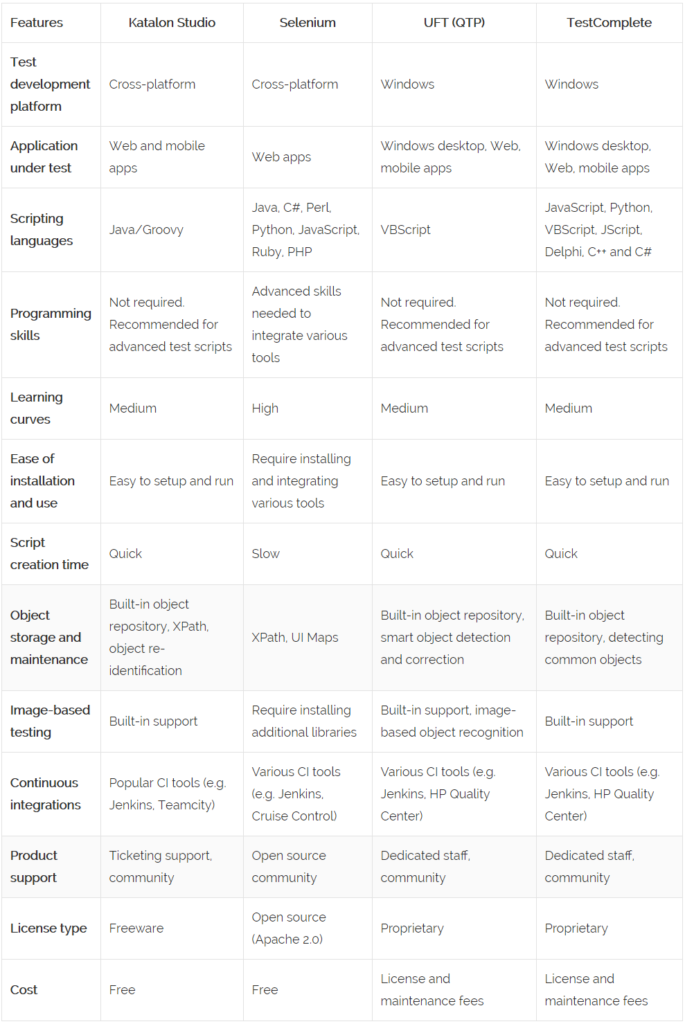
The table below provides a comparison of the tools based on the key features of software automation.
Strengths and Weaknesses

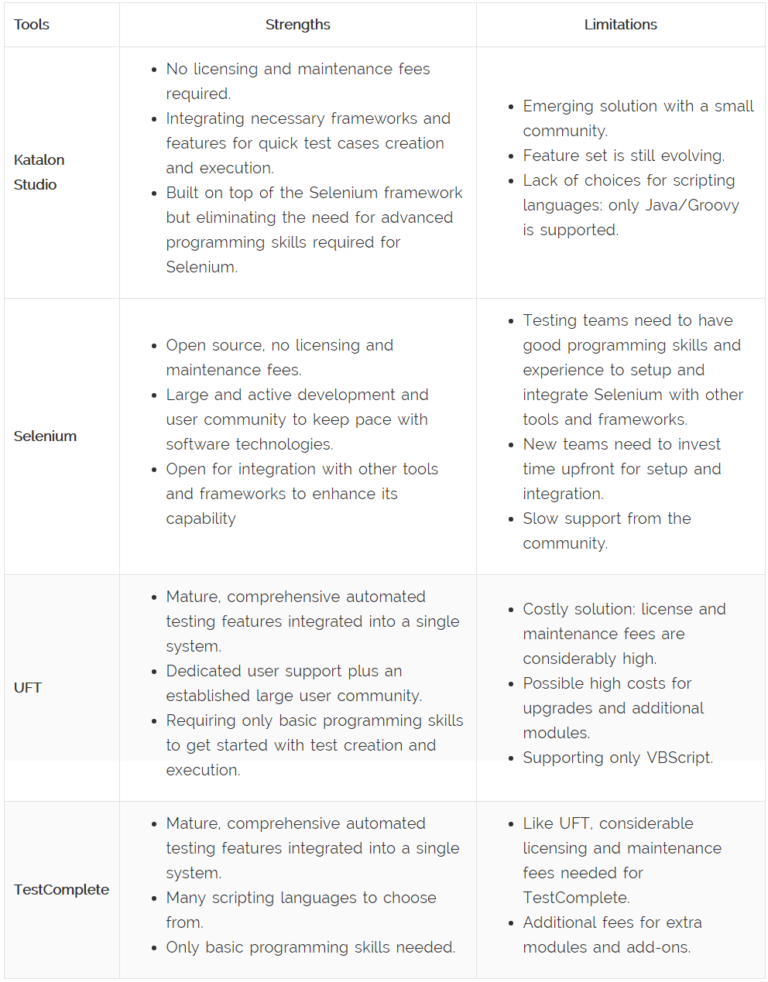
Below is a summary of key strengths and limitations of the tools, based on the comparison above.
There is no one-size-fits-all tool for automated testing. It is highly recommended that testers evaluate various tools in order to select what would best meet their automated testing needs. Programming languages and technologies used to develop software continue to evolve, as do the automated testing tools, making cost a significant factor in tool selection.

Commercial vendors often charge for tool upgrades, which can be substantial if your software uses emerging and frequently changing technologies. Open source and non-commercial tools, on the other hand, do not incur additional charges but require effort and expertise for integrating new upgrades. It is difficult to find the support and expertise needed for integrating various tools and frameworks into open-source solutions.

Emerging tools that integrate with open-source frameworks offer a viable alternative to both commercial and open-source automated testing solutions.
· Categorized: test automation

Jun 21 2022

Test Automation Framework Architecture Types

This article explains what a test automation framework is and gives examples to consider for your own development projects. This blog provided by Alexandar Pushkarev on EuroSTARHuddle.com, our online community for free software testing resources.

What is a framework?

According to Wikipedia, a framework is an abstraction in which software providing generic functionality can be selectively changed by additional user-written code, thus providing application-specific software [1]. It isn’t the easiest definition to digest, and one can usually struggle to actually tell the difference between a framework and a library. The key difference between framework and library, however, is who calls what. Long story short, when you use library, you call library’s code. In comparison, when you use a framework, it calls your code.

Test automation frameworks are by no means different. In general, a test automation framework is something that allows you to implement application-specific test automation solutions by writing and injecting some additional code. Surprisingly, in the test automation community, by framework, people often mean any test automation solution that happened to have any decent structure and design. Wikipedia also supports this opinion [2].

The most common “architecture type” of a test automation solution I’ve seen was something that could be described as a “big ball of mud“. And, in some cases, it performs just great- such things don’t take ages to implement, and it’s quite easy to support for some short periods of time, if you have a limited amount of tests.

The really challenging question is why and when you need a real test automation framework, and when you may go with the plain “big ball of mud” test solutions.

Start with the question, “why?”

All in all, test frameworks are designed to address following issues:

1. Test complexity

The simpler the test is on the top level, the easier it is to create, understand, communicate and maintain.

2. Test maintenance cost

Test automation isn’t a thing that can be taken for granted; it has a price. One of the most painful prices for test automation is a maintenance cost. Well-designed framework should simplify maintenance.

3. Test execution time

Time is money. Time to get feedback from automated tests is also crucial – one wouldn’t like to wait for several hours, just to check that their commit wasn’t wrong.

4. Reporting

Testing is about not finding bugs or accepting stories. Well, not exactly. What testing’s really about is providing information. A test solution that has simple, maintainable tests – easy to maintain and enhance – may be just thrown away if it produces bad reports that are difficult to understand by non-technical stakeholders.

All things considered, if you don’t plan to have hundreds of complex tests scenarios, your tests are fast, and you’re happy with built-in Xunit framework – you may not need a test automation framework at all. The rule of thumb: the lower test level you’re interested in, the less complex your test automation solution should be. In most cases, you don’t need a framework for unit or integration tests, however you may want one for acceptance tests.

Regardless of what test level you’re interested in, there are some typical framework architectures that can be utilized. Most interestingly, framework architecture isn’t affected by test automation approach applied (keyword-driven, BDD, plain code or whatever), because those approaches affects only some layers (most prominently test layers) and don’t touch others. Let’s then take a look at the most known test framework architectures.

Layered architecture

While test automation frameworks are designed to address issues outlined above, it usually isn’t an overly complex software system. The most commonly known architecture pattern, known as Layered Architecture, is often used as a base for test automation framework architecture.

Components within the layered architecture are organized into horizontal layers, and each layer of the architecture has a specific role and responsibility in the application. Components within a specific layer are supposed to deal only with logic that corresponds to that layers [3].

Three-layered automation framework

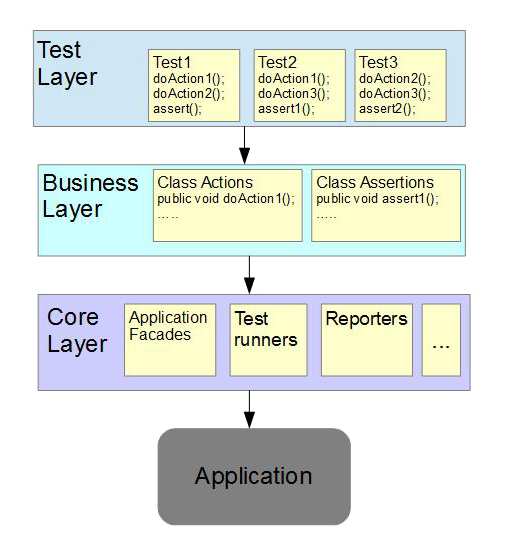
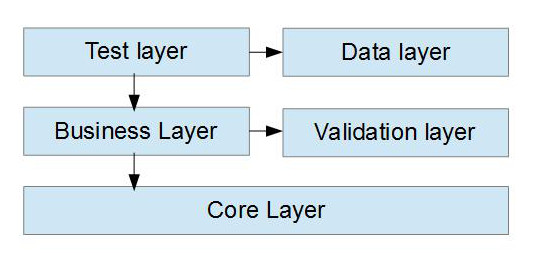
The most known and widely used architecture for software test automation solutions is a three-layered architecture; in which the solution is divided into three logical horizontal layers – usually test layer, business layer, and core layer.

In such architecture, a test layer typically contains test scenarios itself, either in programming language or in any other form (like BDD feature files).

Business layer provides system under test (SuT) specific actions. For example, if we’re talking about online shopping, such actions may be ‘log in’, ‘add to cart’, etc.

Core layer is where real framework (who calls your code) really lives, and it deals with test orchestration, reporting and usually also provides low-level API to communicate with tested applications, like web-service facades, Selenium Web Driver wrappers, etc.

In a BDD inspired framework, a test layer will typically contain feature files, a business layer will contain steps definitions, while a core layer contains BDD- framework configuration and core component. For a data-driven framework, a test layer will contain data files, and a business layer will contain mid-level application specific abstractions.

Four-five layered automation framework

In case you may need something more complex, there are several options to enhance framework architecture. One of the options you may choose, is to extract validation code into separate level (or module, to be precise), which will be used by a business layer, while a core layer may provide interface or orchestration for validation.

In case you’re building hybrid framework, you may need a separate layer for data, so your test layer will have data and non-data tests. All this will add complexity to a core layer, so it may also be logical to separate it into several sub-levels at some point.

Plug-able test automation framework

In case your application is even more complex, you may want different validation for different environments, or different ways to communicate with applications for same tests (for example for testing desktop and mobile versions of the webpage). While it is possible to address this by creating sub-modules in core or validation layers, there’s also a neat way to do this completely opaque to the rest of the system. The idea is to use dependency injection and provide plug-able modules for validation and test-application interfacing.

The idea is essentially the same as in previous framework architectures, with only one difference – validation and facades implements the provided interface, which is used by a business layer, and concrete implementation is typically injected without the other layers’ knowledge about what was really injected.

Considerations

While it is often tempting to pick up the most complex architecture (just in case) or the simplest thing (faster to implement), it is often wise to complete some initial investigation of what you need, based on product vision or expected length of life.

Provided architectures are by no means a standard, they are just examples, and you may implement a plug-able three-layered thing, or even identify 7 different hierarchical layers. You may want some event-driven thing for testing of asynchronous workflow.

There are several typical highlights:

1) Try to make tests as simple, short, and atomic as possible. Ideally, tests should tell what’s being done, not how it’s done, and test only one specific things. Typically, the cost of complex test support outweighs benefits of having such tests.

2) Business layer should provide action implementation (how something is done), using interfaces provided by the core layer.

3) Validation layer should provide action implementation using interfaces provided by either core or business layers.

4) Core layer is the framework itself, and may have complex architecture on its own. Its responsibility is to provide interfaces for upper layer, and provide orchestration for test run and reporting. It also often provides low-level implementation for interfaces exposed to upper layers.

There’s no one-size-fits-all architecture, so you may suggest many other ways to separate test logic. The provided examples are just a starting point. What’s important is that you should be able outline the architecture of the solution you are working on, and guess if it fits to the project or application. My personal advice would be – stick to the simplest architecture that fits your immediate needs, but try to leave other options open in case you need them.

[1] https://en.wikipedia.org/wiki/Software_framework

[2] https://en.wikipedia.org/wiki/Test_automation#Framework_approach_in_automation

[3] Mark Richards, Software Architecture Patterns. O’Reilly Media, 2015

· Categorized: test automation

  • « Go to Previous Page
  • Page 1
  • Page 2
  • Page 3
  • Page 4

Copyright © 2026 · Impressum · Privacy · T&C

part of the