• Skip to main content
Don't miss out - Join us 4-5 Nov | Book Now!

AutomationSTAR

Test Automation Conference Europe

  • Programme
    • AutomationSTAR Team
    • 2026 programme
  • Attend
    • Why Attend
    • Volunteer
    • Location
    • Get approval
    • Bring your Team
    • 2025 Gallery
    • Testimonials
    • Community Hub
  • Exhibit
    • Partner Opportunities
    • Download EXPO Brochure
  • About Us
    • FAQ
    • Blog
    • Test Automation Patterns Wiki
    • Code of Conduct
    • Contact Us
  • Tickets

test automation

Nov 06 2023

Efficient Software Testing in 2023: Trends, AI Collaboration and Tools

In the rapidly evolving field of software development, efficient software testing has emerged as a critical component in the quality assurance process. As we navigate through 2023, several prominent trends are shaping the landscape of software testing, with artificial intelligence (AI) taking center stage. We’ll delve into the current state of software testing, focusing on the latest trends, the increasing collaboration with AI, and the most innovative tools.

Test Automation Trends

Being aware of QA trends is critical. By staying up to date on the latest developments and practices in quality assurance, professionals can adapt their approaches to meet evolving industry standards. Based on the World Quality Report by Capgemini & Sogeti, and The State of Testing by PractiTest, popular QA trends currently include:

  • Test Automation: Increasing adoption for efficient and comprehensive testing.
  • Shift-Left and Shift-Right Testing: Early testing and testing in production environments for improved quality.
  • Agile and DevOps Practices: Integrating testing in Agile workflows and embracing DevOps principles.
  • AI and Machine Learning: Utilizing AI/ML for intelligent test automation and predictive analytics.
  • Continuous Testing: Seamless and comprehensive testing throughout the software delivery process.
  • Cloud-Based Testing: Leveraging cloud computing for scalable and cost-effective testing environments.
  • Robotic Process Automation (RPA): Automating repetitive testing tasks and processes to enhance efficiency and accuracy.

QA and AI Collaboration

It’s no secret that AI is transforming our lives, and ChatGPT’s collaboration can automate a substantial portion of QA routines. We’ve compiled a list of helpful prompts to streamline your testing process and save time.

Test Case Generation

Here are some prompts to assist in generating test cases using AI:

“Generate test cases for {function_name} considering all possible input scenarios.”
“Create a set of boundary test cases for {module_name} to validate edge cases.”
“Design test cases to verify the integration of {component_A} and {component_B}.”
“Construct test cases for {feature_name} to validate its response under different conditions.”
“Produce test cases to assess the performance of {API_name} with varying loads.”
“Develop test cases to check the error handling and exceptions in {class_name}.”

Feel free to modify these prompts to better suit your specific testing requirements.

Example

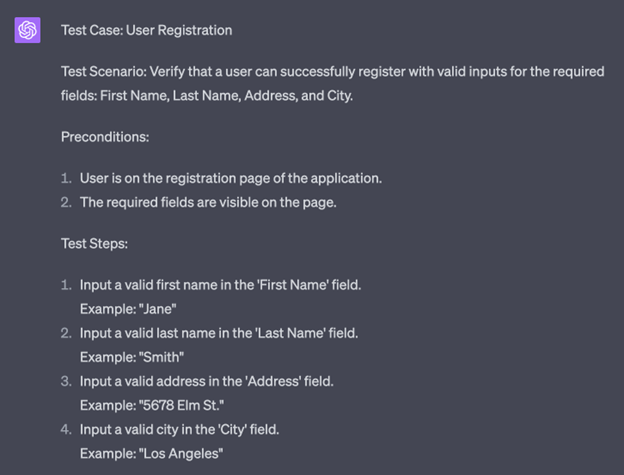
We asked for a test case to be generated for a registration process with specific fields: First Name, Last Name, Address, and City.

AI provided a test case named “User Registration” for the scenario where a user attempts to register with valid inputs for the required fields. The test case includes preconditions, test steps, test data, and the expected result.
Test Code Generation

In the same way, you can create automated tests for web pages and their test scenarios.

To enhance the relevance of the generated code, it is important to leverage your expertise in test automation. We recommend studying the tutorial and using appropriate tools, such as JetBrains Aqua, to write your tests that provide tangible examples of automatically generating UI tests for web pages.

Progressive Tools

Using advanced tools for test automation is essential because they enhance efficiency by streamlining the testing process and providing features like test code generation and code insights. These tools also promote scalability, allowing for the management and execution of many tests as complex software systems grow.

UI Test Automation

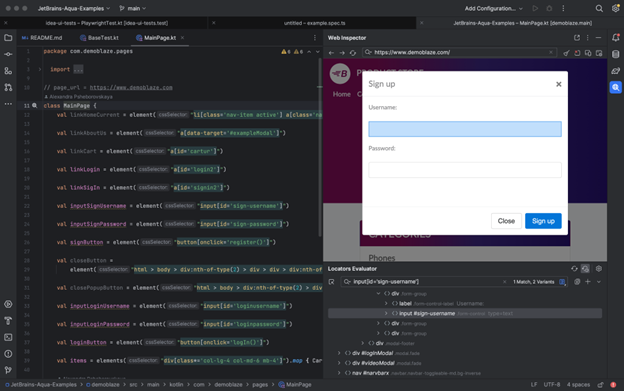
To efficiently explore a web page and identify available locators:
Open the desired page.
iInteract with the web elements by clicking on them.
Add the generated code to your Page Object.

This approach allows for a systematic and effective way of discovering and incorporating locators into your test automation framework.
Code Insights

To efficiently search for available locators based on substrings or attributes, you can leverage autocompletion functionality provided by the JetBrains Aqua IDE or plugin.
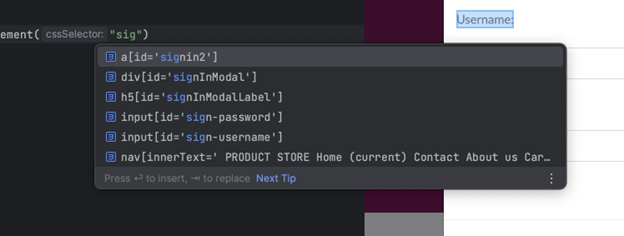
In cases where you don’t remember the location to which a locator leads, you can navigate seamlessly between the web element and the corresponding source code. This allows you to quickly locate and understand the context of the locator, making it easier to maintain and modify your test automation scripts. This flexibility facilitates efficient troubleshooting and enhances the overall development experience.

Test Case As A Code

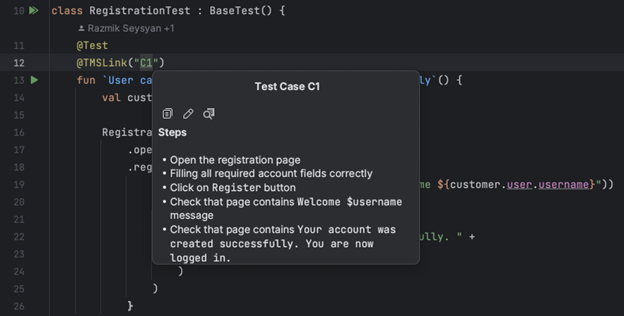
The Test Case As A Code approach is valuable for integrating manual testing and test automation. Creating test cases alongside the code enables close collaboration between manual testers and automation engineers. New test cases can be easily attached to their corresponding automation tests and removed once automated. Synchronization between manual and automated tests to ensure consistency and accuracy is a challenge that does not need to be addressed. Additionally, leveraging version control systems (VCS) offers additional benefits such as versioning, collaboration, and traceability, enhancing the overall test development process.
Stay Tuned

The industry’s rapid development is exciting, and we are proud to be a part of this growth. We have created JetBrains Aqua, an IDE specifically designed for test automation. With Aqua, we aim to provide a cutting-edge solution that empowers testers and QA professionals. Stay tuned for more updates as we continue to innovate and contribute to the dynamic test automation field!

Author

Alexandra Psheborovskaya, (Alex Pshe)

Alexandra works as a SDET and a Product Manager on the Aqua team at JetBrains. She shares her knowledge with others by mentoring QA colleagues, such as in Women In Tech programs, supporting women in testing as a Women Techmakers Ambassador, hosting a quality podcast, and speaking at professional conferences.

JetBrains were an EXPO Gold partner at AutomationSTAR 2023.

· Categorized: AutomationSTAR, test automation · Tagged: 2023, Gold Sponsor

Oct 16 2023

Prompt-Driven Test Automation

Bridging the Gap Between QA and Automation with AI

In the modern software development landscape, test automation is often a topic of intense debate. Some view it strictly as a segment of Quality Assurance, while others, like myself, believe it intersects both the realms of QA and programming. The Venn diagram I previously shared visualizes this overlap.

Historically, there’s a clear distinction between the competencies required for QA work and those needed for programming:

Skills Required for QA Work:

  • Critical Thinking: The ability to design effective test cases and identify intricate flaws in complex systems
  • Attention to Details: The ability to ensure that minor issues are caught before they escalate into major defects.
  • Domain knowledge: A thorough understanding of technical requirements and business objectives to align QA work effectively.

Skills Required for Programming:

  • Logical Imagination: The capability to deconstruct complex test scenarios into segmented, methodical tasks ripe for efficient automation.
  • Coding: The proficiency to translate intuitive test steps into automated scripts that a machine can execute.
  • Debugging: The systematic approach to isolate issues in test scripts and rectify them to ensure the highest level of reliability.

We’re currently at an AI-driven crossroads, presenting two potential scenarios for the future of QA. One, where AI gradually assumes the roles traditionally filled by QA professionals, and another, where QAs harness the power of AI to elevate and redefine their positions.

This evolution not only concerns the realm of Quality Assurance but also hints at broader implications for the job market as a whole. Will AI technologies become the tools of a select few, centralizing the labor market? Or will they serve as instruments of empowerment, broadening the horizons of high-skill jobs by filling existing skill gaps?

I’m inclined toward the latter perspective. For QA teams to thrive in this evolving ecosystem, they must identify and utilize tools that bolster their strengths, especially in areas where developers have traditionally dominated.

So, what characterizes such a tool? At Loadmill, our exploration of this question has yielded some insights. To navigate this AI-augmented future, QAs require:

  • AI-Driven Test Creation: A mechanism that translates observed user scenarios into robust test cases.
  • AI-Assisted Test Maintenance: An automated system that continually refines tests, using AI to detect discrepancies and implement adjustments.
  • AI-Enabled Test Analysis: A process that deploys AI for sifting through vast amounts of test results, identifying patterns, and highlighting concerns.

When it comes to actualizing AI-driven test creation, there are two predominant methodologies. The code-centric method, exemplified by tools like GitHub Code Pilot, leans heavily on the existing codebase to derive tests. While this method excels in generating unit tests, its scope is inherently limited to the behavior dictated by the current code, making it somewhat narrow-sighted.

Contrarily, Loadmill champions the behavior-centric approach. An AI system that allows QA engineers to capture user interactions or describe them in plain English to create automated test scripts. The AI then undertakes the task of converting this human-friendly narrative into corresponding test code. This integration of AI doesn’t halt here – it extends its efficiencies to areas of test maintenance and result analysis, notably speeding up tasks that historically were time-intensive.

In sum, as the realms of QA and programming converge, opportunities for innovation and progress emerge. AI’s rapid advancements prompt crucial questions about the direction of QA and the broader job market. At Loadmill, we’re committed to ensuring that, in this changing landscape, QAs are not just participants but pioneers. I extend an invitation to all attendees of the upcoming conference: visit our booth in the expo hall. Let’s delve deeper into this conversation and explore how AI can be a game-changer for your QA processes.

For further insights and discussions, please engage with us at the Loadmill booth. 

Author

Ido Cohen, founder and CEO of Loadmill.

Ido Cohen is the Co-founder and CEO of Loadmill. With over a decade of experience as both a hands-on developer and manager, he’s dedicated to driving productivity and building effective automation tools. Guided by his past experience in coding, he continuously strives to create practical, user-centric solutions. In his free time, Ido enjoys chess, history, and vintage video games.

Loadmill are a Gold Sponsor at AutomationSTAR 20-21 Nov. 2023 in Berlin

· Categorized: AutomationSTAR, test automation · Tagged: 2023, EXPO, Gold Sponsor

Sep 22 2023

Data-oriented reporting for black box performance testing, part 2

This is part 2 of AutomationSTAR 2023 speaker Jakub Dering’s article on data-oriented reporting for black box performance testing.

In my previous article you’ve learned how to expand your visibility of test reports by adding variables to transaction names. After trying it out, you’ll soon learn that the complexity of your report may grow beyond comprehension and the more variables you add for comparison, the less readable the report becomes.

This happens because the number of transaction groups would grow linearly and final number of rows in your report would equal to (t * v) where t is a number of transaction groups and v is the number of possible variable combinations.

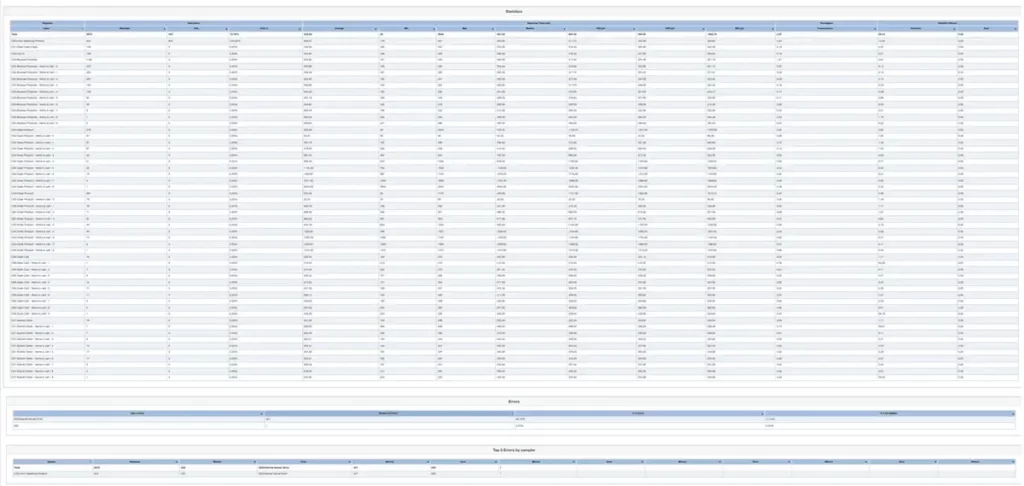
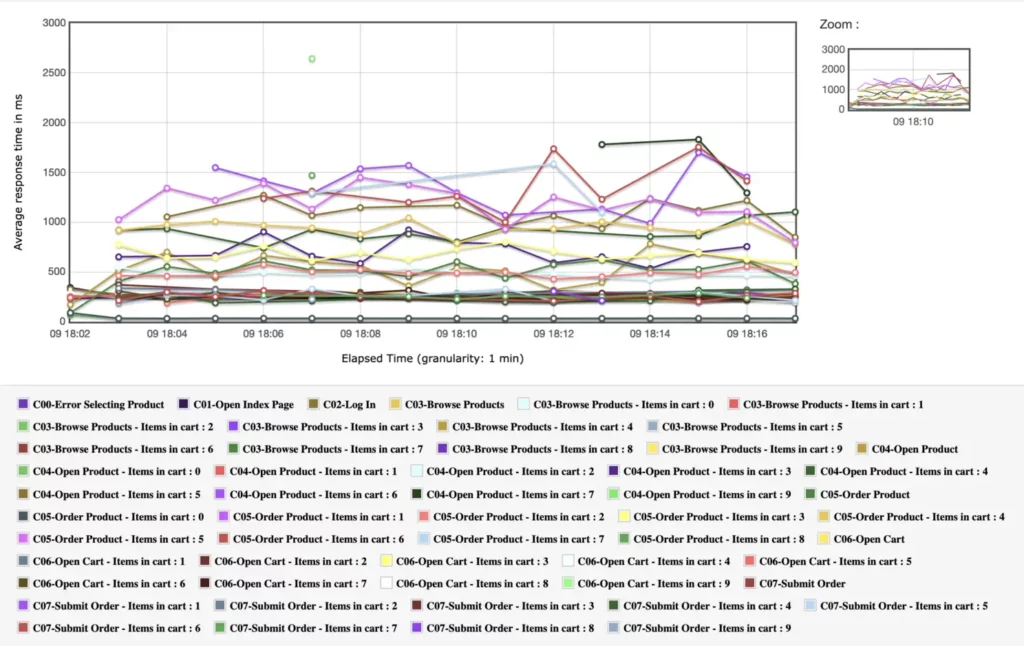
In this article I’ll show you how to deal with this complexity so you can still make use of the data, without spending sleepless nights on analyzing the reports which were once easy to digest, and now they look like this:

Example of a the expanded report with only 1 variable added as a parameter.


The idea is simple: we’re adding some variables we think may be significant to the service and check what happens when we increase those values, either during test runtime or by pre-fetching those variables, and use them inside the test scripts. In my example I’ll be using the same variable as in my previous article: “items in cart” because we know already my service would be affected by this number.

Other examples can be (from user perspective): number of accounts the user owns, duration of the user’s session, number of items in sent messages, number of items displayed on the screen, etc. Anything that we can quantify and rank and varies to some extent.

Due to the nature of performance test we usually end up with a large number of samples, and because the amplitude of response times is unpredictable, I’ve found the Spearman’s correlation rank coefficient to be suitable to limit the correlation to a single value.

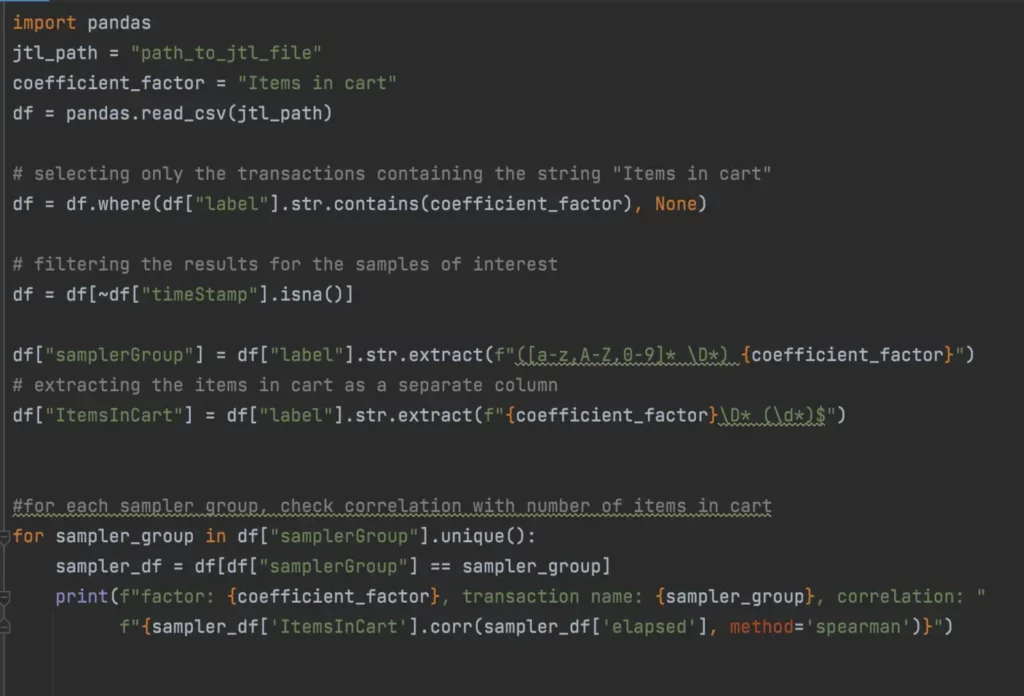
Now, how to do it? I’ve used a Python script that extracts the number of items in cart, and ran the correlation check against the response times for any sampler group that contains this variable.


The output of the function for my report was:

The next question is, how to interpret this data? Spearman’s correlation rank coefficient measures strength of the monotonic correlation, in a range of <-1, 1>. The closer the value is to 0, the weaker the correlation of the data is. As a rule of thumb, the absolute values between 0,3 and 0,7 represent some correlation and the absolute values between 0,7 and 1 represent a strong correlation . In case of my report, you can see that the correlation for transactions “Open Product” and “Order Product” is close to 0,97 – this means a strong relationship.

The correlation is also positive, that means the response time grows. The remaining transaction response times are close to 0, that means there is no correlation between number of items in cart and the response times of the service.

If you want to prioritize your validation, you only need to sort the absolute values of the correlation factors, and remove the values below 0,3 from the list. This gives you a list of potential culprits slowing your services down.

· Categorized: test automation · Tagged: 2023

May 25 2023

Discovering Test Automation Patterns

Patterns will help you solve test automation issues. This blog is an introduction to a Wiki that collates system level test automation patterns to help with (common) automation problems. It is open to all in the test community to avail of the knowledge or to contribute more patterns.

Have you heard about Test Automation Patterns?

We are talking more than patterns for unit tests. Seretta Gamba and Dot Graham created the Test Automation Patterns Wiki that collates system level test automation patterns.  There are patterns for management, process, design and execution, and the issues that can be solved applying them. Right now, there are some 70-80 patterns and about 50-60 issues. They included a diagnostic functionality that lets you easily find the issue or issues that are bothering you and then the issue suggests what patterns to apply. The test automation patterns follow a rule of putting information in only one place. You’ll also notice a convention in the wiki: the patterns are written in capital letters and the issues in italic capitals to tell them apart. This way you can use their names almost as words in a kind of meta-language, a pattern language!

Test Automation Patterns - Dot Graham and Seretta Gamba

Test automation patterns are different from the unit test patterns because:

They are not prescriptive.

Unit-test or software design patterns take a development problem and give you exactly the code to solve it. You can implement it just as is and at the most you have to translate it into your own development language.

The system-level patterns are more generalised/vague.

Think for instance of management issues: companies can be so different in structure, size, hierarchy, etc that it would be impossible to give a single solution for every situation. That’s why many of the patterns just suggest what kind of solutions one should try out.

How does the Test Automation Patterns Wiki work?

Below is an example of you might use the wiki to help you improve or revive test automation. First, go to www.TestAutomationPatterns.org. Try following this example. When you want to improve or revive test automation, the first question will show as:

What below describes the most pressing problem you have to tackle at the moment?

  1. Lack of support (from management, testers, developers etc.).
  2. Lack of resources (staff, software, hardware, time etc.).
  3. Lack of direction (what to automate, which automation architecture to implement etc.).
  4. Lack of specific knowledge (how to test the Software Under Test (SUT), use a tool, write maintainable automation etc.).
  5. Management expectations for automation not met (Return on Investment (ROI), behind schedule, etc.).
  6. Expectations for automated test execution not met (scripts unreliable or too slow, tests cannot run unattended, etc.).
  7. Maintenance expectations not met (undocumented data or scripts, no revision control, etc.).

When several of the options may be an issue, the best strategy is to start with the topic that hurts the most. In this example, we will opt for number 2 because to be able to work efficiently you need time and resources to develop the framework. Once you click on your chosen link, a second question will appear. Second question (for “Lack of resources”)

Please select what you think is the main reason for the lack of resources:

For the following items look up the issue AD-HOC AUTOMATION:

  1. Expenses for test automation resources have not been budgeted.
  2. There are not enough machines on which to run automation.
  3. The databases for automation must be shared with development or testing.
  4. There are not enough tool licences.

More reasons for lack of resources:

  1. No time has been planned for automation or it is not sufficient. Look up the issue SCHEDULE SLIP for help in this case.
  2. Training for automation has not been planned for. See the issue LIMITED EXPERIENCE for good tips.
  3. Nobody has been assigned to do automation, it gets done “on the side” when one has time to spare. The issue INADEQUATE TEAM should give you useful suggestions on how to solve this problem.

If you feel the choices offered do not fully represent the issue, you can initially select one to see the next suggested steps, and if it doesn’t fit, you can go back a step. For this example, selecting the issue SCHEDULE SLIP suggests the following.

SCHEDULE SLIP (Management Issue) Examples:

  1. Test automation is done only in people’s spare time.
  2. Team members are working on concurrent tasks which take priority over automation tasks.
  3. Schedules for what automation can be done were too optimistic.
  4. Necessary software or hardware is not available on time or has to be shared with other projects.
  5. The planned schedule was not realistic.

Alternatively selecting number 1, ‘Lack of support: from management, testers, developers, etc.’ will bring up another question. Second question (for “Lack of support”)

What kind of support are you missing?

If you are lacking support in a specific way, one of the following may give you ideas:

  1. Managers say that they support you, but back off when you need their support. Probably managers don’t see the value of test automation and thus give it a lower priority than for instance going to market sooner.
  2. Testers don’t help the automation team.
  3. Developers don’t help the automation team.
  4. Specialists don’t help the automation team with special automation problems (Databases, networks etc.).
  5. Nobody helps new automators.
  6. Management expected a “silver bullet” or magic: managers think that after they bought an expensive tool, they don’t need to invest in anything else. See the issue UNREALISTIC EXPECTATIONS.

If you are having general problems with lack of support in many areas, the issue INADEQUATE SUPPORT may help. If having difficulty choosing, always select the answer that is most pressing now. This may be option number 2, ‘Testers don’t help the automation team’ which will bring up a Third question (for “Testers don’t help the automation team”)

Please select what you think is the main reason for the lack of support from testers:

  1. Testers think that the Software Under Test (SUT) is so complex that it’s impossible to automate, so why try.
  2. Testers don’t have time because they have an enormous load of manual tests to execute.
  3. Testers think that the SUT is still too unstable to automate and so don’t want to waste their time. Take a look at the issue TOO EARLY AUTOMATION.
  4. Testers don’t understand that automation can also ease their work with manual tests. The issue INADEQUATE COMMUNICATION will show you what patterns can help you in this case.
  5. Testers have been burned before with test automation and don’t want to repeat the experience. Look up issue UNMOTIVATED TEAM for help here.
  6. Testers do see the value of automation, but don’t want to have anything to do with it. Your issue is probably NON-TECHNICAL TESTERS.
  7. Supporting automation is not in the test plan and so testers won’t do it. Check the issue AD-HOC AUTOMATION for suggestions.

Should you think option 6 is the most suitable, simply click on NON-TECHNICAL TESTERS.

NON-TECHNICAL TESTERS (Process Issue) Examples

  1. Testers are interested in testing and not all testers want to learn the scripting languages of different automation tools. On the other hand, automators aren’t necessarily well acquainted with the application, so there are often communication problems.
  2. Testers can prepare test cases from the requirements and can therefore start even before the application has been developed. Automators must usually wait for at least a rudimentary GUI or API.

Resolving Patterns

Most recommended:

  • DOMAIN-DRIVEN TESTING: Apply this pattern to get rid of this issue for sure. It helps you find the best architecture when the testers cannot also be automators.
  • OBJECT MAP: This pattern is useful even if you don’t implement DOMAIN-DRIVEN TESTING because it forces the development of more readable scripts.

Other useful patterns:

  • KEYWORD-DRIVEN TESTING: This pattern is widely used already, so it will be not only easy to apply for your testers, but you will also find it easier to find automators able to implement it.
  • SHARE INFORMATION: If you have issues like Example 1. this is the pattern for you!
  • TEST AUTOMATION FRAMEWORK: If you plan to implement DOMAIN-DRIVEN TESTING you will need this pattern too. Even if you don’t, this pattern can make it easier for testers to use and help implement the automation.

What is the difference between the most recommended and the other useful patterns?

You should always look first at the most recommended patterns, but if for some reason you cannot apply them, then you should at least apply one or more of the useful ones. Here the most recommended pattern is DOMAIN-DRIVEN TESTING.

DOMAIN-DRIVEN TESTING (Design Pattern)

Description – Testers develop a simple domain-specific language to write their automated test cases with. Practically this means that actions particular to the domain are described by appropriate commands, each with a number of required parameters. As an example, let’s imagine that we want to insert a new customer into our system. The domain-command will look something like this:

New_Customer (FirstName, LastName, HouseNo, Street, ZipCode, City, State)

Now testers only have to call New_Customer and provide the relevant data for a customer to be inserted. Once the language has been specified, testers can start writing test cases even before the System under Test (SUT) has actually been implemented.

Implementation – To implement a domain-specific language, scripts or libraries must be written for all the desired domain-commands. This is usually done with a TEST AUTOMATION FRAMEWORK that supports ABSTRACTION LEVELS.

There are both advantages and disadvantages to this solution. The greatest advantage is that testers who are not very adept with the tools can write and maintain automated test cases. The downside is that you need developers or test automation engineers to implement the commands so that testers are completely dependent on their “good will”.  Another negative point is that the domain libraries may be implemented in the script language of the tool, so that to change the tool may mean to have to start again from scratch (TOOL DEPENDENCY). This can be mitigated to some extent using ABSTRACTION LEVELS.

KEYWORD-DRIVEN TESTING is a good choice for implementing a domain-specific language: Keyword = Domain-Command. Potential problems – It does take time and effort to develop a good domain-driven automated testing infrastructure.

The above suggests, the pattern you need is a TEST AUTOMATION FRAMEWORK!

TEST AUTOMATION FRAMEWORK (Design Pattern)

Description – Using or building a test automation framework helps solve a number of technical problems in test automation. A framework is an implementation of at least part of a testware architecture.

Implementation – Test automation frameworks are included in many of the newer vendor tools. If your tools don’t provide a support framework, you may have to implement one yourself. Actually, it is often better to design your own TESTWARE ARCHITECTURE, rather than adopt the tool’s way of organising things – this will tie you to that particular tool, and you may want your automated tests to be run one day using a different tool or on a different device or platform. If you design your own framework, you can keep the tool-specific things to a minimum, so when (not if) you need to change tools, or when the tool itself changes, you minimise the amount of work you need to do to get your tests up and running again.

The whole team, developers, testers, and automators, should come up with the requirements for the test automation framework, and choose by consensus. If you are comparing two frameworks (or tools) use SIDE-BY-SIDE to find the best fit for your situation.

A test automation framework should offer at least some of the following features:

  • Support ABSTRACTION LEVELS.
  • Support use of DEFAULT DATA.
  • Support writing tests.
  • Compile usage information.
  • Manage running the tests, including when tests don’t complete normally.
  • Report test results.

You will have to have MANAGEMENT SUPPORT to get the resources you will need, especially developer time if you have to implement the framework in-house. This pattern tells you what a framework should do, but you may have plenty of ideas yourself. If you’d like suggestions about how to do it, you can delve into the detail of the other patterns, where you will find more advice, particularly things like ABSTRACTION LEVELS and TESTWARE ARCHITECTURE.

However, just having a good technical framework isn’t always going to work, especially if the people seem to have no time for progressing the automation! Therefore this pattern also suggests getting MANAGEMENT SUPPORT.

MANAGEMENT SUPPORT (Management Pattern)

Description – Many issues can only be solved with good management support. When you are starting (or re-starting) test automation, you need to show managers that the investment in automation (not just in the tools) has a good potential to give real and lasting benefits to the organisation.

Implementation – Some suggestions when starting (or re-starting) test automation:

  • Make sure to SET CLEAR GOALS. Either review existing goals for automation or meet with managers to ensure that their expectations are realistic and adequately resourced and funded.
  • Build a convincing TEST AUTOMATION BUSINESS CASE. Test automation can be quite expensive and requires, especially at the beginning, a lot of effort.
  • A good way to convince management is to DO A PILOT. In this way they can actually “touch” the advantages of test automation and it will be much easier to win them over.
  • Another advantage is that it is much easier to SELL THE BENEFITS of a limited pilot than of a full test automation project. After your pilot has been successful, you will have a much better starting position to obtain support for what you actually intend to implement.

If you don’t know what their goals are for automation, you can try to find out about that but challenging a customer’s automation goals probably isn’t the best way to get the help you need! Essentially, that is going in and telling them they’ve done it all wrong which isn’t the best way to build new relationships. Therefore, building a business case isn’t relevant here, but DO A PILOT would be a good choice.

DO A PILOT (Management Pattern)

Context – This pattern is useful when you start an automation project from scratch, but it can also be very useful when trying to find the reasons your automation effort is not as successful as you expected.

Description – You start a pilot project to explore how to best automate tests on your application. The advantage of such a pilot is that it is time boxed and limited in scope, so that you can concentrate in finding out what the problems are and how to solve them. In a pilot project nobody will expect that you automate a lot of tests, but that you find out what are the best tools for your application, the best design strategy and so on.

You can also deal with problems that occur and will affect everyone doing automation and solve them in a standard way before rolling out automation practices more widely. You will gain confidence in your approach to automation. Alternatively, you may discover that something doesn’t work as well as you thought, so you find a better way – this is good to do as early as possible! Tom Gilb says: “If you are going to have a disaster, have it on a small scale”!

Implementation – Here some suggestions and additional patterns to help:

  • First of all, SET CLEAR GOALS: with the pilot project you should achieve one or more of the following goals:
    • Prove that automation works on your application.
    • Chose a test automation architecture.
    • Select one or more tools.
    • Define a set of standards.
    • Show that test automation delivers a good return on investment.
    • Show what test automation can deliver and what it cannot deliver.
    • Get experience with the application and the tools.
  • Try out different tools in order to select the RIGHT TOOLS that fit best for your SUT, but if possible PREFER FAMILIAR SOLUTIONS because you will be able to benefit from available know-how from the very beginning.
  • Do not be afraid to MIX APPROACHES.
  • AUTOMATION ROLES: see that you get the people with the necessary skills right from the beginning.
  • TAKE SMALL STEPS, for instance start by automating a STEEL THREAD: in this way you can get a good feeling about what kind of problems you will be facing, for instance check if you have TESTABLE SOFTWARE.
  • Take time for debriefing when you are through and don’t forget to LEARN FROM MISTAKES.
  • In order to get fast feedback, adopt SHORT ITERATIONS.

What kind of areas are explored in a pilot? This is the ideal opportunity to try out different ways of doing things, to determine what works best for you. These three areas are very important:

  • Building new automated tests. Try different ways to build tests, using different scripting techniques (DATA-DRIVEN TESTING or KEYWORD-DRIVEN TESTING). Experiment with different ways of organising the tests, i.e. different types of TESTWARE ARCHITECTURE. Find out how to most efficiently interface from your structure and architecture to the tool you are using. Take 10 or 20 stable tests and automate them in different ways, keeping track of the effort needed.
  • Maintenance of automated tests. When the application changes, the automated tests will be affected. How easy will it be to cope with those changes? If your automation is not well structured, with a good TESTWARE ARCHITECTURE, then even minor changes in the application can result in a disproportionate amount of maintenance to the automated tests – this is what often “kills” an automation effort! It is important in the pilot to experiment with different ways to build the tests in order to minimise later maintenance. Putting into practice GOOD PROGRAMMING PRACTICES and a GOOD DEVELOPMENT PROCESS are key to success. In the pilot, use different versions of the application – build the tests for one version, and then run them on a different version, and measure how much effort it takes to update the tests. Plan your automation to cope the best with application changes that are most likely to occur.
  • Failure analysis. When tests fail, they need to be analysed, and this requires human effort. In the pilot, experiment with how the failure information will be made available for the people who need to figure out what happened. What you want to have are EASY TO DEBUG FAILURES. A very important area to address here is how the automation will cope with common problems that may affect many tests. This would be a good time to put in place standard error-handling that every test can call on.

Potential problems – Trying to do too much: Don’t bite off more than you can chew – if you have too many goals you will have problems achieving them all. Worthless experiment: Do the pilot on something that is worth automating, but not on the critical path. Under-resourcing the pilot: Make sure that the people involved in the pilot are available when needed – managers need to understand that this is “real work”!

If you’d like to learn more about how to use the Test Automation Patterns Wiki, check it out directly or look up A Journey Through Test Automation Patterns book by Seretta Gamba & Dot Graham on Amazon. The book follows the story of Liz, a test automator, who thought she had just got the best job in the world. Through different experiences of her team, they learn to solve their problems (most of them) through using the test automation patterns. As you get to know the people on the team, you see how the patterns have helped to improve their automation, using very realistic examples.

· Categorized: test automation

Apr 27 2023

The 2023 Lineup is LIVE

It’s here! The AutomationSTAR 2023 programme is LIVE. Are you looking for a blast of test automation inspiration?

We’ve got 2 whole days of headline keynotes, training tutorials, technical track talks, and plenty of opportunity to meet new people in the awesome test automation community.

The 2023 Programme Team, Chris Loder (Canada), John Kent (UK), and Sophie Küster (Germany) have put together a phenomenal line-up.  Get in on the action at Europe’s fastest growing test automation conference.

Check out the talks and secure your place today!

See Programme

3 Keynote Talks

Our 4 keynote speakers are delivering an inspiring dose of knowledge and insights.  Marie Cruz shares her experiences on getting started in tech, and what it was like for her as a member of a minority group in the industry. Ryan Volker and Bastian Schurmann will give you new ideas to continue advancing your test automation framework, and overcome unanticipated headwind; while Janna delves into the vital role of test automation in CI/CD pipelines, and show you techniques for balancing fast feedback. Notebooks at the ready!

4 Half Day Tutorials

2 days of intensive training from leading experts: learn how to use Playwright to automate end-to-end tests, see the importance of using test automation patterns, get the keys to a successful test automation framework, learn how investing in your automation can pay off massively, and lots more.

17 Track Talks & 2 Workshops

The AutomationSTAR track talks and workshops are filled with actionable learnings to advance your test automation projects. What does the Apollo 13 spacecraft disaster have in common with various automation problems in DevOps, CI/CD, and agile? What are the shortfalls faced by freeform UI apps when comes to Visual Testing? What’s the best open source test frameworks for automating web UI tests? What if we applied the Shift-Left approach to performance tests? Get answers to these questions and LOTS more.

We hope you like the programme, and see you in Berlin!

See Programme

A huge welcome to our first AutomationSTAR 2023 sponsors – join them in Berlin, Nov 20-21.

Our AutomationSTAR EXPO packages are bursting with opportunities for you to speak directly to the test automation community, and help solve their problems with your tools and services. Download our EXPO brochure now, or chat to Clare from our EXPO team.

· Categorized: AutomationSTAR, test automation

  • « Go to Previous Page
  • Page 1
  • Page 2
  • Page 3
  • Page 4
  • Go to Next Page »

Copyright © 2026 · Impressum · Privacy · T&C

part of the