• Skip to main content
Super Early Bird - Save 30% | Teams save up to 25%

AutomationSTAR

Test Automation Conference Europe

  • Programme
    • AutomationSTAR Team
    • 2025 programme
  • Attend
    • Why Attend
    • Volunteer
    • Location
    • Get approval
    • Bring your Team
    • 2025 Gallery
    • Testimonials
    • Community Hub
  • Exhibit
    • Partner Opportunities
    • Download EXPO Brochure
  • About Us
    • FAQ
    • Blog
    • Test Automation Patterns Wiki
    • Code of Conduct
    • Contact Us
  • Tickets

Lauren Payne

Nov 02 2023

How to Choose the Right Test Automation Tool for Your Testing Needs

Navigating the vast landscape of test automation tools and platforms can be a daunting task.
With a plethora of options available, each boasting unique features and capabilities, how do you
make the right choice for your specific testing needs? This article aims to guide you through the
process, ensuring you select a tool that aligns perfectly with your requirements.

1. Understanding You Requirements


Before diving into the sea of tools, it’s crucial to have a clear understanding of your testing
needs:

  • Application Type: Start by identifying the nature of your application. Are you testing a
    sleek web application, a mobile app that needs to function seamlessly across devices, or
    perhaps a traditional desktop application? The type of application you’re working with
    can significantly influence your tool choice.
  • Platform Compatibility: In today’s diverse tech ecosystem, compatibility is key. If your
    application is designed to run on multiple operating systems, you’ll need a tool that
    supports cross-platform testing. On the other hand, if your focus is solely on a specific
    OS, ensure the tool you choose excels in that environment.
  • Integration Essentials: Modern development and testing often involve a suite of tools
    working in tandem. Think about your existing tech stack. Does your test automation tool
    need to play well with CI/CD pipelines for seamless deployments? Should it integrate
    effortlessly with your version control system to track changes? Pinpointing these
    integration needs upfront can save you a lot of hassle down the road.

2. Open Source vs. Commercial

When it comes to test automation tools, there’s often a debate between open-source and
commercial options. Both have their merits, and the best choice largely depends on your
specific needs and constraints. Let’s dive deeper:

  • The Allure of Open Source: Tools like Selenium have made a significant mark in the
    testing world, and for good reason. Open-source tools provide flexibility, allowing you to
    tailor them to your exact requirements. And yes, they’re free! However, it’s essential to
    note that “free” doesn’t always mean zero cost. Open-source tools might require a
    steeper learning curve, more setup time, and ongoing maintenance. This also has an
    associated cost to develop a well suited test framework to manage automation capability
    effectively
  • The Premium Touch of Commercial Tools: On the flip side, commercial tools often
    come with a price tag, but they offer a polished experience in return. Think of them as an
    all-inclusive package. They might boast advanced features not found in open-source
    counterparts, offer dedicated customer support to address your queries, and provide
    comprehensive documentation to ease your journey. For teams that need specific
    functionalities or prefer a more guided experience, commercial tools can be worth the
    investment.
  • Budget Considerations: While open-source tools don’t have licensing fees, remember
    to factor in potential costs associated with setup, maintenance, and training along with
    automation resources and SDET engineers to design, develop and maintain automation
    framework. Commercial tools, on the other hand, might have upfront or recurring costs,
    but they could offer a more streamlined experience, reducing long-term expenses.
    Return of investment on automation is essential with respect to time to market. A well
    verse business case is the key to success.
  • Feature Exploration: Always keep an eye on the feature set. While open-source tools
    offer a lot of flexibility, commercial tools might come with unique features that can
    significantly boost your testing efficiency.

3. Aligning with Your Team’s Skill Set

Every team is unique, with its own set of strengths, experiences, and preferences. When
choosing a test automation tool, it’s essential to consider the capabilities and comfort level of
your team members. Here’s how:

Scripting Proficiency: Dive into the technical depth of your team. Are they well-versed
in scripting languages, or do they lean more towards a no-code or low-code approach?
Some automation tools demand a strong coding background, allowing for intricate test
scenarios and customizations. In contrast, others provide a script-less environment,
where tests can be designed using simple drag-and-drop actions or natural language.
Choose a tool that complements your team’s expertise.

User Experience Matters: In the world of software, a tool’s user interface can make or
break the user experience. A well-designed, intuitive interface can significantly
accelerate the testing process, allowing team members to focus on creating robust tests
rather than navigating a complex tool. Moreover, a user-friendly tool can flatten the
learning curve, enabling even newcomers to get up to speed quickly.

4. Scalability and Performance

In the dynamic world of software development, projects evolve. What starts as a small
application can quickly grow into a large-scale platform with multiple features and functionalities.
As such, your test automation tool should be ready to scale up alongside your project. Here’s
what to consider:

  • Parallel Execution: Time is of the essence, especially when you have a vast suite of tests to run. Does your chosen tool support parallel execution? This feature allows multiple tests to run simultaneously, drastically reducing the overall testing time. It’s like having multiple testers working on different parts of your application at the same time, ensuring swift feedback and faster releases.
  • Embracing the Cloud: The cloud has revolutionized the way we think about scalability. With cloud support, your testing platform can easily adapt to increased demands without the hassles of manual infrastructure management. Whether you’re running a handful of tests today or thousands tomorrow, a cloud-based platform ensures consistent performance, flexibility, and accessibility from anywhere.
  • Maintenance Overheads: Test automation scripts and frameworks require ongoing maintenance. Changes in the application under test can break existing scripts, requiring updates. Maintaining a large number of fragile scripts can be time-consuming and frustrating.

5. Community and Support

A vibrant community and dedicated support can make the difference between a smooth
testing experience and a challenging one. Here’s why:

  • Forums and Documentation: Imagine encountering a tricky issue at an odd hour. Where do you turn? Active forums can be a lifesaver, offering insights, solutions, and shared experiences from fellow users worldwide. Additionally, comprehensive documentation and tutorials act as a roadmap, guiding you through the tool’s features, best practices, and troubleshooting steps. They’re like having a user manual tailored to your needs, ensuring you get the most out of your tool.
  • Vendor Support: While community support is fantastic, there are times when you need expert assistance. This is especially true for commercial tools. A responsive vendor support team can address your queries, provide technical assistance, and even offer insights into upcoming features and improvements. It’s like having a dedicated team backing your testing efforts, ensuring you never feel stuck.

6. Integration Capabilities

In today’s interconnected tech landscape, no tool is an island. Your test automation tool, no
matter how powerful, needs to integrate with the other tools in your ecosystem. The integration
ensures a fluid workflow, enhancing efficiency and productivity. Here’s what to look for:

  • CI/CD Integration: Continuous Integration and Continuous Deployment (CI/CD) have become the backbone of modern software development. They ensure that code changes are automatically tested and deployed, leading to faster releases and improved quality. Your test automation tool should be a natural fit within this pipeline, triggering tests as code changes and providing timely feedback to developers. It’s like having a vigilant sentinel that ensures every code change meets the quality standards.
  • Plugin Support: The world of software is vast, and sometimes, you need specialized functionalities that aren’t part of the core tool. That’s where plugins or add-ons come into play. They extend the capabilities of your tool, allowing it to adapt to specific needs. Whether it’s integrating with a unique reporting tool, supporting a specific test framework, or adding a new feature, plugins ensure your tool remains versatile and tailored to your requirements.

7. Review and Feedback

User reviews, feedback, and firsthand experiences can provide a wealth of insights, helping you make an informed decision. Here’s how to tap into these resources:

  • User Reviews and Feedback: There’s a saying that experience is the best teacher, and in the world of software tools, this couldn’t be truer. Dive into user reviews and feedback to understand the strengths and weaknesses of a tool from a real-world perspective. It’s like having a candid conversation with a fellow user, getting the inside scoop on what to expect.
  • Case Studies: Beyond individual reviews, case studies offer a deeper dive into how companies have utilized the tool. They showcase real-world scenarios, implementation strategies, and the outcomes achieved. By exploring case studies, you can gain insights into how the tool performs in diverse environments, the challenges encountered, and the solutions adopted. It’s a window into the tool’s practical application in various settings.
  • Trial Before Commitment: Many tools offer trial versions, allowing you to test the waters before making a commitment. This hands-on experience is invaluable. It lets you explore the tool’s features, gauge its compatibility with your needs, and assess its performance in your specific environment. Think of it as a test drive, ensuring the tool feels right before you invest time and resources.

8. Future-Proofing

In the fast-paced world of technology, what’s cutting-edge today might become obsolete
tomorrow. As such, when selecting a test automation tool, it’s essential to look beyond its
current capabilities and consider its potential to evolve with the times. Here’s how to ensure
your tool is future-ready:

  • Regular Updates and Upgrades: A tool that’s regularly updated reflects a commitment to excellence and adaptability. Dive into the tool’s update history and its roadmap for the future. Frequent updates not only mean that bugs and issues are addressed promptly but also that the tool is continually enhanced with new features and capabilities. It’s like choosing a car that not only runs smoothly now but is also equipped for the roads of tomorrow.
  • Adaptability to New Trends: The tech industry is known for its innovations, from emerging programming languages to novel testing methodologies. Your chosen tool should have the flexibility to adapt to these changes. Whether it’s supporting a new browser, integrating with a trending CI/CD platform, or accommodating a fresh testing approach, the tool’s adaptability ensures you’re always at the forefront of testing excellence
  • Data Management: Test data management is crucial for effective testing. Ensuring that test data remains relevant and up-to-date can be a complex task, particularly in large and complex testing environments.
  • Test Automation Framework: a well-designed test automation framework can streamline the testing process, enhance test coverage, and contribute to the overall quality and reliability of software applications, making it an essential component of modern software development and testing practices.
  • Test Automation Strategy: Elevate your software development with a smart test automation strategy. Speed up testing, cut costs, and deliver top-quality software faster. It’s the competitive advantage your team needs.

Conclusion

Choosing the right test automation tool or platform is a critical decision that can influence the
success of your testing efforts. By considering the factors mentioned above and aligning them
with your specific needs, you can make an informed choice that not only meets your current
requirements but also scales with your future endeavors.

Author

Solitera Team

Solitera Test Automation (SoliteraTA) aims to make the software testing more accessible and efficient for organisations. SoliteraTA is all in one solution for automating web, mobile and desktop applications. It help teams to improve efficiency and effectiveness of their testing processes, and ultimately deliver higher-quality software products with better ROIs.
Solution provides a library of pre-built operations in a straightforward BDD style format for effortless and speedy creation of automated tests. This library eliminates the need for users to possess knowledge of programming languages or complex testing frameworks. The overall solution design facilitates the swift and efficient development of automation capabilities.

Solitera are a Exhibitors at AutomationSTAR 20-21 Nov. 2023. Join us in Berlin.

· Categorized: AutomationSTAR

Oct 30 2023

The Importance of Code Quality: Production vs. Test

Code quality is a topic of prime importance in any software development cycle. It influences not only code functionality but also its maintainability, scalability, and long-term viability. Unfortunately, while we hope it is done for production code, it is often overlooked for test code. As a QA Manager, it’s crucial to understand and advocate for the necessity of high-quality code in both production and testing. Before discussing test code quality, let’s differentiate between test scripts and test code; it’s a crucial consideration.

Test Scripts vs. Test Code: The Distinction

We typically create Test scripts in one of two ways: using record-and-playback tools, then converting the results into scripts; or writing scripts line by line, action by action, as independent tests with limited or no reusability. While scripts seem simple to create and may be quick to deploy, they typically lack flexibility and are brittle, making them susceptible to breaking when things change. This can lead to regression gaps with abandoned scripts and other undesirable results. Test scripts are most suitable for simple, static workflows.

Conversely, test code involves writing code for test automation, ranging from unit tests to API tests to end-to-end tests. This approach often utilizes SDETs (Software Development Engineers in Test) or developers who know object-oriented principles, page object models, and data-driven testing principles. Typically needing fewer resources, it offers superior flexibility, robustness, and efficiency, making it ideal for complex projects with longer lifecycles or systems integral to an organization.

Why Does Code Quality Matter?

Code quality is the cornerstone of any reliable, robust, and efficient software system. Poor code quality can lead to bugs, security vulnerabilities, performance issues, and even system failures. On the other hand, high-quality code addresses these concerns while being easier to read, maintain, and extend, reducing the time and resources needed for debugging and shortening release cycles. High-quality code is good.

While the importance of production code quality is evident, test code quality is often overlooked, if not wholly ignored. We know what can happen with poor production code. Similarly, poor test code can lead to reduced regression testing, missed requirements, or even false positives or negatives, which are notoriously difficult to find. Good test code quality helps resolve these issues in the same way good production code quality helps resolve problems.

Remember, testing is your primary defense against software bugs and defects.

What’s More Important, Production Code Quality Or Test Code Quality?

Let me preface this with my experience across many large enterprise organizations: Code quality is challenging at the best of times, even with organizations having the best intent. And as large projects start running into delays, code quality is often an early victim.

A woman in an orange/red shirt thinking about a puzzling questionBack to the question: both production and test code quality are critical, but test code quality is more important than production code quality. Why, you ask?

Let’s answer that with another question. Which is better: a system with the best code ever but does not work as expected or a poorly written, unmaintainable system that does everything expected?  

We all agree that a system that works as expected is preferred, regardless of the quality of its code. 

The nature of development means bugs; the issue is how quickly you identify and fix them. The better you test, the quicker you find bugs. And the quicker you find bugs, the faster you fix them. So good testing is critical, and the more maintainable and sustainable your tests are, the quicker they can adapt as your system changes, letting you identify bugs sooner.  

Since testing ensures the quality of your production system, and production code quality does not guarantee functionality, test code quality is critical to the success of your test system and, ultimately, your production system, which needs to work, regardless of its code quality. 

Summary 

This article underscores the importance of code quality for both software development and testing. It further differentiates between automated test scripts and test code, accentuating the latter’s superiority. We also see that test code quality can compensate for deficiencies in production code quality while protecting against bugs, explaining how test code quality adds as much if not more, value than production code quality.   

Are you ready to challenge your views and see test code quality in a new light?

Author 

Kim Filiatrault Founder and President

Kim has been in the IT industry for over 35 years, most of it in highly technical areas including generative technologies and test automation. In 2005, Kim specialized in Insurtech and helped many enterprise customers implement large projects. More recently, his company released CenterTest, its new test automation technology, based on his decades of test automation and generative technologies expertise and they have started helping companies revolutionize the way they test.

When not working, Kim enjoys off-roading with his Jeep, going to the UT Longhorns Football games, serving his local communities, and traveling. 

Kimputing are an Exhibitor Sponsor at AutomationSTAR 20-21 Nov. 2023 in Berlin 

Kim Filiatrault

· Categorized: AutomationSTAR · Tagged: 2023, EXPO

Oct 26 2023

How To Turn Secure Planning into Secure Delivery?

It’s the year 2000. The millennium problem had just been conquered and mobile phones were only used by big shots. I had just graduated and worked on some small local projects, when the opportunity came along to join a major project for a large international company. While I was quickly working on my English vocabulary and pronunciation, I took my first steps in the world of SAP and a whole landscape of connected applications. I started working together with team members from different parts of the world. Since interaction was only done via e-mail and phone calls, it was an exciting outlook to meet people in real life when after one year of working from a distance a central on-site user acceptance test was planned.

The test activities should be executed in Atlanta, Georgia. It was my first traveling to the US and even my first time flying in general. Since I wanted to be fit and well prepared on the Monday morning, I travelled two days early. So did other colleagues, and on Sunday I met some of the people that I recognized from the voices on the many phone calls. In the evening there were already around 30 people from Asia, Europe, and the America’s, all travelled around and prepared to start the acceptance testing.

That Monday morning the kick off started punctually at 9am. Introductions, instructions and test scripts were dealt with and laptops and desktops were switched on. After the first coffee rumor spread some people couldn’t connect to one of the main test systems. I tried myself and strange enough I had the same problem. Shortly after 11am it appeared nobody could connect, and it became very crowded in the coffee corner. The test manager was making loud calls and busy conversations and looked kind of stressed. Around noon it appeared that the main test system was down for planned maintenance and according to planning it would only be back on Wednesday evening.

There we were, 30 people travelling in their weekend from all over the world, staying in hotels and being together for one week to work in a single room somewhere in the world. Unfortunately the first three days of the week we couldn’t do anything because of an unknown planning conflict with another team. A big disappointment for the world travelers, and even worse for the project and the company.
The experience from the year 2000 always stayed in my mind and now that I have work experience in many other companies I can conclude that those kind of issue keep popping up at times. Projects and teams have secure individual plannings but are not fully aware of conflicts with other projects and activities. Many times that lack of awareness leads to unexpected system unavailability, which in turn leads to running out of plannings and deadlines. From those experiences the idea arose to develop software to help companies getting central insight into the availability of systems in their system landscape. This idea was turned into an actual development project in 2018 when one of our customers was looking for tooling in the market but couldn’t find anything. The first version of ERMplanner was born.

Today my company is working on version 2.7 of ERMplanner. To complete the circle, we recently had contact with the company were it all started in the year 2000. Some of the people from the Atlanta test week are still around and believe it or not, similar issues are still occurring today. The company is very interested in the tooling that we have built over the years. Two weeks ago we had an implementation workshop and in a few weeks a pilot is started to work with ERMplanner and get better insight in all the activities affecting their system availability. A successful implementation in this company would be the crowning glory of our work and I could even think of retiring.

Author

Ronald Vreugdenhil, Founder of ERMplanner

Ronald Vreugdenhil studied Computer Science and worked as a consultant in the SAP logistics and workforce management areas. He has over 20 years of national and international project experience.

Since 2009 he is co-owner of PeachGroup, helping organizations to improve their service and maintenance processes. In 2017 he founded ERMplanner. ERMplanner is standard software to turn your release planning into reliable deliveries. It prevents conflicts between individual schedules of release-, change-, project- and test managers so that all planned work can be carried out according to schedule.

ERMplanner are a Gold Sponsor at AutomationSTAR 20-21 Nov. 2023 in Berlin

· Categorized: AutomationSTAR · Tagged: 2023, EXPO

Oct 24 2023

Allure Report Is More Than A Pretty Report

Behind the pretty HTML cover of Allure Report is the idea that QA should be the responsibility of the entire team, not just QA – which means that test results should be accessible and readable by people without the QA or dev skill set. Report allows you to move past the details that don’t help you, staying at your preferred level of abstraction – and yet if you do need to drill into the code, it’s just a few mouse clicks away.

Report achieves this basic goal by being language-, framework-, and tool-agnostic. It can hide the peculiarities of your tech stack because it doesn’t depend upon it. So how does one become agnostic? You can’t do it through magic, you have to write tons of integrations, literally hundreds of thousands lines of code to integrate with anything and everything. Allure Report is a hub of integrations, and its structure is designed specifically with the purpose of making new integrations easier.

Let’s imagine that we’re writing a new integration for Report, and look at what resources we can leverage to make our job easier. We will be comparing how much effort we need to apply with Report and with other tools. We will start with the most straightforward advantages – the existing codebase; and then talk about more fundamental stuff like architecture and knowledge base.

Selenide native vs Selenide in Allure Report

To begin with, let us compare native reporting for Selenide with the way Selenide is integrated in Allure Report, and then see how difficult it was to write the integration for Report.

While creating simple reporting for Selenide is relatively easy, it’s a completely different story if you want to make quality test reports. In JUnit, there is only one extension point – the exception that is being thrown on test failure. You can jam the meta-information for the report into that exception, but working with this information will be difficult.

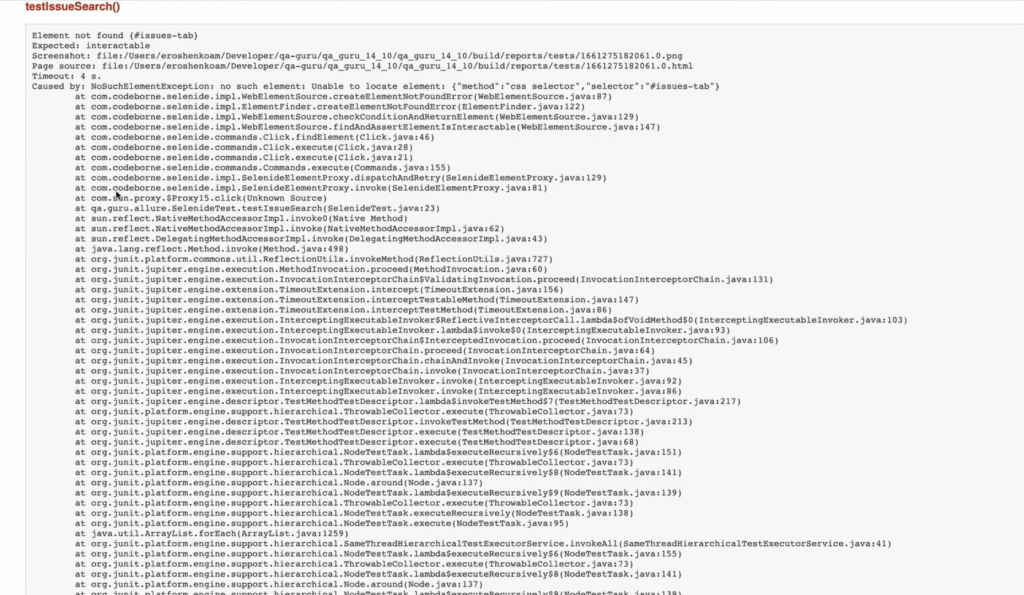
By default, Selenide and most other tools take the easy road. When Selenide reports on a failed test, what you get is just the text of the exception, a screenshot, and the HTML of the page at the time of failure:

If you’re the only tester on the project and all the tests are fresh in your memory, this might be more than enough – which is what the developers of Selenide are telling us.

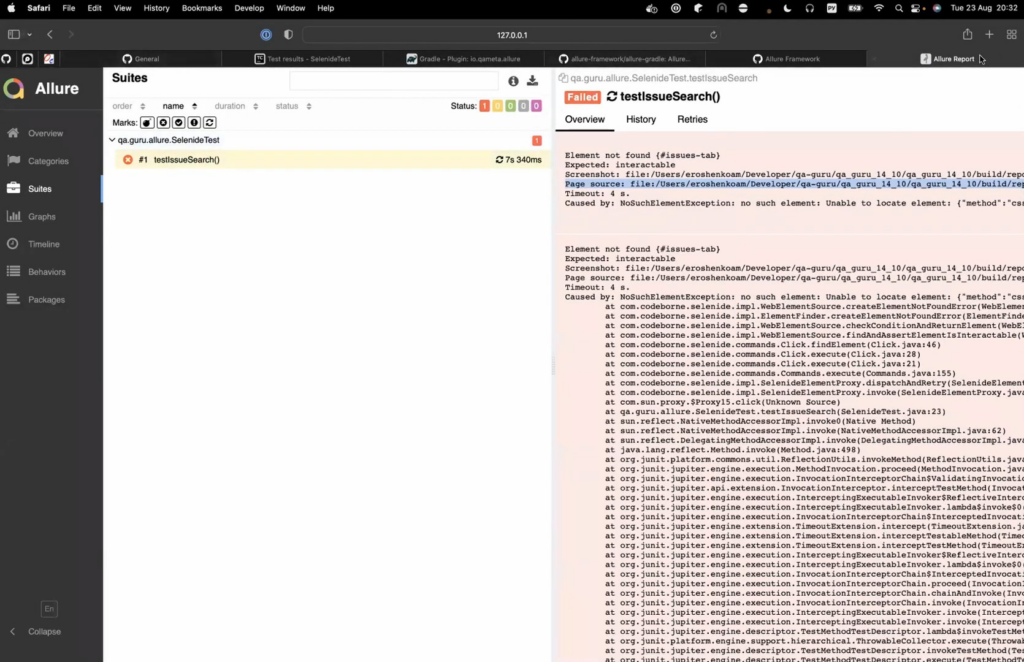
Now, let’s compare this to Allure Report. If you run Report on a Selenide test with nothing plugged in, you’ll get just the text of the exception, same as with Selenide’s report.

But, as I’ve said before, the power of Allure Report is in its integrations. Things will change if we turn on allure-selenide and an integration for the framework you’re using (in this case – allure-junit). First (this is specific to the Selenide integration), we’re going to have to add the following line at the beginning of our test (or as a separate function with a @BeforeAll annotation):

SelenideLogger.addListener(“AllureSelenide”, new AllureSelenide());

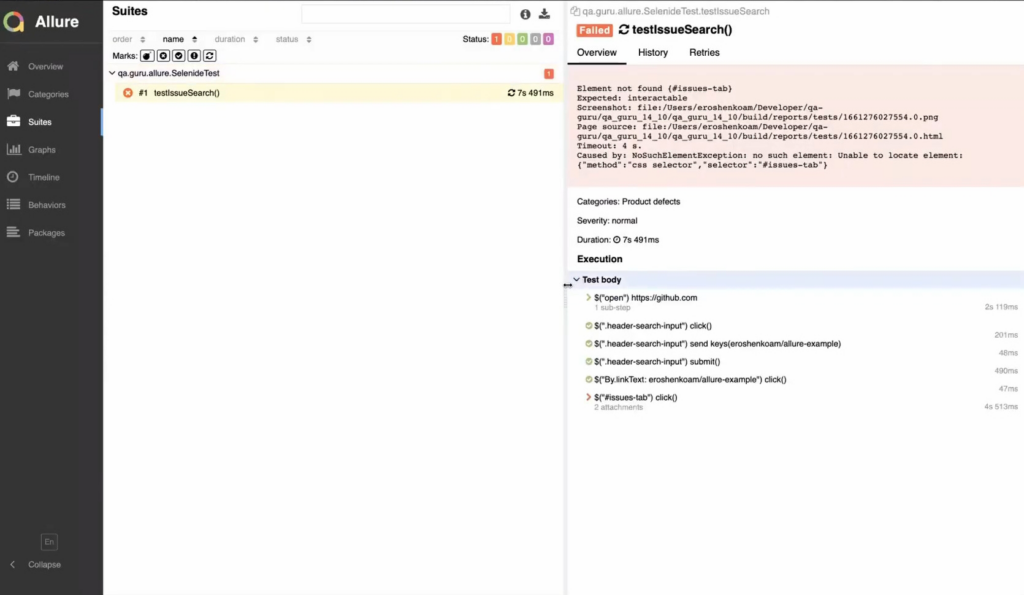
Now, our test results have steps in them, and you can see precisely where the test has failed:

This can help you figure out why the test failed (whether the problem is in the test or in the code). You also get screenshots and the page source. Finally, with these integrations, you can wrap the function calls of your test inside the step() function or use the @Step annotation for functions you write yourself. This way, the steps displayed in test results will have custom names that you’ve written in human language, not lines of code. This makes the test results readable by people who don’t write Java (other testers, managers etc.). Adding all the steps might seem like a lot of extra work, but in the long run it actually saves time, because instead of answering a bunch of questions from other people in your company you can just direct them to test results written in plain English.

This is powerful stuff compared to what Selenide (and most other tools) offer as default reports. So here’s the main question for this article: how much effort did it take to achieve this? The source code for the allure-selenide integration is about 250 lines long. Considering the functionality that this provides, that’s almost nothing. Writing such an integration would probably be as easy as providing the bare exception that we get if we use Selenide’s native reporting.

This is the main takeaway: a proper integration with Allure Report takes about as much effort as a quick and easy integration with other tools (provided we’re talking about a language where Report has an established code base, such as Java or Python). How is that possible?

Common Libraries

The 250 lines of code in allure-selenide leverage files with about 500 lines of code from the allure-model section of allure-java, and about 1300 lines from allure-java-commons. These common libraries have been created to ease the process of making new integrations – and there are more than a dozen for Java alone that utilize these common libraries.

Writing these libraries is not a straightforward task. There are problems of execution here that can be extremely difficult to solve. For instance, when writing the allure-go integration, Anton Sinyaev spent several months solving the issue of parallel test execution (an issue which was left unsolved for 8 years in testify, the framework from which allure-go was forked). Such problems can be unique for a particular framework, which makes writing common libraries difficult. Generally speaking, once the process has been smoothed out, writing an integration for a framework like JUnit might take a month of work; but if there are no common libraries present, you could be looking at 4 or 5 months.

The JSON with the results

Let’s go deeper. What if we’re writing an integration for an entirely new language? Since the language is different, none of the code can be reused. Here, the example with Go is particularly telling, since it is quite unlike Java or Python, both in basic things like lack of classes, and in the way it works with threads. Because of this, not only was it not possible to reuse the code, but even the general solutions couldn’t be translated from one language to another. Then what HAS been reused in that case?

Arguably the most important part of Allure Report is its data format, the JSON file which stores the results of test runs. This is the meeting point for all languages, the thing that makes Allure Report language-agnostic. Designing that format took about a year, and it has incorporated some major architectural decisions – which means if you’re writing a new integration, you no longer have to think about this stuff. Thanks to this, the first, raw version of allure-go was written over a weekend – although it took several months to solve problems of execution and work out the kinks.

Experience

Finally, there is the least tangible asset of all – experience. Writing integrations is a peculiar field of programming, and a person skilled in it will be much more productive than someone who is just talented and generally experienced. If one had to guess, it would probably take 10 people about 2–3 years to re-do the work that’s been done on Allure Report, with one developer for each of the major languages and its common libraries, 2 or 3 devs for the reporter itself, an architect, and someone to work with the community.

Community

Allure Report’s community is not an asset strictly speaking, but when creating a new integration, it actually provides an extremely important role in several ways.

  1. DEMAND. As we’ve already said, adding test reporting to a framework or a tool can take months of work if done properly. If you’re doing this purely for your own comfort, you’ll probably cut a lot of corners, do things quick and dirty. If, on the other hand, you’re working on something that is going to be used by millions of people, that’s motivation enough to sit around for an extra month or two and provide, say, proper parallel execution of tests.
  2. EXPERIENCED DEVELOPERS. Here, we’re kind of returning to the previous section: the open-source nature of the tool allowed Qameta to get in touch with plenty of developers experienced in writing integrations, and hire from that pool.
  3. THE INTEGRATIONS THEMSELVES. Allure report didn’t start out as a tool designed to integrate with anything and everything – the first version was just built for Junit 4 and Python. Pretty much everything outside allure-java and allure-python was initially developed outside Qameta, and then verified and internalized by the company.

All of this has been possible because there are many developers out there for whom Allure Report is a default tool – they are the bedrock of the community.

Conclusion

The structure of Allure Report didn’t appear all at once, like Athena did from the head of Zeus. It took many years of thinking, planning, and re-iterating on community feedback. What emerged as a result was a tool that was purpose-built to be extensible and to smooth out the creation of new integrations. Today, expanding upon this labor means leveraging the code, experience and architectural decisions that have been accumulated over the years.

If you’d like to learn more about Allure Report, we’ve recently created a dedicated site. Naturally, there’s documentation, as well as detailed info on all the integrations (under “Modules”). See if you can find your language and test framework there! And we’re planning to add much more stuff in the future, like guides, so don’t be a stranger and pay us a visit.

Author

Artem Eroshenko

CPO and Co-Founder of Qameta Software

Qameta Software are a Gold Sponsor at AutomationSTAR 20-21 Nov. 2023 in Berlin

· Categorized: AutomationSTAR · Tagged: 2023, EXPO, Gold Sponsor

Oct 19 2023

End-to-end testing: An end-to-end guide to overcoming 7 common challenges.

End-to-end testing — which tries to recreate the user experience by testing an application’s entire workflow from beginning to end, including all integrations and dependencies with other systems — is more difficult now than ever.

The challenges with end-to-end testing have increased tremendously over the past several years as enterprise IT has exploded; this has led to an unprecedented number of applications, all of which are highly distributed and interconnected.

But it’s exactly this situation that makes conducting end-to-end testing an imperative for your organization.

Unpacking the current state of end-to-end testing: Inside the explosion of enterprise IT

The average organization uses more than 900 applications today, according to MuleSoft’s 2022 Connectivity Benchmark Report, and a single business workflow might touch dozens of these applications via microservices and APIs. To ensure business processes keep running, testers must replicate the work users perform across multiple applications and ensure none of those workflows are impacted when one of those applications is updated.

Ongoing cloud migration further complicates things. Bessemer Venture Partners’ State of the Cloud Report notes that more than 140 public and private cloud companies have now reached a valuation of $1 billion or more. At current growth rates, cloud could penetrate nearly all enterprise software in a few years, according to the report’s authors. That means that tests must function across heterogenous architectures as enterprise cloud migration journeys progress.

To truly protect the user experience as all of these enterprise IT systems evolve at ever-increasing speeds, it’s critical to test the complete end-to-end business process, which may span multiple applications, architectures, and interfaces. That’s because any given part of an application might function differently when working in conjunction with another system than it does when working in isolation — the latter of which is not a real-world scenario. Given this situation, it’s no surprise that leading industry analysts call out end-to-end testing as a critical capability for test automation software.

Despite this growing need, end-to-end testing isn’t easy. Not only do today’s applications evolve at a rapid-fire pace, but they’re often highly connected with other systems in an enterprise IT landscape. These connections create numerous dependencies and, as a result, many points of potential failure to test. It’s all but impossible to carry out extensive end-to-end testing manually, unless you have a lot of time on your hands, but end-to-end test automation has its own challenges.

In fact, Google went so far as to “say no” to conducting more end-to-end testing, citing the relative instability of the test scripts, which require updating every time a connected application gets updated, creating a significant maintenance burden. Despite this challenge, comprehensive end-to-end testing still offers the best solution to protecting the user experience, which should be the ultimate goal of everyone from business analysts to developers and testers. Here’s a look at the top end-to-end testing challenges, as well as how the right processes and testing tools can help you overcome them.

Addressing end-to-end testing head on: The top seven challenges + best practices to address them.

There’s no doubt about it: Successful end-to-end testing is challenging. But it’s also well within reach for modern testing organizations. Success is simply about understanding the challenges, identifying the best ways to overcome them, and introducing the right processes and technology to help put those plans into action.

With that in mind, here’s a look at the top seven end-to-end testing challenges, plus best practices for how to address them.

1) Testing across a diverse set of complex apps & programs

Proper end-to-end testing will likely include a combination of both enterprise applications (e.g. SAP, Salesforce, Oracle, ServiceNow, etc.) and custom developed, customer-facing applications. Gregor Hohpe of “The Architect Elevator” sums up why testing across disparate, interconnected systems is so difficult:


“Complex, highly interdependent systems tend to have poorly understood failure states and large failure domains: It’s difficult to know what can go wrong; if something does go wrong, it’s difficult to know what actually happened; and if one-part breaks, the problems cascade in a domino effect.”

Of course, that complexity is exactly what makes end-to-end testing so important, particularly in a DevOps-driven world where speed is a priority and applications change so quickly. To address this challenge and maintain speed, organizations must introduce advanced test automation tools. The testing technology makes a big difference in this regard, as organizations must aim for high levels of automation to maintain the necessary speed and coverage when it comes to testing all of the necessary workflows within an application, including all of the connection points with other applications.

2) Accounting for overall maintenance challenges

End-to-end tests are flat-out difficult to maintain. That’s because every time a component of the application’s user interface changes, the test needs to get updated along with it. In today’s world of frequent updates, that can mean quite a lot of changes. And if your tests don’t get updated to match UI changes, they may miss critical bugs that degrade the user experience.

One of the best ways to combat these challenges is to prioritize certain workflows over others based on risk, so QA teams aren’t overwhelmed with writing and rewriting end-to-end tests for every possible workflow. While end-to-end testing is absolutely a must for the reasons described above, not every single area of the application requires this level of scrutiny if testers also use lower-level tests, such as unit tests and integration tests, throughout.

3) Combating flakiness in tests

Beyond overall maintenance challenges, end-to-end tests tend to be “flaky” because they are meant to mimic real-world scenarios. As a result, factors like network conditions, API failures, and system load can impact the outcomes of these tests.

Additionally, the testing solution used matters, particularly given the level of test automation required for ongoing end-to-end testing at the necessary speed. For example, Selenium is a useful tool, but it can create brittle tests (due to factors like data, context, and ties to external services), which makes Selenium useful, but only if your organization has the resources to maintain and update the test scripts.

Using model-based test automation — for example, with a tool like Tricentis Tosca — can help combat the flaky nature of end-to-end tests. Tosca’s modular test design eliminates the maintenance burden that’s typically so challenging for end-to-end test automation. Its no-code approach means that there’s no scripting knowledge required, so testers can start and quickly scale end-to-end test automation, regardless of their skillset. And because it’s built for both enterprise packaged applications and custom-developed software, it’s ideal for testing end-to-end workflows that span both. To see how it works, watch the webinar: How to master enterprise end-to-end testing: A scalable, codeless approach.

4) Handling an ever-increasing volume of connected apps

On average, organizations require access to 33 different systems for developing and testing. This means a lot of dependencies on web services and third parties exist throughout the testing process, many of which are likely external systems over which an organization’s QA team has no control. And these connections continue to increase, which only adds to the number of applications to account for during end-to-end testing.

Including those connected systems in end-to-end testing can be challenging when they are changing rapidly themselves. It can also become quite costly depending on the number of systems involved that charge for simulations. The solution to this challenge lies in a service virtualization solution that can mock those external systems for end-to-end testing so that testers don’t have to pay for costly simulations or rely on a live version of the system (which may experience issues that can contribute to test flakiness). Ultimately, this type of solution eliminates many of the factors that are out of testers’ control when it comes to interacting with connected apps.

5) Working with comparatively slower tests

End-to-end tests are often much slower than other types of testing, which can be a challenge for DevOps-driven teams that want immediate feedback so they can react quickly. Ultimately, the comparatively slower speed of end-to-end tests makes iterative feedback difficult. And this challenge only compounds as the number of end-to-end tests in use increases.

This challenge goes back to two critical solutions: (1) Increasing automation to help maintain speed throughout testing, since automated tests will always run faster than manual tests, and (2) prioritizing which workflows require end-to-end testing and which don’t. The latter of these solutions is especially important, as it’s not realistic for organizations to conduct end-to-end testing for every possible workflow within their applications. Rather, it’s important to identify top workflows within the application (either due to level of usage or business-critical functionality) and prioritize those for end-to-end testing, while supplementing with lower-level tests throughout.

6) Using proper test data

Testers spend the most time simply finding and preparing the right data for tests. And end-to-end tests require a variety of data, regardless of whether they’re manual or automated. For example, testers might need to track down historical data or speak to a subject matter expert to get the right data. In some cases, organizations pull in production data and anonymize it for security purposes, but that approach adds another layer of complexity and can create risks in the case of any kind of audit.

Fortunately, there is another way to speed up this process without adding the complexity created by using production data: introducing a test data management tool to automate the creation of synthetic test data. Testers can run about 80-90% of the necessary tests using this synthetic test data, which mimics production data but doesn’t carry the same risk since it is not actually real user data. And because a test data management tool can automate the creation of this synthetic data, it makes the entire process faster.

7) Ensuring alignment across teams

All the complexities involved with end-to-end testing become even more challenging if testing is distributed rather than centralized, Tricentis Founder Wolfgang Platz wrote for “InfoWorld.” With end-to-end testing, the entire team — from business analysts to developers and testers —needs to work together, and this isn’t easy when each set of users has different tools, and the information doesn’t carry over from one to the next. When that happens, teams end up having to duplicate work or build custom integrations between the tools. Ultimately, it can lead to misunderstandings and breakdowns in communications.

To deliver a smoother end-to-end testing process, teams should align on a solution that can synchronize information across the variety of technologies each group uses. Doing so should create a single source of truth to eliminate communication issues and make the hand-off from one team to the next more efficient. Additionally, because end-to-end testing connects tests across front-end systems of engagement and back-end systems of record to assess the complete user experience, this type of alignment across teams not only improves the testing process for internal users, but delivers better results across packaged and customer-facing apps.

End-to-end testing is challenging, but organizations must prioritize it

There’s no getting around it: End-to-end testing is challenging, and the explosion of enterprise IT alongside increasingly rapid speeds of change only complicates it further. However, it’s these exact reasons that make end-to-end testing so important for organizations to conduct regularly.

Specifically, all the dependencies between applications create various points of failure and require more complete testing that mimics real-world scenarios for users. And while organizations won’t realistically be able to apply end-to-end testing to every single workflow within an application, they do need to apply this higher level of testing to highly used and “mission critical” workflows.
The key to delivering on this need successfully (which includes maintaining the necessary speed and overcoming challenges around test maintenance, flakiness, and more) lies in introducing the right technology and processes. Doing this improves maintenance needs, creates less flaky tests, speeds up test setup and feedback times, and helps keep all users aligned, among many other benefits.

Author

Tricentis Team

Tricentis is the global leader in continuous testing and automation, widely credited for reinventing software testing for DevOps and agile environments. The Tricentis AI-based, automation platform enables enterprises to accelerate their digital transformation by dramatically increasing software release speed, reducing costs, and improving software quality.

Tricentis has been widely recognized as the leader by all major industry analysts, including being named a leader in Gartner’s Magic Quadrant five years in a row. Tricentis has more than 2,000 customers, including the largest brands in the world, such as Accenture, Coca-Cola, Nationwide Insurance, Allianz, Telstra, Dolby, RBS, and Zappos.

Tricentis are a Platinum Sponsor at AutomationSTAR 20-21 Nov. 2023. Join us in Berlin.

· Categorized: AutomationSTAR

  • « Go to Previous Page
  • Page 1
  • Page 2
  • Page 3
  • Page 4
  • Go to Next Page »

Copyright © 2026 · Impressum · Privacy · T&C

part of the