• Skip to main content
Early Bird offer - - Ends 30th Sep - Book Now!

AutomationSTAR

Test Automation Conference Europe

  • Programme
    • AutomationSTAR Team
    • 2026 programme
  • Attend
    • Why Attend
    • Volunteer
    • Location
    • Get approval
    • Bring your Team
    • 2025 Gallery
    • Testimonials
    • Community Hub
  • Exhibit
    • Partner Opportunities
    • Download EXPO Brochure
  • About Us
    • FAQ
    • Blog
    • Test Automation Patterns Wiki
    • Code of Conduct
    • Contact Us
  • Tickets

AutomationSTAR

Sep 01 2025

Leave Complexity Behind: No-Code Test Automation with Low-Code integration via Robot Framework and TestBench

Fast releases demand efficient testing – but traditional test automation is often too complicated. TestBench and Robot Framework combine no-code test design with low-code implementation. The result: test automation that is clear, fast, and flexible – without technical barriers.

Challenges in Test Automation

Agile software development demands high quality and fast delivery cycles. Test automation is essential for this – but comes with two typical hurdles:

1. Separated know-how: QA testers know the requirements, technical automation engineers know how to implement them. However, the other knowledge is often missing.

2. Delays due to disruptions in the processes: Changes to automated tests often require successive work steps between the QA specialist and technical teams – which takes time.

Goal: Specification = Automation

The solution: An approach in which tests are automated directly during specification – without prior technical knowledge on the QA specialist side or detailed domain knowledge on the technical side.

This article shows how a combined no-code/low-code approach with TestBench and the Robot Framework closes precisely this gap.

Expertise and Technology – Thought of Separately, Strong Together

The idea: Professional test design and technical automation are created in specialised tools – TestBench for the specification, Robot Framework for the execution.

Both tools are based on the principle of Keyword Driven Testing and exchange test data and structures via defined interfaces. This enables a clean separation – and efficient interaction at the same time.

Keyword Driven Testing with TestBench

With the test design editor in TestBench, test cases can be put together using drag-and-drop from reusable steps, the so-called keywords – without any programming knowledge. Test data is defined as parameters or in data tables and clearly managed.

The advantages:

• Clarity: Each keyword stands for an action and generates its own test result.

• Reusability: Keywords can be used multiple times and maintained centrally.

• Efficiency: Changes only affect individual keywords – not the entire test case.

Example:

A vehicle consisting of a basic model, special model and several accessories is to be configured. The test sequence required for this is mapped using three keywords:
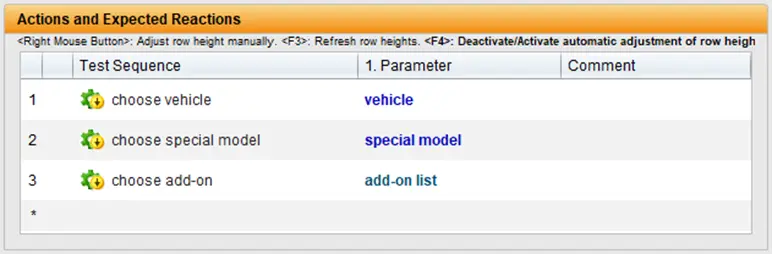
The parameter list of the test sequence maps the data interface of the test sequence:
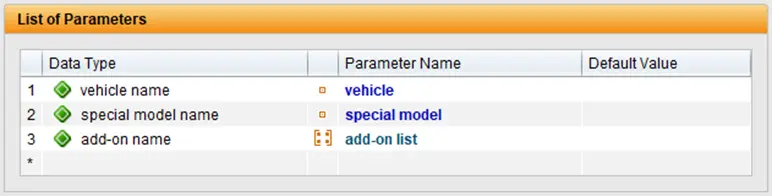
The values of the test sequence parameters are stored in data types and can be assigned values in the associated data table:
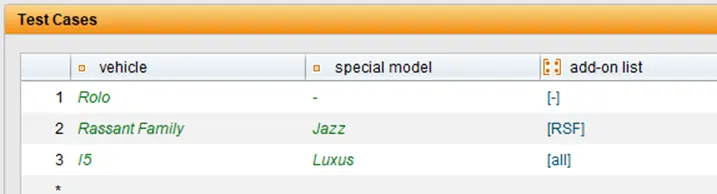
Each line of this table represents a run of the test sequence with the values from the line, i.e. it represents a specific test case. The specifications of the test cases are created in TestBench, which serve as a template for the implementation of the test automation in the Robot Framework. TestBench therefore represents the no-code part of the solution.

Keyword Driven Testing with Robot Framework

The Robot Framework also relies on the Keyword Driven approach, in which test steps are described by reusable commands, the keywords. The advantage: The tests are structured in tabular form, are easy to read and can also be understood by non-technicians. However, basic programming knowledge is helpful for implementing technical keywords. Robot Framework comes with many standard libraries (e.g. BuiltIn, OperatingSystem, Collections) and can be extended by hundreds of specialised libraries – for example for web tests with Selenium or Browser Library, SAP with Robosapiens, databases, APIs and much more. Customised libraries only need to be developed for very specific requirements. The tests themselves are usually created in VS Code or IntelliJ IDEA – supplemented by plugins such as RobotCode, which enable syntax highlighting, code completion and test execution directly in the IDE.

Example: Vehicle configuration by keywords

A simple test case, e.g. for configuring a vehicle, could look like this:
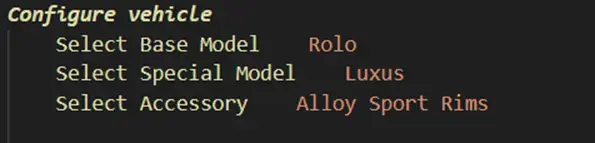
In this illustration, each step of the test procedure is described using a single keyword – such as Select Base Model, Select Special Model or Select Accessory. Each keyword takes on a clearly defined task – and can be reused several times.

The technical realisation takes place on several levels: A keyword such as Select Base Model calls up other keywords internally – for example to find UI elements, wait for visibility and make a selection.

Transparency at every level: the Robot Framework protocol

A major advantage of the Robot Framework is the detailed logging of each test step – including all keywords called, times, success or error messages:
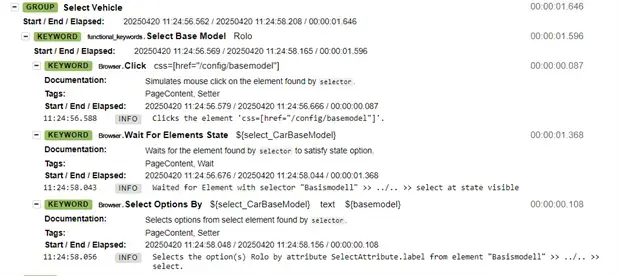
As can be seen in the example, the Robot Framework not only documents the process of the keyword select base model but also shows all internal steps – from the mouse click to the selection of the correct option. Errors can therefore be analysed down to the lowest level.

Technology that adapts – and integrates

Thanks to the large selection of libraries, almost all technologies can be tested with Robot Framework – web, mobile, desktop, databases, APIs, SAP, etc. Different libraries can even be combined within a test case, enabling flexible end-to-end scenarios: from web browser to SAP to mobile app – and back again.

In combination with TestBench’s no-code design, this results in a consistent, efficient automation approach: QA testers specify – technology implements. Fast, legible and robust.

Test Design Meets Automation – Seamlessly Synchronised

The test cases specified in TestBench are transferred directly to the Robot Framework – where they are implemented with technical keywords. Conversely, already realised keywords from Robot Framework can be transferred back into TestBench and used for new tests.

The speciality:

Top-down and bottom-up work simultaneously.

QA testers create scenarios, technical teams develop the appropriate keywords. Everything remains synchronised via a dedicated TestBench extension for Robot Framework – without media discontinuity or loss of time.

TestBench acts as a leading system: it generates test cases, expects ready-made keywords – and controls the execution. The test data is also transferred directly, which does not require any separate data logic on the technical side.

Result: Specification = Automation.

Advantages of the No-Code/Low-Code Combination

The integrated solution consisting of TestBench and Robot Framework offers numerous advantages:

Simple test design: Users with domain knowhow create tests without detailed technical knowledge.

Centralised keyword management: Domain specific and technical keywords are clearly separated – but centrally available.

Efficient collaboration: Clearly defined responsibilities, seamless exchange.

High maintainability: Keywords can be maintained with pinpoint accuracy, changes are implemented quickly.

Parallel working: Specification and implementation take place simultaneously – without dependencies.

Future-proof: The architecture remains flexible and expandable – especially in the rapidly developing technology sector.

Conclusion: Test automation that adapts – not the other way round

The combination of no-code test design with low-code automation elegantly solves the typical challenges in test automation:

• Domain specialists and technical teams work together efficiently.

• Automated tests are created at an early stage – and adapt with flexibility.

• The solution scales – from small scenarios to large test suites.

Compared to pure no-code solutions, the approach is significantly more flexible, sustainable and technically robust – making it a future-proof choice for professional test automation.

Would you like to find out more about this topic? Then download our whitepaper now!

Author

Dierk Engelhardt

Dierk Engelhardt is TestBench product manager at imbus AG. With his many years of experience, he advises and supports customers in the introduction and customized integration of tools into the software development process. He also advises on setting up agile teams and integrating testing into the agile context.“

Imbus are exhibitors in this years’ AutomationSTAR Conference EXPO. Join us in Amsterdam 10-11 November 2025.

· Categorized: AutomationSTAR · Tagged: 2025, EXPO

Aug 27 2025

EU Regulations: The Example of the European Accessibility Act

Starting in mid-2025, the legal obligation to verify the accessibility of websites in the EU will extend to the private sector. This affects companies from various industries such as e-commerce, banking, and insurance, which must ensure their digital offerings are accessible. The public sector in Germany, for instance, was already required to test both internal and external websites for accessibility and ensure they comply with the standards of the Barrierefreie-Informationstechnik-Verordnung (BITV), based on the Web Content Accessibility Guidelines (WCAG). This is just one of many upcoming EU regulations, including product liability directives and the AI Act.

With this extension, it is expected that there will be waves of legal warnings and fines similar to those after the introduction of GDPR. This increases the pressure on service providers and operators of digital offerings to review and adapt their websites according to legal requirements.

However, current technology only allows a small portion of WCAG requirements to be tested automatically. Many aspects of accessibility still need to be manually tested and results from automations have to be reviewed by a human tester, making the process more time- consuming and resource intensive. The Accessibility Conformance Testing (ACT) working group of the W3C is developing conformity rules that include both manual and partially automated testing methods to enable a more comprehensive assessment of WCAG compliance. About 30% of the success criteria of WCAG 2.2 are considered automatable in a classical way. With the use of AI, better coverage is possible here. webmate can provide automation for up to 60% of the success criteria.

Shift Left for Accessibility

Accessibility is a crucial aspect of software development that has often been neglected. To effectively address and prevent accessibility issues, they should be integrated early into the testing routine. One way to do this is by using tools like webmate, which already can provide valuable insights during the development phase and shine in quality assurance and documentation processes.

The upcoming legal changes and technological developments make it clear that companies must take proactive measures to meet accessibility requirements and avoid legal risks. By automating tests in pipelines and CI/CD processes, continuous accessibility testing can be ensured without the need for additional manual testing efforts. The “Shift Left” approach in testing means that developers should consider accessibility from the initial implementation of a feature, rather than waiting until the end of the development process.

Manual testing can also capture aspects of accessibility that automated tools might overlook. However, manual testing alone is not sufficient to guarantee comprehensive accessibility. A combination of automated tests and manual feedback is necessary to obtain a complete picture of accessibility issues and ensure that all user groups can equally benefit from the software.

The Need for Auditing

Regular audits ensure the traceability and documentation of accessibility measures. This is particularly important for compliance with national and international standards. Audits enable systematic reviews of existing processes and ensure that all aspects of accessibility are continuously maintained and improved. This way, the Accessibility Enhancement Act can be easily fulfilled.

Audits should be considered a complementary part of regular testing processes. While tests help identify problems early, audits provide a comprehensive assessment and documentation of the overall accessibility situation. The audit results also serve as excellent proof. This can create a well-rounded and effective accessibility management system that meets both legal requirements and the needs of all users.

Due to the lengthy and time-consuming process, it is often difficult to meet all components and regulations. With the help of specialized tools, audits can be repeatedly conducted, and compliance is achieved. In my opinion, only those who embrace the EU regulations can act in a future-relevant manner.

Testfabrik: Driving Quality, Reducing Risk, Accelerating Delivery.

In today’s high-stakes digital landscape, leading enterprises trust webmate to deliver end- to-end testing solutions that align with business goals. From compliance to performance, we help de-risk deployments, streamline operations, and future proof for upcoming requirements. Without slowing down innovation.

Author

Tim Böhm

Tim Böhm is a tech enthusiast and passionate teacher. During and after his computer science studies, he worked at Testfabrik Consulting + Solutions AG in both product development and marketing. Since 2024, he has been leading the sales and marketing department for webmate and regularly appears as an instructor in training sessions and as a speaker at webinars and events.

Testfabrik were exhibitors at AutomationSTAR Conference EXPO 2025. Join us in Antwerp 4-5th November 2026.

· Categorized: AutomationSTAR · Tagged: 2025, exhibitor

Aug 25 2025

Allure Start: tech stack as a service

The diversity of modern testing and development tools forces us to experiment a lot with the tech stack.

Suppose our team created a JavaScript project with tests, and then developers decided to switch to Python. Now, testers are presented with a choice: continue writing E2E tests in Playwright-JS, or switch to Pytest + Playwright.

Taking the time to properly analyze a decision is never easy, because it means you have to stop working. The more tests you have, the more difficult and time-consuming the analysis becomes.

What is the comparative performance of your test suite with different frameworks? How difficult will it be to implement screenshot highlighting with our new stack? Each comparison means you need to spend at least several hours on environment setup. At best, you lose a lot of time, at worst, you delay decisions and accrue technical debt.

This is an issue that the Allure team has been facing a lot, since creating a language-agnostic reporter meant working with lots of different tech stacks. To simplify environment setup, the team wrote Allure Start, an open-source tool that allows you to customize a tech stack with a few mouse clicks and then download a fully configured project environment.

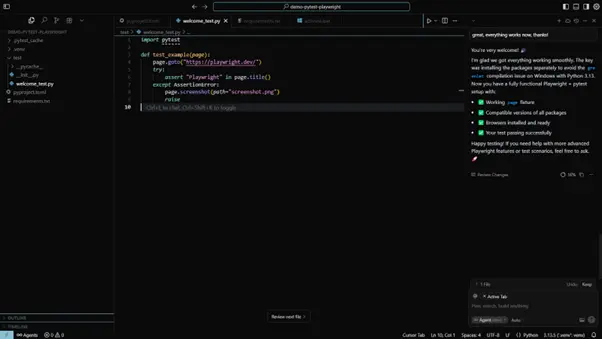
To get a feel for how much time this saves, let’s go through the steps of setting up an environment for a project with Pytest and Playwright (say, for experimenting with screenshots for automated tests). First, we’ll take the usual route, and then see how Allure Start changes the process.

The usual route

We assume that Python is already installed on the system, Allure Report is available, and an IDE is configured (let’s say, Cursor). It’s probably a good idea to make sure everything is working (run `python -–version’, ‘pip –version’, and ‘allure –version’ in the terminal).

Next, we follow these steps:

  • We create a new project in Cursor, add a test folder for tests, and a pyproject.toml file for metadata.
  • Create a local Python virtual environment, so that we don’t pollute the common Python with our project’s dependencies: `python -m venv .venv`.
  • Activate the environment: `. ./.venv/bin/activate` (Windows/Linux) or `./.venv/Scripts/Activate.ps1` (Windows).
  • Update pip dependencies: `python -m pip install –upgrade pip setuptools wheel`.
  • Use pip to install dependencies: ‘pip install pytest pytest-playwright allure-pytest allure-python-commons’. This will create a requirements.txt file that lists all dependencies; once it’s created, installing dependencies can be done via `pip install -r ./requirements.txt`.
  • Playwright is going to need browsers to work: `playwright install`.
  • It’s a good idea to freeze pip dependencies, so that future updates of Pytest or Playwright do not break our code: `pip freeze ./requirements.txt`

If everything has been hooked up properly, we can finally start writing our tests, and run them with the `pytest` command:

The usual route: switching package managers

As our experiment evolves, we might decide to switch to a different package manager — in more serious projects, poetry is usually used instead of pip. Installing and configuring poetry can take a while as well. For instance, do you remember off-hand how to configure it to use an in-project virtual environment? ChatGPT (or Cursor) does speed up this process, but it still takes a while. Keep in mind that what we’ve just described is the best case scenario, with no time spent on debugging — which is a very optimistic assumption.

The same with Allure Start

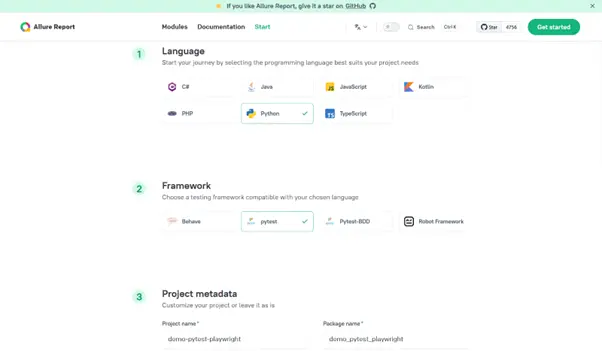
The entire process from the previous section is replaced by literally a few mouse clicks. We go to https://allurereport.org/start/, and select Python -> Pytest.

Next, we specify project metadata and download an archive that can be immediately opened in your favorite IDE. Playwright will need to be added separately, but everything else is ready. Importantly, the environment is stable and debugged.

Note that the project you’ve just downloaded contains some elements that are absent in the manual project we’ve set up above:

  1. An src folder with a placeholder for our system under test.
  2. Two scripts: run.bat for Windows and run.sh for Linux/Mac. These pretty much repeat all the steps we’ve done manually (creating a virtual environment, updating the package manager, etc.)

Now, for the second case we’ve discussed above: switching from pip to poetry. Allure Start allows us to change the package manager with literally one click:

Now download a new project, and if the old project already has some code, copy it. That’s it.

Use cases

Allure Start saves time on virtually every project, but some use cases stand out in particular.

1.Experimentation and decision-making.

That’s an obvious one, we’ve discussed it at the start. If you want to compare different frameworks, each comparison means an extra few hours setting up the environment; Allure Start cuts that time down drastically.

2. Tech Support

When someone comes to you complaining that in their setup, Jest version something.something glitches out, you need to replicate their stack if you want to reproduce their problem. Even if you’ve already worked under that exact setup, it will take you a few hours to refresh all the dependencies and ensure everything works properly.

3. Onboarding and education.

Switching to a new tech stack becomes a much easier affair if the environment is stable and debugged. This is important both for new hires, for teams that want to switch instruments, and for people new to the industry. Having just learned how to write selectors, you might be eager to get some testing done. But then it turns out you need to spend several frustrating days setting up the IDE and all the dependencies. Not fun.

Conclusion

The modern testing tech stack is incredibly variable, and you can find all kinds of permutations out there. That limits the number of people in the community who have worked on a particular permutation, makes problem-solving more difficult, and complicates experimenting with new tools.

Allure Start helps you try out different combinations of tools error-free and quickly, with just a few clicks. That means:

  • Less time spent on decisions to adopt or upgrade technologies
  • Way quicker diagnosing of technical problems on uncommon tech stacks
  • Lower barrier of entry for people who are just beginning to learn test automation

Try it and tell us what you think!

Author

Dmitry Baev

Author of Allure Framework & CTO of Qameta Software

Allure Report were exhibitors at AutomationSTAR Conference EXPO 2025. Join us in Antwerp 4-5th November 2026.

· Categorized: AutomationSTAR · Tagged: 2025, event sponsors

Aug 20 2025

Discover Key Insights with The World Quality Report 2024-25

The latest World Quality Report is here, and it continues to be the go-to source for organizations seeking to stay informed in quality engineering and software testing. It offers valuable insights into the latest trends and developments and testing practices. As digital transformation accelerates across industries, this year’s edition presents critical findings on how businesses are adapting their quality strategies to meet new challenges, especially in an era dominated by emerging technologies like generative AI (Gen AI).

A significant aspect of this year’s edition is the exploration of how Gen AI is being leveraged to revolutionize QA and testing. As organizations increasingly adopt AI-powered tools to automate testing processes and generate predictive insights, the report examines how these technologies are improving efficiency, coverage, and accuracy in testing environments. Readers can learn about the ways AI is helping companies reduce manual intervention, accelerate release cycles, and ensure higher-quality software. The report also addresses the challenges of implementing AI-driven testing, providing guidance on how to overcome barriers to adoption.

68% of organizations report investing in AI solutions, and the technology has become a critical component of the quality transformation agenda. Gen AI is introducing unprecedented efficiencies in software testing and quality assurance (QA), helping organizations streamline operations, reduce manual intervention, and improve the accuracy and coverage of testing. The ability of Gen AI to create test cases and extract test data poses to significantly reduce the workload of quality engineers and testers.

In addition to overall trends, the World Quality Report delves into sector-specific insights and provides a detailed analysis for individual industries such as automotive, retail, energy, financial services, healthcare, manufacturing, and telecommunications. Industry leaders can how their peers are navigating unique challenges within their sectors. For instance, the report highlights how the banking industry is focusing on security and compliance in QA, while the retail sector is prioritizing the customer experience in its testing efforts. By offering a granular view of quality engineering in different industries, the report provides tailored recommendations for businesses to enhance their testing capabilities.

Whether you are a quality engineer, manual tester, business analyst, or CIO, the World Quality Report 2024-2025 is an essential resource for understanding the latest innovations in quality assurance and testing. You will see both high-level trends and industry-specific insights, the report equips readers with the knowledge on quality strategies, emerging best practices, and how to navigate the complexities of current software development. Explore The World Quality Report soon and discover how you can drive your organization’s quality transformation agenda forward.

Author

Olivier Félis

Olivier is a seasoned software testing and quality assurance professional with over 20 years of experience. Currently, he is a Senior Solutions Consultant and Practice Lead for the ALM solution at OpenText. Olivier has a strong background in managing complex test environments and driving innovation in testing methodologies within an integration company. He has led numerous large-scale projects in various industries including pharmaceutical, finance, and hospitality. For the past 3 years, Olivier has been involved in exploring new technologies and innovation to improve and facilitate software reliability and performance

Opentext were exhibitors at AutomationSTAR Conference EXPO 2025. Join us in Antwerp 4-5th November 2026.

· Categorized: AutomationSTAR · Tagged: 2025, EXPO

Aug 18 2025

Tracking Test Coverage made easy with Xray

Test coverage is a crucial indicator that helps QA teams in evaluating how comprehensively their test cases verify an application’s functionality and requirements. When teams don’t have a systematic way to monitor test coverage, they might leave certain requirements untested or overlook important scenarios.

Xray streamlines test coverage management by integrating traceability and reporting features directly into your workflow. But how can you leverage Xray to improve your coverage tracking? Let’s dive in.

The struggles of tracking Test Coverage

Many teams face significant roadblocks when trying to track it. From scattered tools to manual tracking inefficiencies, these challenges can lead to unclear testing progress. Below are some of the most common struggles teams encounter when managing test coverage:

Scattered tools and data

To monitor test coverage, many QA teams combine development platforms, spreadsheets, and stand-alone test management systems. Misalignment between requirements, test cases, and issues can result from this fragmentation, which makes it challenging to provide a cohesive picture of testing progress. Without an integrated system, tracking the relationship between SDLC stages requires extra effort, increasing the risk of missing critical coverage gaps.

Manual updates prone to errors

Tracking test coverage manually – whether through spreadsheets or non-integrated tools – introduces a high risk of human error. Test cases may be outdated, duplicated, or missing altogether, making it hard to assess real coverage accurately.

Difficulty identifying Coverage gaps

Without a structured system for mapping tests to requirements, QA teams struggle to identify untested areas of an application. The lack of visibility increases the risk of defects slipping through undetected, affecting software quality and user experience.

Lack of real-time insights for QA Managers

Even when the data is not very scattered and there is certain automation in place, teams can still struggle with getting report insights at the pace required in modern development. Overnight batches or long cache delays cannot be considered an optimal solution.

Overcoming these challenges requires a test management solution that centralizes coverage tracking, integrates with development workflows, and provides real-time insights. This is where Xray can make a difference.

How Xray simplifies Test Coverage tracking

Xray provides a structured approach to tracking test coverage, ensuring every requirement is validated and accounted for. Here’s how it enhances clarity in the QA process:

  • Seamless traceability: Xray links requirements, test cases, executions, and defects, creating a clear end-to-end connection between testing and development;
  • Comprehensive, real-time reporting: with built-in coverage reports, teams can instantly see which requirements are covered, partially tested, or missing tests;
  • Organization: Xray eliminates the chaos of scattered tools by integrating directly with Jira, centralizing all testing efforts in one place;

Xray Reporting and Test Coverage

Xray’s reporting capabilities provide a clear, structured view of test coverage, helping teams identify weak spots and optimize their testing efforts.

In order to make well-informed decisions on test priority, resource allocation, and overall release preparedness, QA managers should leverage Xray’s reports. These reports offer real-time information that assist teams in concentrating on the areas that pose the greatest risk, as opposed to depending on human tracking or assumptions. The ability to drill down into specific test results also makes it easier to diagnose and address quality issues early.

Coverage reports

Xray’s coverage report maps requirements to tests, giving teams a visual representation of which areas have been tested and where gaps exist. This report helps ensure that critical functionality is not overlooked and provides confidence in the overall test strategy. By identifying untested or partially tested requirements, teams can take proactive measures before release.

Traceability report

Teams may monitor requirements, test cases, and defects in a unified, readable way by using the traceability matrix. This makes it easier for testers to ascertain whether a requirement has enough test coverage and whether any flaws have been associated with it. Xray helps teams better manage risks by offering complete insight into test dependencies.

Document Generation and customizable reporting

DocGen/Xporter empowers teams with highly customizable reporting capabilities, enabling them to generate detailed, tailored documents directly from Jira. With flexible templates and automation, teams can create reports that fit their exact needs—whether for compliance, audits, or executive summaries. Additionally, Xporter supports gadgets, allowing users to visualize key report data in dynamic dashboards, enhancing visibility and decision-making across projects.

Xray’s and Jira integration

Xray’s seamless integration with Jira ensures that testing is an integral part of the development process, fostering better collaboration between QA and development teams.

  • Unified workflow – by embedding testing directly into Jira, teams can manage test cases, executions, and defects within the same tool they use for product delivery. This eliminates the need for external test management tools and keeps all teams aligned;
  • Better visibility – with real-time test progress available in Jira, stakeholders can easily track test results without needing to switch between different platforms. This transparency helps teams react quickly to failed tests and make informed decisions on release readiness;
  • Increased efficiency – by managing tests alongside development tasks, teams reduce bottlenecks and improve overall productivity. Developers can see test coverage for their features, while testers can quickly report defects linked to specific requirements, creating a more streamlined and effective QA process.

With Xray’s reporting tools and Jira integration, teams gain better insight into their testing efforts, ensuring higher software quality and smoother releases.

Take control of your Test Coverage with Xray

By combining requirements, tests, and defects into a single, smooth workflow, Xray makes test coverage tracking easier. QA teams can quickly find gaps, monitor progress, and make data-driven choices with Xray’s robust traceability features, real-time coverage insights, and extensive reporting capabilities. The integration with Jira further enhances collaboration, ensuring that development and testing efforts stay aligned. By adopting Xray, teams eliminate manual tracking inefficiencies, improve testing accountability, and ultimately deliver higher-quality software with confidence.

Ready to take control of your test coverage? Start your Xray free trial now.

Author

Mariana Santos

Mariana Santos is the Content Marketing Manager for Xray. She is responsible for implementing and promoting content that reflects the most important topics for the testing community. She focuses on highlighting crucial subjects from the software testing and quality ecosystem and communicating them continuously.

Xray were Gold Sponsors at AutomationSTAR Conference EXPO 2025. Join us in Antwerp 4-5th November 2026.

· Categorized: AutomationSTAR · Tagged: AutomationSTAR2025, event sponsor, Software Testing

  • « Go to Previous Page
  • Page 1
  • Page 2
  • Page 3
  • Page 4
  • Page 5
  • Page 6
  • Interim pages omitted …
  • Page 9
  • Go to Next Page »

Copyright © 2026 · Impressum · Privacy · T&C

part of the