• Skip to main content
Super Early Bird - Save 30% | Teams save up to 25%

AutomationSTAR

Test Automation Conference Europe

  • Programme
    • AutomationSTAR Team
    • 2025 programme
  • Attend
    • Why Attend
    • Volunteer
    • Location
    • Get approval
    • Bring your Team
    • 2025 Gallery
    • Testimonials
    • Community Hub
  • Exhibit
    • Partner Opportunities
    • Download EXPO Brochure
  • About Us
    • FAQ
    • Blog
    • Test Automation Patterns Wiki
    • Code of Conduct
    • Contact Us
  • Tickets

test automation

Apr 27 2023

The 2023 Lineup is LIVE

It’s here! The AutomationSTAR 2023 programme is LIVE. Are you looking for a blast of test automation inspiration?

We’ve got 2 whole days of headline keynotes, training tutorials, technical track talks, and plenty of opportunity to meet new people in the awesome test automation community.

The 2023 Programme Team, Chris Loder (Canada), John Kent (UK), and Sophie Küster (Germany) have put together a phenomenal line-up.  Get in on the action at Europe’s fastest growing test automation conference.

Check out the talks and secure your place today!

See Programme

3 Keynote Talks

Our 4 keynote speakers are delivering an inspiring dose of knowledge and insights.  Marie Cruz shares her experiences on getting started in tech, and what it was like for her as a member of a minority group in the industry. Ryan Volker and Bastian Schurmann will give you new ideas to continue advancing your test automation framework, and overcome unanticipated headwind; while Janna delves into the vital role of test automation in CI/CD pipelines, and show you techniques for balancing fast feedback. Notebooks at the ready!

4 Half Day Tutorials

2 days of intensive training from leading experts: learn how to use Playwright to automate end-to-end tests, see the importance of using test automation patterns, get the keys to a successful test automation framework, learn how investing in your automation can pay off massively, and lots more.

17 Track Talks & 2 Workshops

The AutomationSTAR track talks and workshops are filled with actionable learnings to advance your test automation projects. What does the Apollo 13 spacecraft disaster have in common with various automation problems in DevOps, CI/CD, and agile? What are the shortfalls faced by freeform UI apps when comes to Visual Testing? What’s the best open source test frameworks for automating web UI tests? What if we applied the Shift-Left approach to performance tests? Get answers to these questions and LOTS more.

We hope you like the programme, and see you in Berlin!

See Programme

A huge welcome to our first AutomationSTAR 2023 sponsors – join them in Berlin, Nov 20-21.

Our AutomationSTAR EXPO packages are bursting with opportunities for you to speak directly to the test automation community, and help solve their problems with your tools and services. Download our EXPO brochure now, or chat to Clare from our EXPO team.


· Categorized: AutomationSTAR, test automation

Oct 03 2022

Email deliverability testing with SpamAssassin

Learn about SpamAssassin’s email filtering system to keep inboxes clear of unwanted emails & assign scores to emails. Thanks to Mailosaur for providing us with this blog post.

SpamAssassin (SA) is a well-established email filtering system designed to live up to its name. It uses comprehensive spam-fighting methods to keep inboxes clear of unwanted email. The filter assigns scores to emails to separate the genuine from the unwanted.

In this article, we’ll look at how a SpamAssassin score is calculated and what you can do it improve it. Inspecting and improving your SpamAssassin results will help you write better emails that your recipients will be happy to receive.

What is SpamAssassin?

SpamAssassin (officially, ‘Apache SpamAssassin’) is an open-source project developed and operated by the Apache Software Foundation. It was initially released in 2001 with the aim of providing a robust and customisable filter for detecting ‘email spam’, the Monty Python-inspired term for the practice of sending out unsolicited emails en masse.

The filter employs a range of different tests. These include scanning an email’s body and header, and checking a sender’s IP against several different block and allow lists. Users can add and adapt rules, or simply resort to SpamAssassin’s spam classifier and train it with their own data. Many email providers rely on SpamAssassin scores to classify incoming email as spam or the opposite, ‘ham’.

The SpamAssassin score

Each SpamAssassin rule is associated with a value that can be either negative or positive. The SpamAssassin filter runs its tests on each incoming email and adds up the values for the rules that are triggered. It then returns an aggregated SpamAssassin score. Perhaps counterintuitively, a higher score signifies a higher probability that an email is spam. Therefore, when passing your transactional emails through the SpamAssassin filter, you should aim for a lower rather than a higher score.

If an email passes a certain threshold, it’s regarded as spam. By default that threshold is set to 5.0 in the SpamAssassin configuration, though it can be adjusted by the user. It’s common to tweak the threshold to reach a good balance between low numbers of false positives (genuine email wrongly classified as spam) and false negatives (spam email that tricks the filter into thinking it’s genuine). That’s why your email might make it into the inbox of one recipient, but land in the spam folder of another—they might be using an email service with more restrictive anti-spam settings. Therefore, when you test your emails against the SpamAssassin filter, simply being under the 5.0 threshold may not be enough. Rather, you should aim for the lowest possible score.

Rule-based spam filters

So what does a SpamAssassin rule look like? Let’s look at an example that uses the KAM rules, a widely used custom rule set:

You can probably figure out the type of scam targeted here, but let’s go through it line-by-line. The first line is simply a comment for the developer that isn’t very descriptive. The next two lines are more interesting: tagged as ‘body’, they consist of two Perl regular expressions (‘regexes’). Regexes are powerful expressions for pattern-matching in text and are frequently part of the SpamAssassin filter.

Together, the regexes describe a pattern often used in spammy email in which a sender describes a job offer with unrealistically great conditions. Interestingly, the rule only gets triggered if the text includes the claim that the recipient can make ‘twice as much’ (not more, not less) money than with their current employer. This is ensured by a ‘meta’ rule (a complex combination of expressions) which requires that the sum of two individual patterns is at least two.

When this meta rule is triggered, a spam score increases by 4.3 points. Remember when we said that a score of 5.0 often suffices for a spam classification? So if your email uses the above pattern, it gets dangerously close to the spam folder.

While the McGrail Foundation which developed the KAM rules is closely associated with Apache’s SpamAssassin, the ruleset is not strictly speaking part of SA’s core rule collection. Have a look at all of SpamAssassin’s default rules here. To add your own rules, you’ll need to incorporate them into your local configuration and set the parameter ‘allow_local_rules’ to 1.

Probabilistic spam filters

Hard-coded rules are fine for catching spam, but an even smarter solution is to combine these rules with a score from a probabilistic spam classifier. Enter SpamAssassin’s Bayesian classifier, which is a machine learning model often employed in spam filtering. As is common with machine-learning techniques, the more emails the classifier sees, the better it gets at categorizing them.

SpamAssassin users thus have a way of fine-tuning the filter to their requirements, by feeding their own emails designated ‘spam’ or ‘ham’ to the classifier. By enabling the ‘bayes_auto_learn’ parameter one may even use the system without any previously labeled data. In such cases, incoming emails which the filter tagged as either spam or ham with a very high probability are fed back to the classifier as training data.

How to check your SpamAssassin score

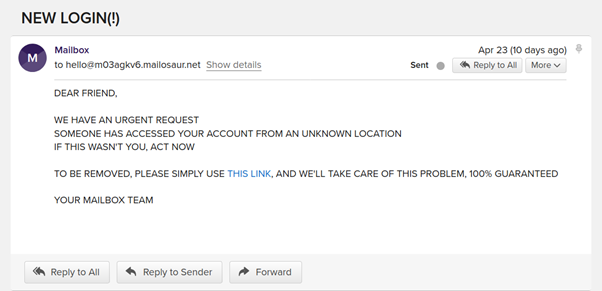
Let’s finally look at SpamAssassin in action! After setting up a new server on our Mailosaur account, we’ll send it this deliberately suspicious email:

It does not look particularly trustworthy. We can already tell that we’ll get a pretty high SpamAssassin score for this email, but can you guess which parts will most trigger the filter?

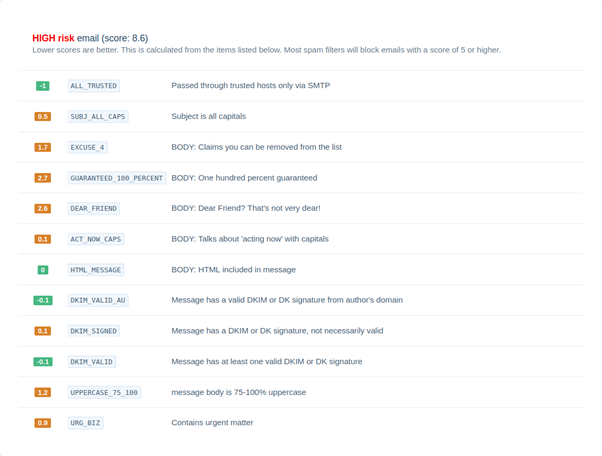
Let’s open our Mailosaur dashboard to investigate:

While there are a few slightly positive elements in our email (notably the authentication signatures in the header), we made just about every mistake possible in the email’s body. The two most negative items, however, were in addressing our recipient a ‘dear friend’ and mentioning a ‘100% guarantee’.

Interestingly, despite its mediocre SpamAssassin score, Gmail accepted the above email into an inbox folder. That’s likely due to the fact that this email service prioritises spam-catching rules differently from SpamAssassin’s default settings.

How to improve your SpamAssassin score

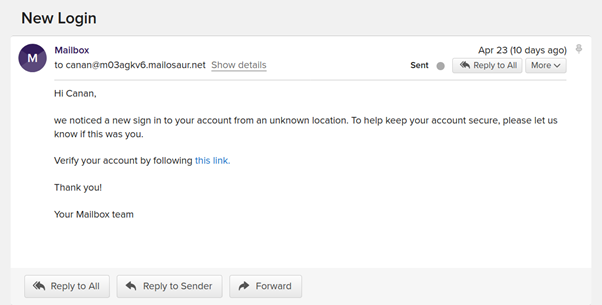
Improving our SpamAssassin score is not too difficult. Let’s simply avoid the spammy phrases that trigger the addition of high values to our score. So as a little challenge, let’s try to do the best we can and achieve a negative SpamAssassin score:

Not only does our email sound much less frantic than the previous one (lowercasing may have helped), but it’s also personalised and friendly, managing to get our message across just as well. What does our SpamAssassin score say now?

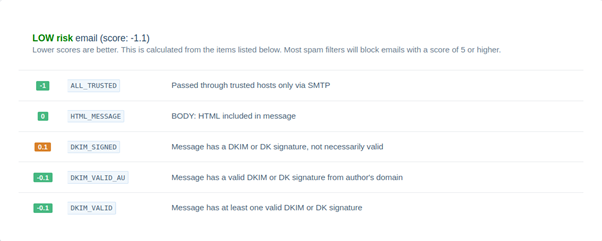
What a lovely sight! SpamAssassin likes our email just as much as we do—and we’ve achieved our goal of generating a negative SpamAssassin score.

Content is not everything

While examples that look at the body of an email are fun and intuitively understandable, a lot of SpamAssassin checks are performed behind the scenes, and many of these require more than a nicely written email to be fooled. For instance, if your domain lands on a block list, there’s not much you can do other than use a different domain or a different email provider.

Likewise, message authentication protocols such as DKIM and SPF have been designed specifically to address the problem of email spoofing, where the sender pretends to be somebody else. While you can still manipulate the content of your email headers, you cannot simply fake a DKIM protocol. What makes SpamAssassin so robust as a spam filter is that it combines all those metrics (and more) to form a score.
So what can you do besides writing polished emails and using well-formed HTML? Here are a few tips:

• Use the email standards we mentioned: DKIM and SPF. They prove that you wrote the email and that you’re authorised to send emails from your domain.

• Avoid sending email in bulk from a brand new ip address: that’s considered suspicious behaviour. Instead, if sending emails to multiple recipients, make sure to distribute them over several days, slowly increasing the daily load.

• Work on your sender reputation. Make sure to send personalised emails that your recipients actually want to read. The more your emails get opened and read, and the less they’re marked as spam, the better your reputation will be.

Use a dedicated email testing solution

Checking your SpamAssassin score is one tiny piece of the much larger puzzle that is email deliverability and testing. If you’re serious about communicating with your customers, consider using a dedicated email testing platform like Mailosaur, which allows you to do everything above, and much more, as part of your automated testing suite.

Mailosaur is an exhibitor at AutomationSTAR 2022. Join the software testing community in Munich, 17-18 October. Get your ticket now.

This blog is translated from English to German by Google.

· Categorized: test automation

Jul 22 2022

Why attend AutomationSTAR

Why is AutomationSTAR an unmissable experience? This is where the leaders in software testing are coming together.

Accelerate your testing projects, make connections, & join a global community. This is a space to deep dive into all things automation in testing, and share different perspectives, discuss the problems and issues you face, and find solutions together. Check out everything that’s on offer, and join us in Munich, 17-18 Oct.

Valuable learnings

Whether you are new to coding, building a test automation project from scratch, or interested in codeless tools, AutomationSTAR is where you’ll find the answers. Our superstar speakers are bringing you answers, to help you accelerate your delivery, get future ready, and achieve your goals. Talks will cover different levels of automation in testing, including methodologies such as DevOps, new technologies like AI, and lots more

Meaningful connections

It’s a diverse community bursting with creativity – with plenty of chances to jump into different conversations and make meaningful connections. With coffee breaks, networking lunches, and lots of bonus sessions, AutomationSTAR is where creativity flourishes. You’ll chat with software testers from every industry, and have lots of lightbulb moments as you spark new ideas.

Expert speakers

25 speakers will bring you in-depth knowledge on everything automation – get razor sharp insights directly from testing leaders. Learn about the role of automation engineers, how to achieve reliable test automation, and answer questions on why we test and why we make the choices we do. Kickstart your cypress test automation, create an automation framework, learn the importance of soft skills, and LOTS more.

Solve testing challenges

We know that you’re looking for tangible results – that’s why our testing experts will be answering your tough questions, whether that’s during an inspiring track talk session, or an in-depth tutorial. The AutomationSTAR speakers will share their own experiences and learnings, to get you where you want to be in your test automation projects. You’ll also be surrounded by like-minded peers who are having the same issues you are, and finding solutions together.

Teamwork

We are all about the community, and we love welcoming teams to the conference. QA team training is crucial for implementing successful automation projects. Create a whole team approach at AutomationSTAR, ensuring everyone is well versed in their roles, and possess the technical skills they need to support the tests, scale productivity – and deliver an exceptional user experience. Bonus: groups save on tickets, so get the office together and join us in Munich.

Our 2-for-1 offer is currently running until July 31st – this is your chance to save 50% on tickets! Book now.

get tickets

This blog is translated from English to German by Google.

· Categorized: test automation · Tagged: 2022

Jul 14 2022

Playwright vs Selenium: what are the main differences and which is better?

Wondering how to choose between Playwright vs Selenium for your test automation? Read on to see a comparison. Thanks to Danny Shain at Applitools for providing this blog.

When it comes to web test automation, Selenium has been the dominant industry tool for several years. However, there are many other automated testing tools on the market. Playwright is a newer tool that has been gaining popularity. How do their features compare, and which one should you choose?

What is Selenium?

Selenium is a long-running open source tool for browser automation. It was originally conceived in 2004 by Jason Huggins, and has been actively developed ever since. Selenium is a widely-used tool with a huge community of users, and the Selenium WebDriver interface even became an official W3C Recommendation in 2018.

The framework is capable of automating and controlling web browsers and interacting with UI elements, and it’s the most popular framework in the industry today. There are several tools in the Selenium suite, including:

• Selenium WebDriver: WebDriver provides a flexible collection of open source APIs that can be used to easily test web applications.

• Selenium IDE: This record-and-playback tool enables rapid test development for both engineers and non-technical users.

• Selenium Grid: The Grid lets you distribute and run tests in parallel on multiple machines.

The impact of Selenium goes even beyond the core framework, as a number of other popular tools, such as Appium and WebDriverIO, have been built directly on top of Selenium’s API.

Selenium is under active development and recently unveiled a major version update to Selenium 4. It supports just about all major browsers and popular programming languages. Thanks to a wide footprint of use and extensive community support, the Selenium open source project continues to be a formidable presence in the browser automation space.

What is Playwright?

Playwright is a relatively new open source tool for browser automation, with its first version released by Microsoft in 2020. It was built by the team behind Puppeteer, which is a headless testing framework for Chrome/Chromium. Playwright goes beyond Puppeteer and provides support for multiple browsers, among other changes.

Playwright is designed for end-to-end automated testing of web apps. It’s cross-platform, cross-browser and cross-language, and includes helpful features like auto-waiting. It is specifically engineered for the modern web and generally runs very quickly, even for complex testing projects.

While far newer than Selenium, Playwright is picking up steam quickly and has a growing following. Due in part to its young age, it supports fewer browsers/languages than Selenium, but by the same token it also includes newer features and capabilities that are more aligned with the modern web. It is actively developed by Microsoft.

Selenium vs Playwright

Selenium and Playwright are both capable web automation tools, and each has its own strengths and weaknesses. Depending on your needs, either one could serve you best. Do you need a wider array of browser/language support? How much does a long track record of support and active development matter to you? Is test execution speed paramount?

Each tool is open source, cross-language and developer friendly. Both support CI/CD (via Jenkins, Azure Pipelines, etc.), and advanced features like screenshot testing and automated visual testing. However, there are some key architectural and historical differences between the two that explain some of their biggest differences.

Selenium Architecture and History

• Architecture: Selenium uses the WebDriver API to interact between web browsers and browser drivers. It operates by translating test cases into JSON and sending them to the browsers, which then execute the commands and send an HTTP response back.

• History: Selenium has been in continuous operation and development for 18+ years. As a longstanding open source project, it offers broad support for browsers/languages, a wide range of community resources and an ecosystem of support.

Playwright Architecture and History

• Architecture: Playwright uses a WebSocket connection rather than the WebDriver API and HTTP. This stays open for the duration of the test, so everything is sent on one connection. This is one reason why Playwright’s execution speeds tend to be faster.

• History: Playwright is fairly new to the automation scene. It is faster than Selenium and has capabilities that Selenium lacks, but it does not yet have as broad a range of support for browsers/languages or community support. It is open source and backed by Microsoft.

Comparing Playwright vs Selenium Features

It’s important to consider your own needs and pain points when choosing your next test automation framework. The table below will help you compare Playwright vs Selenium.

CriteriaPlaywrightSelenium
Browser SupportChromium, Firefox, and WebKit (note: Playwright tests browser projects, not stock browsers)Chrome, Safari, Firefox, Opera, Edge, and IE
Language SupportJava, Python, .NET C#, TypeScript and JavaScript.Java, Python, C#, Ruby, Perl, PHP, and JavaScript
Test Runner Frameworks SupportJest/Jasmine, AVA, Mocha, and VitestJest/Jasmine, Mocha, WebDriver IO, Protractor, TestNG, JUnit, and NUnit
Operating System SupportWindows, Mac OS and LinuxWindows, Mac OS, Linux and Solaris
ArchitectureHeadless browser with event-driven architecture4-layer architecture (Selenium Client Library, JSON Wire Protocol, Browser Drivers and Browsers)
Integration with CIYesYes
PrerequisitesNodeJSSelenium Bindings (for your language), Browser Drivers and Selenium Standalone Server
Real Device SupportNative mobile emulation (and experimental real Android support)Real device clouds and remote servers
Community SupportSmaller but growing set of community resourcesLarge, established collection of documentation and support options
Open SourceFree and open source, backed by MicrosoftFree and open source, backed by large community


Should You Use Selenium or Playwright for Test Automation?

Is Selenium better than Playwright? Or is Playwright better than Selenium? Selenium and Playwright both have a number of things going for them – there’s no easy answer here. When choosing between Selenium vs Playwright, it’s important to understand your own requirements and research your options before deciding on a winner.

Selenium vs Playwright: Let the Code Speak

A helpful way to go beyond lists of features and try to get a feel for the practical advantages of each tool is to go straight to the code and compare real-world examples side by side. At Applitools, our goal is to make test automation easier for you – so that’s what we did!

In the video below, you can see a head to head comparison of Playwright vs Selenium. Angie Jones and Andrew Knight take you through ten rounds of a straight-to-the-code battle, with the live audience deciding the winning framework for each round. Check it out for a unique look at the differences between Playwright and Selenium.

Selenium Vs Applitools webinar

If you like these code battles and want more, we’ve also pitted Playwright vs Cypress and Selenium vs Cypress – check out all our versus battles here.

In fact, our original Playwright vs Cypress battle (recap here) was so popular that we’ve even scheduled our first rematch. Who will win this time? Register for the Playwright vs Cypress Rematch now to join in and vote for the winner yourself!

Applitools is an exhibitor at AutomationSTAR 2022. Join the software testing community in Munich, 17-18 October. Get your ticket now.

Author

Danny Shain Content Marketing Manager Applitools

Danny Shain – Content Marketing Manager at Applitools

Writer at heart passionate about meaningful effective communication. Extensive experience working with a range of material, from fiction to academic to promotional. Technology lover and e-commerce veteran.

This blog has been translated from German to English by Google.

· Categorized: Selenium, test automation · Tagged: 2022

Jun 23 2022

Check out the AutomationSTAR Conference programme

The AutomationSTAR programme is packed with inspiring sessions and in-depth tutorials, to elevate your test automation projects.

The AutomationSTAR programme is live! This October 17-18, the sharpest minds in automation are coming together to share their knowledge with you. Through visionary keynotes, track talks, workshops, and half day tutorials they will share new insights, real-life experiences, and help YOU with challenges in your testing projects.

Whether you’re new to coding, building a test automation project from scratch, or interested in codeless tools, AutomationSTAR is where you’ll find the answers. Accelerate your delivery, get future ready, and achieve your goals. Talks will cover different levels of automation in testing, including methodologies such as DevOps, new technologies like AI, and lots more.

World class keynote speakers

Our inspiring keynote speakers are bringing you top insights on test automation. Bas Dijkstra questions the role of automation engineers, and why the role of test automation engineer is a difficult one. Andrew Knight discusses why testing itself is art as much as it’s engineering, and will give you a blueprint for testing success. Jenny Bramble strives to answer the question of why we test and why we make the choices we do.

Inspiring track talks

The AutomationSTAR track talks are packed with thought-provoking sessions – speakers will discuss a wide range of topics to add real value to your testing: how to get true success from automation, event driven test automation, how to make your automated tests reliable, revolutionizing your functional test automation, and lots more. Get ready to accelerate your projects.

Meaningful connections

Of course, you’ll also have plenty of opportunity to network with other delegates, and expand your connections. With coffee breaks, networking lunches, and lots more, AutomationSTAR is a diverse, collaborative environment where creativity flourishes. You’ll chat with software testers from every industry, and have lots of lightbulb moments as you spark new ideas together!

see programme

This blog is translated from English to German by Google.

· Categorized: test automation · Tagged: 2022

  • « Go to Previous Page
  • Page 1
  • Page 2
  • Page 3
  • Go to Next Page »

Copyright © 2026 · Impressum · Privacy · T&C

part of the